
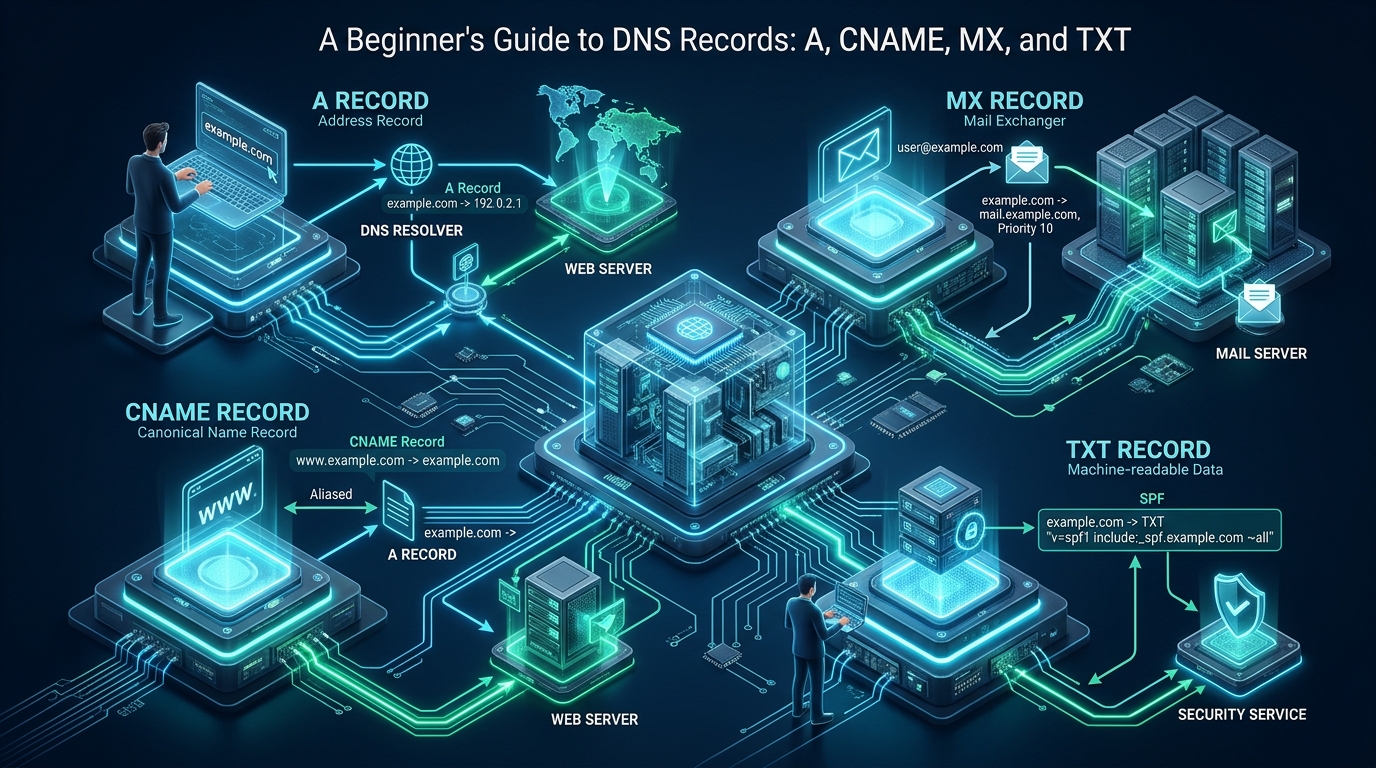
Misconfigured DNS records represent one of the most pervasive root causes of application downtime, broken mail routing, and recursive resolution latency across cloud infrastructure. When deploying mission-critical platforms on MeraHost, understanding the exact operational boundaries of foundational resource records ensures instantaneous record propagation, zero-downtime microservice migrations, and resilient perimeter security. Establishing absolute command over A, CNAME, MX, and TXT records transforms domain routing from a source of brittle failure into a deterministic, high-throughput delivery architecture.
A Beginner’s Guide to DNS Records: A, CNAME, MX, and TXT Architecture
Every modern web request begins with a distributed recursive lookup pipeline. When a client application or browser initiates a connection to a fully qualified domain name (FQDN), the operating system delegates the query to a local stub resolver, which queries recursive resolvers (such as your ISP or anycast DNS clusters). The recursive resolver traverses the DNS hierarchy—querying Root nameservers (.), Top-Level Domain (TLD) nameservers (such as .org or .com), and finally the Authoritative Nameservers that host the actual zone files. Within those authoritative zone files reside the atomic building blocks of the Internet: resource records.
While modern RFC specifications define dozens of resource record types (including AAAA for IPv6, SRV for service discovery, CAA for certificate authority authorization, and PTR for reverse lookups), the vast majority of web applications, cloud hosting environments, and enterprise services depend entirely on four primary record types: A, CNAME, MX, and TXT. Understanding their structural mechanics, RFC constraints, and performance implications is critical for any systems engineer, webmaster, or cloud architect.
1. The A Record (Address Record): Direct IPv4 Routing
The A Record (defined originally in RFC 1035) is the most fundamental DNS record in existence. Its sole objective is to bind a fully qualified domain name directly to a 32-bit IPv4 address (e.g., 192.0.2.1). Without an A record (or its 128-bit IPv6 sibling, the AAAA record), client browsers have no mechanism to resolve a hostname into the transport-layer network packets required to initiate a TCP handshake or TLS negotiation.
Syntax and Standard Anatomical Structure
In a standard BIND zone file or DNS management interface, an A record consists of four key components: Name (Host), Time-to-Live (TTL), Class (IN for Internet), and the Target IPv4 Address:
; Standard Authoritative A Record Syntax
; [Host/Label]       [TTL]     [Class]   [Type]   [Target IPv4 Address]
example.com.         3600      IN        A        198.51.100.25
api.example.com.     300       IN        A        198.51.100.26
stage.example.com.   60        IN        A        198.51.100.27
Enterprise Architectural Use Cases for A Records
- Zone Apex (Root Domain) Hosting: RFC specifications dictate that the root or apex of a domain (e.g.,
example.com, commonly denoted with the@symbol) must resolve directly to IP addresses via A and AAAA records rather than canonical aliases. - DNS Round-Robin Load Balancing: You can configure multiple A records with the exact same hostname pointing to distinct server IPs. Authoritative nameservers cycle the order of IP addresses returned in each query response, distributing inbound HTTP/HTTPS traffic across multiple backend nodes without requiring an external load balancer.
- Zero-Overhead Resolution: Because an A record terminates the DNS lookup immediately by returning the final IP address, it avoids the recursive round-trip latency penalty inherent in chained aliases.
Architecture Note on TTL Sizing: Setting your A record TTL (Time-to-Live) to a low value (e.g., 60 to 300 seconds) prior to a planned server migration allows changes to propagate across worldwide recursive resolvers in minutes. Once your production environment stabilizes, elevate the TTL to 3600 or 86400 seconds to maximize edge caching and minimize recursive lookup overhead.
2. The CNAME Record (Canonical Name): Aliasing and Redirection
The CNAME Record (Canonical Name, specified in RFC 1034 and RFC 2181) acts as a pointer or alias that maps one domain name to another canonical domain name. Crucially, a CNAME record does not point to an IP address; it points strictly to another hostname.
When a recursive resolver encounters a CNAME record during resolution, it must restart the lookup process using the target canonical hostname to discover its final IP address. For example, if www.example.com has a CNAME pointing to cluster1.cdn-provider.net, the resolver must issue a secondary query for cluster1.cdn-provider.net to fetch its A or AAAA record.
; Standard Authoritative CNAME Record Syntax
; [Alias Hostname]       [TTL]     [Class]   [Type]   [Canonical Target Hostname]
www.example.com.         3600      IN        CNAME    example.com.
assets.example.com.      1800      IN        CNAME    cdn.merahost-edge.net.
status.example.com.      300       IN        CNAME    hosted-status-node.org.
The Zone Apex Restriction (RFC 1912 Violation)
One of the most critical rules in DNS engineering is the Zone Apex CNAME Restriction. According to RFC 1034 (Section 3.6.2) and RFC 1912 (Section 2.4): “If a CNAME RR is present at a node, no other data should be present.”
Because every domain’s zone apex (the root domain, such as example.com) must inherently contain mandatory SOA (Start of Authority) and NS (Nameserver) records, placing a CNAME record at the zone apex violates DNS protocol standards. Doing so causes authoritative nameservers to reject zone validation or breaks mail routing and sub-delegation entirely. Modern managed DNS providers solve this using proprietary pseudo-records known as ALIAS or ANAME records, which dynamically resolve the target hostname on the nameserver side and synthesize standard A records at the apex.
Architecture Note on CNAME Chaining: Avoid chaining CNAME records (e.g.,
app.example.com->lb.example.com->edge.cloud.net). Every additional CNAME layer introduces an incremental recursive query round-trip (adding 20ms to 80ms of latency per hop), increases the likelihood of query timeouts on high-latency mobile networks, and risks triggering resolution loops.
3. The MX Record (Mail Exchanger): High-Availability Email Routing
The MX Record (Mail Exchanger, defined in RFC 5321 and RFC 7505) governs how inbound email is routed across the Internet using the Simple Mail Transfer Protocol (SMTP). When a sending mail transfer agent (MTA)—such as Postfix, Exim, Google Workspace, or Microsoft 365—delivers an email to a recipient at [email protected], it issues a DNS query specifically for the MX records of example.com.
Priority Sizing and Failover Architecture
Unlike A and CNAME records, an MX record introduces a mandatory 16-bit integer field known as the Preference or Priority (ranging from 0 to 65535). Senders are protocol-bound to attempt delivery to the mail server with the lowest numerical priority value first. If that primary server is unreachable or offline, the sender fails over to the next lowest numerical value.
; Standard Authoritative MX Record Syntax
; [Zone Domain]    [TTL]   [Class]  [Type]  [Priority]  [Mail Server Hostname]
example.com.       3600    IN       MX      10          mail1.example.com.
example.com.       3600    IN       MX      20          mail2.example.com.
example.com.       3600    IN       MX      30          backup-mx.merahost.org.
In the configuration above, sending MTAs will always connect to mail1.example.com (priority 10). If mail1 fails to respond to TCP port 25 SYN packets after repeated connection retries, the sender connects to mail2.example.com (priority 20). If both are inaccessible, the offsite secondary cluster backup-mx.merahost.org (priority 30) accepts and queues the inbound messages until the primary systems recover.
Architecture Note on MX Targets: RFC 2181 explicitly mandates that the target hostname of an MX record MUST resolve directly to an A or AAAA record. Pointing an MX record to a CNAME alias is an explicit protocol violation that triggers mail delivery bounces, greylisting rejections, and reputation penalties across major recipient mail providers.
4. The TXT Record (Text Record): Security, Verification, and Identity
Originally conceived in RFC 1035 as a simple mechanism to hold human-readable descriptive notes, the TXT Record has evolved into the cornerstone of domain identity verification, cryptographic authentication, and anti-phishing defense across the global Internet.
Because TXT records can store arbitrary string data up to 255 characters per string token (and multiple concatenated strings up to the maximum DNS payload limit), modern software architectures utilize TXT records to publish machine-readable security policies, TLS ownership verification tokens, and cryptographic public keys.
Core Production Uses of TXT Records
- SPF (Sender Policy Framework – RFC 7208): Declares which mail servers and IP blocks are authorized to transmit email on behalf of your domain.
- DKIM (DomainKeys Identified Mail – RFC 6376): Publishes the public cryptographic key (RSA 2048-bit or Ed25519) used by receiving mail servers to verify that email headers and message bodies have not been tampered with in transit.
- DMARC (Domain-based Message Authentication, Reporting, and Conformance – RFC 7489): Instructs receiving mail servers how to treat emails that fail SPF or DKIM checks (e.g.,
p=none,p=quarantine, orp=reject) and specifies reporting email endpoints. - Third-Party Ownership Verification: Validates domain control for Google Search Console, Microsoft 365, Let’s Encrypt ACME DNS-01 challenges, and CDN networks without altering production web traffic.
; Standard Authoritative TXT Record Syntax for Modern Email Security
; SPF Record at Zone Apex:
example.com.         3600    IN    TXT    "v=spf1 ip4:198.51.100.25 include:_spf.merahost.org ~all"

; DKIM Public Key Record at Subdomain Selector:
default._domainkey.example.com. 3600 IN TXT "v=DKIM1; k=rsa; p=MIIBIjANBgkqhkiG9w0BAQEFAAOCAQ8AMIIBCgKCAQEA0wJ8z7y..."

; DMARC Enforcement Policy Record:
_dmarc.example.com.  3600    IN    TXT    "v=DMARC1; p=reject; sp=reject; pct=100; rua=mailto:[email protected]"
Comprehensive Architectural Matrix: DNS Record Characteristics
The comparative matrix below details the operational differences, protocol behaviors, and production tuning guidelines across standard unoptimized environments versus optimized enterprise DNS infrastructure.
| Feature / Metric | Standard / Default | Tuned / Production |
|---|---|---|
| Latency / Overhead | Baseline (Uncached recursive queries) | Optimal (Edge Anycast < 15ms) |
| A Record Mapping | Static single IPv4 pointer | GeoDNS + Multi-homed Health-Checked IP Pools |
| CNAME Optimization | Unchecked CNAME chains (2-4 hops) | Flattened ALIAS/ANAME at Apex + Single-Hop Edge |
| MX Redundancy | Single MX host without priority backup | Multi-Tier Geographically Distributed MX Arrays |
| TXT Record Validation | Permissive SPF (+all or missing DMARC) | Strict SPF -all, 2048-bit DKIM, and DMARC p=reject |
| Propagation Agility | Fixed 86400s (24h) TTL lock-in | Dynamic TTL Staging (300s pre-cutover, 3600s steady) |
Production Configuration: Complete Enterprise BIND 9 Zone File
The following production zone file demonstrates a fully compliant RFC implementation integrating A, CNAME, MX, and TXT records within an authoritative BIND 9 / NSD server environment. Save this file to /var/named/zones/db.example.com.zone:
$TTL 3600 ; Default TTL: 1 hour
$ORIGIN example.com.

; ==============================================================================
; START OF AUTHORITY (SOA) RECORD
; Serial format: YYYYMMDDNN (Year, Month, Day, Revision)
; ==============================================================================
@       IN      SOA     ns1.merahost.org. admin.example.com. (
                        2026102501 ; Serial number
                        7200       ; Refresh (2 hours)
                        3600       ; Retry (1 hour)
                        1209600    ; Expire (2 weeks)
                        300        ; Negative Cache TTL (5 minutes)
                        )

; ==============================================================================
; AUTHORITATIVE NAMESERVERS (NS RECORDS)
; ==============================================================================
@       IN      NS      ns1.merahost.org.
@       IN      NS      ns2.merahost.org.

; ==============================================================================
; ADDRESS RECORDS (A & AAAA RECORDS) - ZONE APEX & HOSTS
; ==============================================================================
@       IN      A       198.51.100.25
@       IN      AAAA    2001:db8:100::25
mail1   IN      A       198.51.100.50
mail2   IN      A       198.51.100.51
origin  IN      A       198.51.100.25

; ==============================================================================
; CANONICAL NAME RECORDS (CNAME ALIASES) - SUBDOMAINS ONLY
; ==============================================================================
www     IN      CNAME   example.com.
cdn     IN      CNAME   edge.merahost-cdn.net.
portal  IN      CNAME   app-cluster.example.com.
app-cluster IN  A       198.51.100.30

; ==============================================================================
; MAIL EXCHANGER RECORDS (MX RECORDS) - PRIORITY BASED ROUTING
; ==============================================================================
@       IN      MX      10 mail1.example.com.
@       IN      MX      20 mail2.example.com.
@       IN      MX      50 fallback-backup.merahost.org.

; ==============================================================================
; TEXT RECORDS (TXT RECORDS) - EMAIL SECURITY & DOMAIN VERIFICATION
; ==============================================================================
; SPF: Authorize primary mail nodes and hosting relay, hard-fail unauthorized senders
@       IN      TXT     "v=spf1 mx ip4:198.51.100.25 include:_spf.merahost.org -all"

; DKIM: Cryptographic public verification key for default selector
default._domainkey IN TXT (
                        "v=DKIM1; k=rsa; p=MIIBIjANBgkqhkiG9w0BAQEFAAOCAQ8AMIIBCgKCAQEA"
                        "tQ4oG8aZgL9P0e7K1XoW2mD3yQ8vT4kR6sF7wA1bC2eE3gH4jK5mN6pQ7rS8"
                        "tU9vW0xY1zA2bC3dE4fG5hJ6kL7mN8pQ9rS0tU1vW2xY3zA4bC5dE6fG7hJ8"
                        "kL9mN0pQ1rS2tU3vW4xY5zQIDAQAB" )

; DMARC: Strict reject policy with aggregate XML telemetry reporting
_dmarc  IN      TXT     "v=DMARC1; p=reject; sp=reject; pct=100; rua=mailto:[email protected]; ruf=mailto:[email protected]"
Production Sysctl Tuning for High-Volume DNS Resolvers
Standard Linux kernel defaults are tuned for general-purpose desktop or light server workloads. When operating an enterprise authoritative nameserver, Unbound resolver, or CoreDNS cluster handling thousands of UDP/TCP queries per second, unoptimized kernel network parameters cause silent UDP packet drops under burst conditions. Deploy the following tuned configuration to /etc/sysctl.d/99-dns-performance.conf:
# /etc/sysctl.d/99-dns-performance.conf
# Linux Kernel Network Stack Hardening & High-Throughput UDP Socket Tuning

# 1. Expand Maximum and Default Socket Receive/Send Buffers (absorbs UDP microbursts)
net.core.rmem_max = 67108864
net.core.wmem_max = 67108864
net.core.rmem_default = 8388608
net.core.wmem_default = 8388608

# 2. Expand UDP Memory Page Pressure Limits (min, pressure, max in 4KB pages)
net.ipv4.udp_mem = 65536 131072 262144
net.ipv4.udp_rmem_min = 16384
net.ipv4.udp_wmem_min = 16384

# 3. Increase Network Device Backlog Queue and SYN Backlog
net.core.netdev_max_backlog = 100000
net.core.somaxconn = 65535
net.ipv4.tcp_max_syn_backlog = 3240000

# 4. Enhance Ephemeral Port Range for Concurrent Outbound DNS Queries
net.ipv4.ip_local_port_range = 10240 65535

# 5. Protect Against Amplification Attacks and Spoofing (Reverse Path Filtering)
net.ipv4.conf.default.rp_filter = 1
net.ipv4.conf.all.rp_filter = 1

# 6. Mitigate TCP SYN Flood Attacks for DoT / DoH Listeners
net.ipv4.tcp_syncookies = 1
net.ipv4.tcp_rfc1337 = 1
Execute the following bash commands to reload the kernel parameters into active memory without rebooting the operating system:
# Apply sysctl parameters immediately
sudo sysctl -p /etc/sysctl.d/99-dns-performance.conf

# Verify active UDP receive errors and buffer drops
netstat -su | grep -E "packet receive errors|receive buffer errors"
Automated Diagnostic Verification with Dig and Drill
Never rely solely on graphical web dashboards to confirm record propagation. Enterprise engineers leverage standard command-line tools like dig (Domain Information Groper) to query authoritative nameservers directly, bypassing stale local caches:
# 1. Query A Record Directly Against Authoritative Nameserver:
dig @ns1.merahost.org example.com A +noall +answer

# 2. Trace Complete Iterative Root-to-Leaf Delegation:
dig example.com +trace

# 3. Verify Priority Ordering of MX Records:
dig example.com MX +short

# 4. Inspect Raw TXT SPF and DMARC Strings:
dig example.com TXT +short
dig _dmarc.example.com TXT +short

# 5. Check Authoritative Delegation and Authoritative Answer Flag (aa):
dig @ns1.merahost.org www.example.com CNAME +noall +answer +comments
For production hosting environments where microsecond lookup times and 100% uptime are non-negotiable, enterprise infrastructure on MeraHost Enterprise Cloud pairs low-latency Anycast routing with isolated LiteSpeed web servers and NVMe storage tiers to ensure your applications remain instantaneous across worldwide markets.
Frequently Asked Questions (FAQ)
Can I use a CNAME record for my root domain (e.g., example.com)?
No, standard DNS protocol rules (RFC 1034 and RFC 1912) prohibit placing a CNAME record at the zone apex. Because the apex requires SOA and NS records, and a CNAME cannot coexist with any other record type at the same label, standard nameservers reject it. If you need alias functionality at the root domain, use an ALIAS or ANAME virtual record provided by modern DNS providers, which dynamically converts the canonical target into standard A/AAAA records at the authoritative layer.
Why should an MX record never point to a CNAME alias?
According to RFC 2181 (Section 10.3), the domain name specified in an MX record RDATA field must resolve directly to an A or AAAA address record, not to another CNAME. When an MX record points to a CNAME, sending mail transfer agents (MTAs) must execute recursive alias resolution loops, which frequently triggers delivery timeouts, greylisting rejections, or permanent NDR (Non-Delivery Report) bounce messages from enterprise email hosts like Google Workspace and Microsoft 365.
How long does it take for DNS record modifications to propagate globally?
DNS propagation time is governed strictly by the Time-to-Live (TTL) value configured on the previous record before the modification was made. Recursive resolvers cache the record for the duration specified by that TTL. If your TTL was configured for 86400 seconds (24 hours), downstream ISP resolvers may continue returning the old cached record for up to 24 hours. Best practice for planned migrations is to reduce TTL values to 300 seconds (5 minutes) 48 hours prior to maintenance.
What is the 10-lookup limit in SPF TXT records, and how do I avoid exceeding it?
RFC 7208 specifies that an SPF validation check must not execute more than 10 DNS lookup mechanisms (such as include, a, mx, ptr, or redirect). If an SPF string requires more than 10 lookups, receiving mail filters return a PermError, causing valid outbound emails to be flagged as spam or dropped. To avoid this limit, utilize IP network blocks (ip4: and ip6:) which do not count against the 10-lookup quota, or implement SPF flattening via automated macro-expansion.
Deploy Enterprise-Grade Production Infrastructure
Need guaranteed performance with zero price hikes? Host mission-critical workloads on MeraHost with pure Enterprise NVMe, LiteSpeed Web Server, and Same Renewal Price, Always (starting at ₹99/mo).