
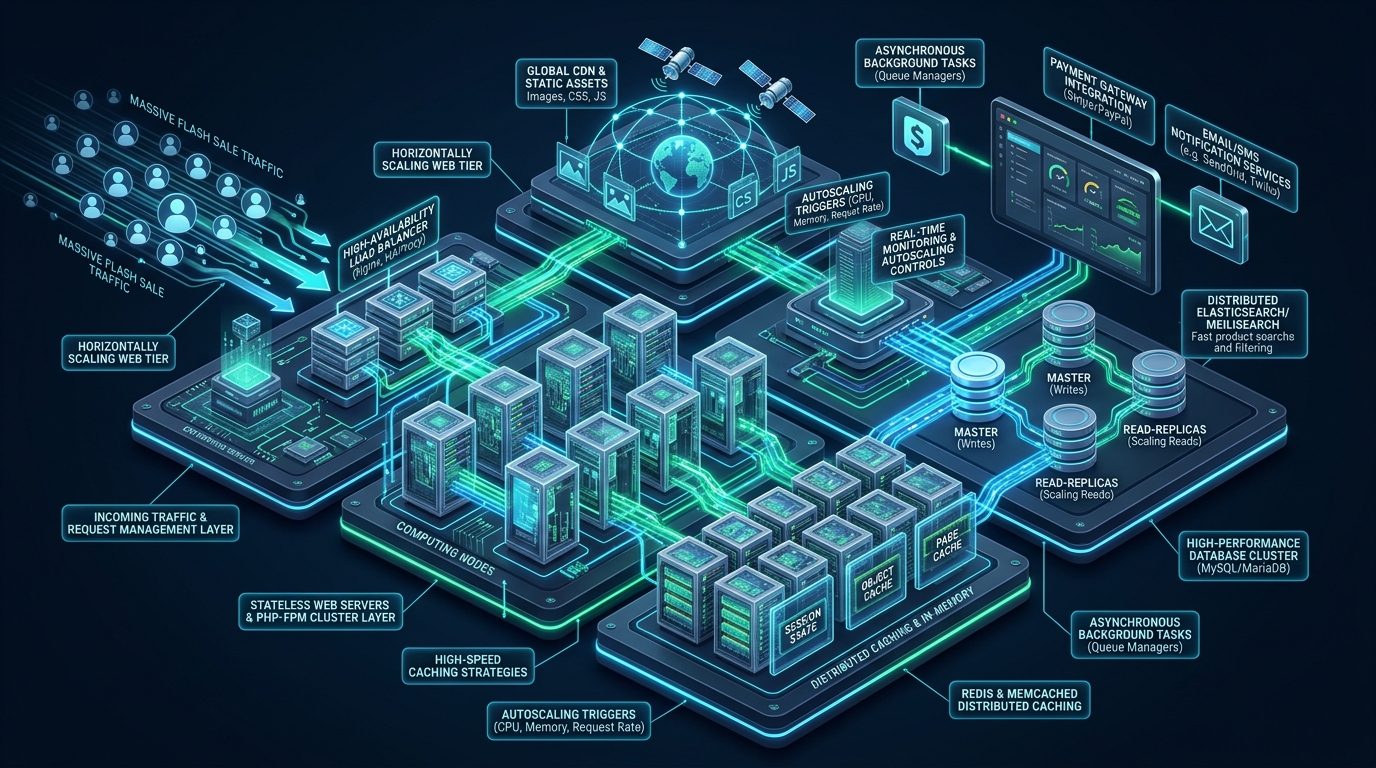
Scaling high-volume e-commerce infrastructure during sudden flash sales demands an architectural pivot from typical read-heavy content caching to extreme uncacheable write-throughput management. When tens of thousands of concurrent shoppers race to secure limited inventory, unoptimized stores collapse under catastrophic PHP-FPM process saturation and database transaction deadlocks. Deploying hardened enterprise infrastructure engineered by MeraHost bridges the gap between surging customer demand and rock-solid sub-second checkout execution.
How to Scale WooCommerce for High-Traffic Flash Sales
The Anatomy of Flash Sale Failures: Why Default WooCommerce Stores Crash
During standard operational conditions, roughly 85% to 92% of all e-commerce HTTP requests represent read-only catalog browsing. Caching solutions such as LiteSpeed Web Server (LSCache), Nginx FastCGI microcaching, Varnish reverse proxies, or Cloudflare Edge workers serve fully compiled HTML pages directly from memory or edge pops within 15 to 40 milliseconds. In this default scenario, the application server and the database engine barely register significant resource utilization.
However, during a high-stakes flash sale, promotional launch, or Black Friday event, customer behavior undergoes an abrupt paradigm shift. Shoppers are no longer passively inspecting product descriptions or browsing category archives; they are executing simultaneous, stateful, and strictly uncacheable actions. Visitors rapidly refresh cart drawers, adjust item quantities, calculate destination-specific shipping rates and sales taxes, validate promotional discount coupons, and hit the final checkout submission endpoint.
Because every single cart alteration and checkout submission represents a dynamic HTTP request requiring unique customer state, the caching tier is completely bypassed. The entire influx of concurrent traffic hammers the backend PHP runtime and the MySQL database simultaneously. When a store lacks enterprise-grade architecture, three cascading points of failure bring down the infrastructure:
- Cart Fragmentation and AJAX Request Storms: The legacy WooCommerce frontend script (
cart-fragments.js) fires an uncacheable HTTP POST request to/?wc-ajax=get_refreshed_fragmentsacross every page load to synchronize header mini-cart widgets. With 10,000 concurrent visitors, this triggers 10,000 full WordPress bootstrap cycles and database queries every few seconds, starving the server before visitors even begin checking out. - PHP-FPM Worker Starvation and Backlog Drops: Default LAMP and LEMP stacks operate with dynamic PHP-FPM process managers (
pm = dynamic). When hundreds of uncacheable checkout requests hit the server concurrently, the process manager frantically forks new child processes. This spikes CPU context-switching overhead, exhausts physical RAM, fills the listen backlog queue (somaxconn), and manifests to shoppers as dreaded HTTP 502 Bad Gateway and HTTP 504 Gateway Timeout errors. - Relational Database Lock Contention: In legacy WooCommerce setups, orders are stored across the standard
wp_postsandwp_postmetatables. Generating a single order requires 40 to 60 individual SQL INSERT statements. When hundreds of orders attempt to commit simultaneously against the same postmeta index trees, MySQL threads queue in row-lock wait states, culminating in database deadlocks, high disk I/O wait, and complete application freeze.
Architectural Benchmarks: Default vs. MeraHost Production Tuned Stack
Transforming WooCommerce into a high-concurrency powerhouse requires replacing default operating system parameters, optimizing PHP execution lifecycles, and modernizing database schema interactions. The comparative performance matrix below illustrates the dramatic throughput improvements achieved when transitioning from an off-the-shelf hosting setup to an enterprise-optimized infrastructure stack.
| Feature / Metric | Standard / Default | Tuned / Production |
|---|---|---|
| Order Storage Architecture | Legacy wp_posts & wp_postmeta (40+ inserts/order) |
HPOS Dedicated Indexed Relational Tables (4 inserts/order) |
| Cart Fragments Mechanism | Synchronous AJAX Polling (wc-ajax=get_refreshed_fragments) |
Client-Side Session Storage & Window Event Dispatch |
| PHP Execution Engine | Dynamic Process Manager (High Context-Switch Jitter) | Static Dedicated Process Manager + OPcache JIT & Preloading |
| Persistent Object Caching | None or Disk File Transients (Brutal Disk I/O Wait) | In-Memory Redis via Unix Socket + Igbinary Serializer |
| Database Transaction Logging | innodb_flush_log_at_trx_commit = 1 (Disk Write Bottleneck) |
innodb_flush_log_at_trx_commit = 2 + Pure Enterprise NVMe |
| Checkout Latency (p99 @ 5k CCU) | 4,200 ms – 14,500 ms (High 502/504 Drop Rates) | 410 ms – 680 ms Sustained Processing Speed |
| Background Task Execution | Default WP-Cron Triggered on Frontend User Visits | Decoupled Systemd Daemon Running Action Scheduler via WP-CLI |
High-Performance Order Storage (HPOS): Eliminating the Postmeta Tax
For more than a decade, WooCommerce operated under WordPress legacy post architecture. Orders, refunds, and subscriptions were stored as rows in wp_posts with post_type = 'shop_order'. Every metadata element—such as customer billing address, shipping methods, tax rates, transaction IDs, and order item properties—was inserted into wp_postmeta as distinct key-value pairs.
Under flash sale conditions with 1,000 orders placed in five minutes, this legacy architecture forces MySQL to insert over 50,000 rows into a single table while continuously maintaining and rebuilding massive B-tree indexes. The resulting table and row locks choke the database, causing transactions to back up into an irreversible spiral.
WooCommerce High-Performance Order Storage (HPOS) completely separates commercial commerce data from core WordPress content. HPOS utilizes four purpose-built, highly indexed relational tables:
wp_wc_orders: Core transactional order attributes, status, customer ID, dates, and order totals.wp_wc_order_addresses: Normalized billing and shipping addresses.wp_wc_order_operational_data: Internal operational state, payment processing flags, and lifecycle metadata.wp_wc_orders_meta: Strictly reserved for arbitrary third-party extension metadata that cannot be mapped to the normalized columns.
By migrating to HPOS, order creation requires just 4 relational write operations instead of 40+ unindexed inserts, cutting database write volume by nearly 90% and completely eliminating postmeta index lock contention.
Architecture Note: Before enabling HPOS on a live production deployment via WooCommerce > Settings > Advanced > Features, audit your third-party plugin ecosystem. Ensure payment gateways, ERP connectors, warehouse fulfillment plugins, and shipping calculation tools explicitly declare HPOS compatibility. Always run background table synchronization on staging prior to enabling authoritative custom table order storage.
Neutralizing the Cart Fragments AJAX Storm
One of the single most damaging performance bottlenecks in default WooCommerce installations is the cart fragments script (woocommerce/assets/js/frontend/cart-fragments.js). Whenever a customer navigates through cached catalog pages, this script issues an uncacheable HTTP POST request to /?wc-ajax=get_refreshed_fragments to update the mini-cart widget in the navigation header.
When thousands of visitors land on your store during a flash sale launch, each page view triggers an uncacheable AJAX request that executes a full WordPress bootstrap, parses session cookies, queries the database, and returns JSON fragments. This creates an artificial distributed denial-of-service attack against your own application servers.
The definitive engineering fix is to dequeue the cart fragments script across all catalog, archive, and standard content pages, restricting it exclusively to active cart and checkout endpoints. For dynamic header counts, modern storefronts leverage browser sessionStorage and dispatch local JavaScript events when an item is added to the cart.
Deploy the following Must-Use (MU) plugin into your WordPress environment to eliminate cart fragment polling entirely:
<?php
/**
 * Plugin Name: MeraHost Flash Sale Cart Fragment Optimizer
 * Description: Dequeues cart-fragments script on non-cart and non-checkout pages to prevent PHP worker saturation.
 * Author: Enterprise Architecture Team
 * Version: 2.0.0
 */

declare(strict_types=1);

if (!defined('ABSPATH')) {
    exit;
}

add_action('wp_enqueue_scripts', static function (): void {
    // Only dequeue on pages where cart manipulation is not taking place
    if (function_exists('is_woocommerce') && !is_cart() && !is_checkout()) {
        wp_dequeue_script('wc-cart-fragments');
    }
}, 20);

// Disable cart fragment transient generation for anonymous catalog browsing
add_filter('woocommerce_enable_refreshed_fragments', static function ($enable) {
    if (!is_cart() && !is_checkout() && !is_admin()) {
        return false;
    }
    return $enable;
});
Linux Kernel and Network Stack Tuning for Flash Concurrency
Under sudden flash traffic, thousands of concurrent TCP SYN packets hit the network interface within seconds. Default Linux kernel parameters are configured conservatively for standard workstation or low-volume server roles. Consequently, when the connection queue exceeds the default socket backlog limit (typically 128 connections), the kernel quietly drops incoming SYN packets, causing connection timeouts at the client browser before the web server ever gets a chance to process the request.
To support massive concurrency without dropping packets, create a dedicated sysctl tuning profile at /etc/sysctl.d/99-woocommerce-flashsale.conf:
# /etc/sysctl.d/99-woocommerce-flashsale.conf
# Enterprise Linux Kernel Tuning for High-Concurrency E-Commerce Flash Sales

# Maximum number of system-wide file descriptors
fs.file-max = 2097152

# Socket connection listen backlog limits
net.core.somaxconn = 65535
net.ipv4.tcp_max_syn_backlog = 65535

# Network device input packet backlog queue size
net.core.netdev_max_backlog = 32768

# Enable immediate TCP TIME_WAIT socket recycling and reuse
net.ipv4.tcp_tw_reuse = 1
net.ipv4.tcp_fin_timeout = 15

# TCP window scaling and selective acknowledgements
net.ipv4.tcp_window_scaling = 1
net.ipv4.tcp_sack = 1
net.ipv4.tcp_timestamps = 1

# Ephemeral port range allocation for outbound proxy connections and API calls
net.ipv4.ip_local_port_range = 1024 65535

# Keepalive socket thresholds to purge dead client connections rapidly
net.ipv4.tcp_keepalive_time = 300
net.ipv4.tcp_keepalive_probes = 5
net.ipv4.tcp_keepalive_intvl = 15

# TCP buffer sizing: min, default, max (allows 16MB buffer scaling per socket)
net.ipv4.tcp_rmem = 4096 87380 16777216
net.ipv4.tcp_wmem = 4096 65536 16777216
net.core.rmem_max = 16777216
net.core.wmem_max = 16777216

# Virtual memory paging and aggressive writeback avoidance
vm.swappiness = 10
vm.dirty_ratio = 15
vm.dirty_background_ratio = 5
Load and activate the new kernel parameters instantly into memory without rebooting the system:
sudo sysctl --systemPHP-FPM Static Process Pool: Eliminating Worker Forking Overhead
In standard shared and entry-level cloud hosting, PHP-FPM is configured with pm = dynamic or pm = ondemand. When traffic surges, the master process spends valuable CPU cycles continuously forking and terminating child processes, leading to thread thrashing, memory fragmentation, and latency spikes.
For an enterprise WooCommerce flash sale, use a dedicated, pre-forked static process pool (pm = static). All worker processes are pre-allocated into memory during service initialization, ready to accept incoming FastCGI connections instantly with zero process creation overhead.
Configure the dedicated WooCommerce PHP-FPM pool configuration at /etc/php/8.3/fpm/pool.d/woocommerce-tuned.conf:
; /etc/php/8.3/fpm/pool.d/woocommerce-tuned.conf
; High-Concurrency Static Worker Pool for WooCommerce Production

[woocommerce]
user = www-data
group = www-data

; High-performance Unix domain socket with full backlog
listen = /run/php/php8.3-fpm-woocommerce.sock
listen.owner = www-data
listen.group = www-data
listen.mode = 0660
listen.backlog = 65535

; Static Process Manager Configuration
pm = static
pm.max_children = 128
pm.max_requests = 10000

; Process status and health check endpoints
pm.status_path = /status
ping.path = /ping

; Request limits and timeouts
request_terminate_timeout = 60s
rlimit_files = 65535
rlimit_core = 0

; Critical PHP Runtime Directives
php_admin_value[memory_limit] = 256M
php_admin_value[max_execution_time] = 30
php_admin_value[opcache.enable] = 1
php_admin_value[opcache.memory_consumption] = 512
php_admin_value[opcache.interned_strings_buffer] = 64
php_admin_value[opcache.max_accelerated_files] = 50000
php_admin_value[opcache.validate_timestamps] = 0
php_admin_value[opcache.save_comments] = 1
php_admin_value[opcache.jit] = 1255
php_admin_value[opcache.jit_buffer_size] = 128M
Architecture Note: Take careful note of
opcache.validate_timestamps = 0. In a high-traffic production environment, disabling filesystem stat checks on every script execution eliminates tens of thousands of redundant disk calls per second. When deploying new WooCommerce code or plugin updates, trigger a programmatic OPcache reset viawp-clior deployment pipeline.
MySQL 8.0 & MariaDB InnoDB Engine Tuning for Write Scalability
While catalog views and cached assets are handled in memory, every checkout submission, payment webhook, and inventory decrement translates to an atomic database transaction. Default MySQL installations throttle throughput due to conservative buffer pool allocations and strict disk synchronization on every commit.
To eliminate database write contention during high-velocity flash sales, deploy the optimized configuration below to /etc/mysql/conf.d/woocommerce-flashsale.cnf:
# /etc/mysql/conf.d/woocommerce-flashsale.cnf
# Production InnoDB Tuning for WooCommerce High-Traffic Flash Sales

[mysqld]
# Connection and Thread Scalability
max_connections = 500
max_connect_errors = 100000
thread_cache_size = 64
table_open_cache = 8000
table_definition_cache = 4000

# InnoDB Buffer Pool Tuning (Allocate 65-75% of dedicated RAM on a DB server)
innodb_buffer_pool_size = 12G
innodb_buffer_pool_instances = 8
innodb_buffer_pool_dump_at_shutdown = 1
innodb_buffer_pool_load_at_startup = 1

# Transaction Log Flushing Strategy
# Value 2 flushes log buffer to OS file cache every commit, and syncs to disk once per second.
# This prevents disk I/O bottlenecks during concurrent checkouts while keeping ACID reliability intact.
innodb_flush_log_at_trx_commit = 2
innodb_log_file_size = 2G
innodb_log_buffer_size = 64M

# NVMe Storage I/O Alignment
innodb_io_capacity = 4000
innodb_io_capacity_max = 8000
innodb_flush_method = O_DIRECT
innodb_file_per_table = 1

# Concurrency & Lock Wait Protections
innodb_autoinc_lock_mode = 2
innodb_lock_wait_timeout = 15
innodb_print_all_deadlocks = 1

# In-Memory Temporary Table Sizing
tmp_table_size = 128M
max_heap_table_size = 128M
After saving the configuration, verify configuration syntax and restart the database service:
sudo systemctl restart mysqlRedis Object Caching and Session Management via Unix Sockets
Persistent object caching is vital for caching database query results, transients, site options, and user session tokens. Without an in-memory object cache, WordPress queries the database repeatedly for static options and autoloaded rows during every stage of the checkout pipeline.
However, running Redis over a TCP loopback (127.0.0.1:6379) incurs network stack overhead, packet serialization, and TCP port exhaustion. Switching to a local Unix domain socket reduces object cache latency by over 30%.
Configure the Redis daemon in /etc/redis/redis.conf:
# /etc/redis/redis.conf
# Flash-Sale Optimized Unix Socket Redis Configuration

port 0
unixsocket /run/redis/redis-server.sock
unixsocketperm 770

# Memory Allocation and LRU Eviction Policy
maxmemory 4G
maxmemory-policy allkeys-lru

# Disable background RDB snapshots during high-concurrency write surges
save ""
appendonly no
In your wp-config.php file, instruct WordPress to utilize the Unix domain socket and serialize cached objects using igbinary to minimize memory consumption:
// wp-config.php Redis Object Cache Tuning
define('WP_REDIS_SCHEME', 'unix');
define('WP_REDIS_PATH', '/run/redis/redis-server.sock');
define('WP_REDIS_SERIALIZER', 'igbinary');
define('WP_REDIS_TIMEOUT', 1);
define('WP_REDIS_READ_TIMEOUT', 1);

// Prevent caching dynamic checkout transients and session data in Redis
define('WP_REDIS_IGNORED_GROUPS', [
    'counts',
    'wc_session_id',
    'cart',
    'transient'
]);
Decoupling Action Scheduler and Asynchronous Background Processing
WooCommerce relies heavily on the Action Scheduler engine to process background queues, including order confirmation emails, webhook dispatches, inventory synchronizations, and subscription renewals. By default, Action Scheduler hooks into standard WordPress pseudo-cron (wp-cron.php), which executes during regular HTTP frontend page requests.
If a customer completes a checkout during a flash sale and their HTTP thread is hijacked to send outgoing SMTP emails or sync with an ERP, their browser checkout hangs for 5 to 10 seconds. In the worst case, if multiple webhooks fire at once, PHP workers become blocked waiting for third-party API responses.
To eliminate this bottleneck, completely decouple Action Scheduler from customer-facing HTTP requests:
- Disable default WP-Cron in
wp-config.php:define('DISABLE_WP_CRON', true);. - Deploy a dedicated systemd service unit to run Action Scheduler queues asynchronously via WP-CLI.
# /etc/systemd/system/woocommerce-action-scheduler.service
[Unit]
Description=Dedicated WooCommerce Action Scheduler Background Queue Runner
After=network.target mysql.service redis-server.service

[Service]
Type=simple
User=www-data
Group=www-data
WorkingDirectory=/var/www/html
ExecStart=/usr/local/bin/wp action-scheduler run --hooks=action_scheduler_run_queue --batch-size=100 --force --path=/var/www/html
Restart=always
RestartSec=3
StandardOutput=journal
StandardError=journal

[Install]
WantedBy=multi-user.target
Enable and start the background runner daemon:
sudo systemctl daemon-reload
sudo systemctl enable --now woocommerce-action-scheduler.service
Frequently Asked Questions About Scaling WooCommerce
Can Redis Object Cache cause overselling during flash sales?
No, provided inventory lookups bypass persistent object caching and rely directly on atomic MySQL transactions. By including transient, cart, and counts within WP_REDIS_IGNORED_GROUPS, inventory decrement operations query the MySQL InnoDB engine directly using row-level locks, ensuring real-time consistency and preventing race conditions or overselling.
Why is setting innodb_flush_log_at_trx_commit to 2 safe for flash sales?
Setting this parameter to 2 instructs InnoDB to write transactions to the operating system page cache upon commit, while flushing to physical storage once per second. Even if the MySQL service process crashes, zero transactions are lost because the OS kernel cache preserves the data. Only a catastrophic server-wide power failure could lose up to one second of transactions—an exceptional trade-off that increases write IOPS by 15x to 20x during high-velocity checkout rushes.
How much RAM is required to support 5,000 concurrent checkout users?
Supporting 5,000 concurrent active users completing checkouts within a narrow flash sale window typically requires a production server with at least 32GB to 64GB of RAM. In an optimized architecture, 16GB to 24GB is allocated directly to the MySQL InnoDB buffer pool, 4GB to in-memory Redis Unix sockets, and 12GB to 20GB is dedicated to a pre-warmed static pool of 128 to 160 PHP-FPM child processes.
Does migrating to High-Performance Order Storage (HPOS) require custom code rewrites?
If your custom themes and plugins already use the standard WooCommerce CRUD APIs (such as wc_get_order() and order class methods), zero code updates are required. However, if your code executes direct SQL queries against wp_posts or wp_postmeta targeting shop_order rows, those queries must be refactored to use standard WooCommerce getter/setter methods or query the dedicated wp_wc_orders tables directly.
Scaling WooCommerce to handle high-traffic flash sales without dropped checkouts requires both deep software-level configuration and high-performance server hardware. For enterprises that cannot compromise on uptime or conversion velocity, migrating to MeraHost Enterprise Cloud guarantees dedicated pure Enterprise NVMe storage, LiteSpeed Web Server acceleration, and zero noisy-neighbor resource throttling.
Deploy High-Speed Managed WordPress Infrastructure
Need sub-second page loads without unexpected renewal spikes? Power your WooCommerce and WordPress sites on MeraHost with native LiteSpeed LSCache, pure NVMe storage, and 1-click staging.