
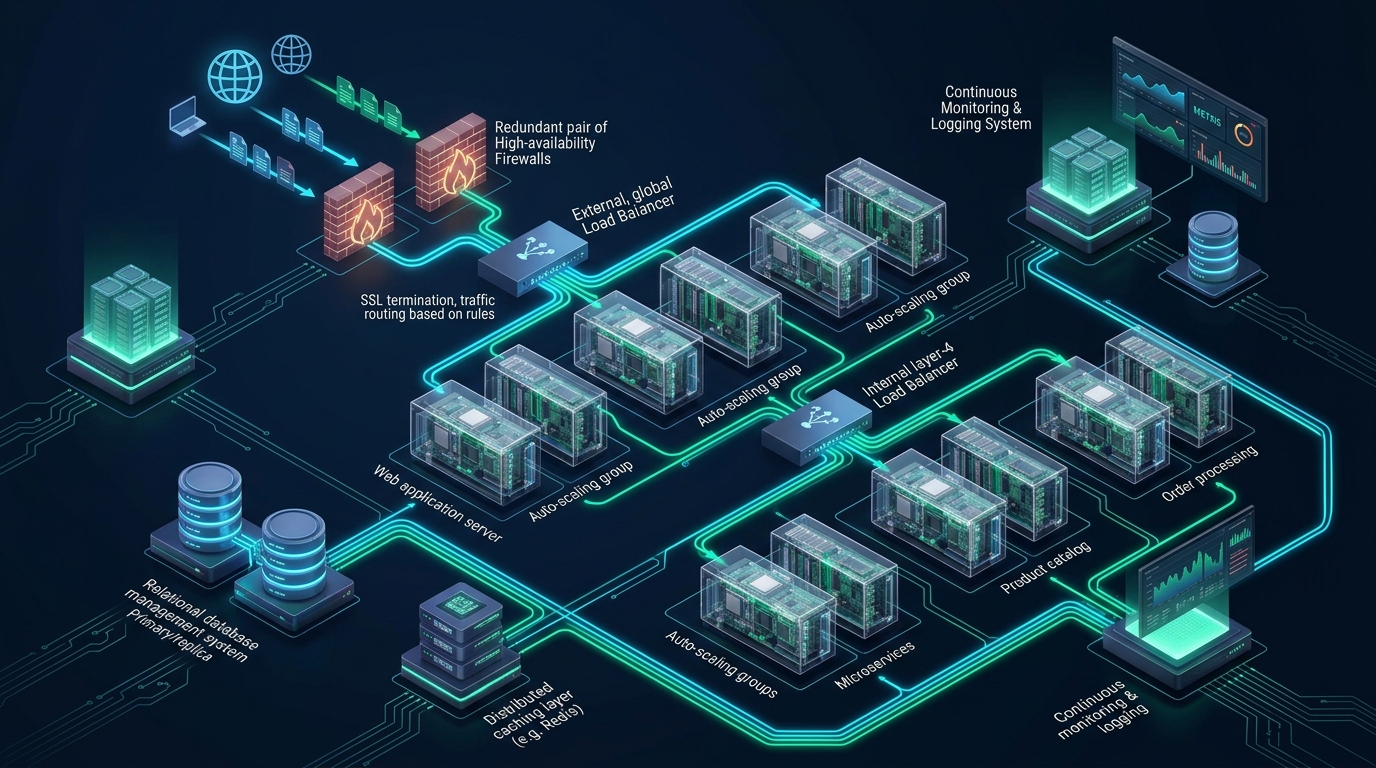
Scaling modern web applications beyond the capacity of a single physical server is not merely a matter of throwing additional compute instances behind a round-robin DNS entry; unmanaged traffic distribution inevitably introduces connection thrashing, state desynchronization, and catastrophic single-point-of-failure (SPOF) outages. For engineering teams deploying mission-critical systems at MeraHost, implementing an enterprise-grade load balanced web architecture is the foundational prerequisite for sustaining hundred-thousand-request-per-second concurrency with sub-millisecond dispatch latency. Decoupling high-performance ingress routers, stateless application worker pools, and persistent state stores transforms vulnerable monolithic hosts into resilient, self-healing computing fabrics capable of instantaneous failover.
What Is the Optimal Load-Balanced Web Architecture for Enterprise Scale?
Direct Answer: An enterprise load balanced web architecture couples redundant Layer 4 transport balancers (using Keepalived VRRP and HAProxy/IPVS) for line-rate packet steering with Layer 7 reverse proxies (Nginx or LiteSpeed Web Server) for TLS termination, HTTP/3 multiplexing, intelligent path routing, and automated health checks across stateless application server pools.
Designing high-availability systems requires treating every architectural layer—from Layer 3 network routing down to operating system socket buffers—as a potential bottleneck. In a typical unoptimized web environment, incoming traffic terminates directly on a single web server that runs the presentation layer, the application runtime (such as PHP-FPM, Node.js, or Python WSGI), and local databases. Under unexpected traffic surges or hardware degradation, CPU saturation locks the thread pool, memory exhaustion triggers Linux kernel OOM (Out of Memory) panics, and the entire platform suffers catastrophic downtime.
A mature load balanced web architecture replaces this fragile topology by separating traffic arbitration from request execution. Rather than exposing application servers directly to public subnets, high-throughput load balancer clusters receive client connections, evaluate node health, offload compute-heavy cryptographic handshakes, and intelligently distribute workloads across horizontally scaled backend tiers. When executed properly, backend instances can be patched, deployed, or rebooted without dropping a single active client transaction.
Layer 4 vs. Layer 7 Load Balancing: Tactical Selection Matrix
Understanding the distinction between transport-layer (Layer 4) and application-layer (Layer 7) load balancing is critical when engineering a high-capacity production topology. Each approach operates at different OSI model abstractions and satisfies distinct architectural objectives.
1. Layer 4 Transport-Level Load Balancing (TCP/UDP)
Layer 4 balancers operate exclusively at the transport layer of the network protocol stack. They inspect only IP headers and TCP/UDP port tuples (Source IP, Source Port, Destination IP, Destination Port) without inspecting or terminating the underlying application payload. High-performance software implementations like Linux Virtual Server (IPVS) or HAProxy in mode tcp process packets with ultra-low latency and negligible CPU consumption.
Because Layer 4 balancers do not decrypt TLS certificates or parse HTTP protocol headers, they cannot route traffic based on URL request paths, HTTP cookies, user-agent headers, or HTTP request verbs. However, their sheer forwarding throughput makes them ideal as the edge ingress layer in multi-tier enterprise deployments, handling hundreds of thousands of concurrent TCP flows and dispatching them to downstream Layer 7 proxies.
2. Layer 7 Application-Level Load Balancing (HTTP/HTTPS/HTTP/3)
Layer 7 balancers terminate incoming client TCP connections, complete the cryptographic TLS handshake, decrypt the traffic, and inspect the raw HTTP request stream. Software engines like HAProxy in mode http, Nginx, and LiteSpeed Web Server examine URIs, cookie data, HTTP headers, and API query parameters before determining the target backend destination.
Layer 7 arbitration unlocks powerful operational capabilities:
- Microservice & Path-Based Routing: Direct
/api/v2/*requests to low-latency Go microservices,/checkout/*to secure isolated payment workers, and/static/*to high-speed NVMe caching clusters. - Intelligent Content Caching & Compression: Cache static assets in-memory and compress responses using Brotli or Gzip, drastically reducing backend application load.
- Advanced Session Stickiness: Inject encrypted cookies (e.g.,
SERVERID) to bind client sessions to specific backend nodes without exposing internal network topologies. - Zero-Downtime Canary Deployments: Route a percentage of incoming production traffic (e.g., 5%) to a canary release cluster while monitoring error rates via Prometheus metrics.
Architecture Note: In enterprise production environments, the recommended pattern is a two-tier architecture: redundant Layer 4 IPVS/Keepalived ingress nodes terminate incoming BGP/VIP traffic and distribute raw packets across a pool of Layer 7 HAProxy or LiteSpeed instances. This model delivers wire-speed packet dispatch combined with granular application-aware routing.
Eliminating the Load Balancer Single Point of Failure (SPOF)
A load balancer that distributes traffic across ten backend web nodes does not create a highly available system if that load balancer is itself a solitary hardware instance or virtual machine. If the primary load balancer crashes, the entire application goes dark. True high availability demands redundant load balancer nodes configured in an Active-Passive or Active-Active topology.
The industry-standard mechanism for load balancer redundancy in Linux private clouds is the Virtual Router Redundancy Protocol (VRRP), managed via keepalived. In this architecture, a floating Virtual IP (VIP) address is shared between a Master load balancer node and one or more Backup nodes. The nodes exchange periodic VRRP advertisement heartbeats across a dedicated heartbeat interface or local VLAN (typically every 1,000 milliseconds).
If the Master node fails to broadcast heartbeats—or if an internal health script detects that the local HAProxy daemon has hung—the Backup node initiates a priority election, broadcasts Gratuitous ARP (GARP) packets to update top-of-rack switch forwarding tables, and binds the VIP to its own physical network interface in less than 500 milliseconds. Clients connected to the public VIP experience virtually zero interruption.
Comparative Architecture Matrix: Default vs. Tuned Load-Balanced Cluster
The architectural differences between an unoptimized single-host setup and an enterprise load balanced web architecture directly dictate capacity thresholds, failover latency, and operational survival under peak loads:
| Architecture Component | Single-Host / Default | Tuned Load-Balanced Cluster |
|---|---|---|
| Ingress Redundancy | Single Public IP (Direct Server SPOF) | Dual Keepalived VRRP / BGP Anycast VIP Pair |
| Failover Convergence Time | 15 to 120 Minutes (Manual DNS TTL propagation) | < 500 Milliseconds (Sub-Second GARP Takeover) |
| SSL/TLS Termination Overhead | Executed on Application Cores (High CPU Steal) | Offloaded to Dedicated Edge Proxies with Session Cache |
| Traffic Dispatching Logic | Unchecked DNS Round-Robin | Dynamic Least Connections + Active Health Probing |
| Backend Health Verification | Passive (Users experience HTTP 502/504 errors) | Active HTTP synthetic health probing (2s interval, fast eviction) |
| Session State Storage | Local Filesystem (/tmp or /var/lib/php/sessions) | External Redis Sentinel / NVMe Cluster with Stick-Tables |
| Rolling Upgrades & Deployments | Requires Maintenance Windows & Downtime | Hitless Graceful Reloads (Zero Dropped Packets) |
The Golden Rule of Load Balancing: Strictly Stateless Application Tiers
A load balancer can only operate effectively if any backend node can satisfy any incoming request. If an application stores authentication tokens, shopping cart sessions, or uploaded media files on its local storage, routing a user’s next request to a different node results in session drops, authorization failures, and 404 errors. Architectural decoupling requires three structural shifts:
1. Centralized Session Management
All user session data must be extracted from application process memory and local disk storage into an ultra-low latency, in-memory datastore such as a Redis Sentinel cluster or Memcached pool. When a client authenticates, the session identifier is validated against the centralized Redis tier in less than 200 microseconds, allowing any application node to process subsequent requests seamlessly.
2. Shared Asset and Object Storage
User-generated assets, document uploads, and compiled static assets should never reside on application server disks. Instead, assets must be persisted to S3-compatible object storage or distributed network filesystems (e.g., CephFS, GlusterFS, or NFS over dedicated 10Gbps storage networks) fronted by a global Content Delivery Network (CDN) or edge LiteSpeed caching proxy.
3. Database Read/Write Splitting with Connection Pooling
Distributing web traffic across multiple application servers shifts the bottleneck directly to the relational database. If twenty web workers open unconstrained MySQL/PostgreSQL connections during traffic surges, database connection exhaustion immediately cascades into site-wide failure. The architectural solution involves deploying intermediate connection proxies (such as ProxySQL or PgBouncer) to pool backend connections, combined with asynchronous read replicas to isolate write transactions from heavy reporting and catalog queries.
Architecture Note: While HAProxy supports cookie-based sticky sessions (inserting a
SERVERIDcookie into client headers), sticky sessions should be used as a migration stopgap rather than a permanent design pattern. If a backend node fails, all users pinned to that node lose their session unless state is stored externally in Redis.
Production-Ready Configuration Blueprint
Building an enterprise load-balanced web environment requires precise, battle-tested system configurations. The following production files form an end-to-end, high-availability ingress stack deployed on modern Linux enterprise environments.
1. Load Balancer Kernel Network Stack Hardening (/etc/sysctl.d/99-loadbalancer-tuning.conf)
Load balancers handle tens of thousands of concurrent TCP sockets and brief ephemeral connection lifecycles. Default Linux kernel parameters are tuned for modest workstation workloads and will rapidly exhaust ephemeral ports, drop SYN queues, and saturate socket buffer memory. Apply this tuned configuration to optimize network throughput:
# /etc/sysctl.d/99-loadbalancer-tuning.conf
# Enterprise Linux Kernel Tuning for High-Concurrency Load Balancers

# Allow Keepalived and HAProxy to bind to non-local Virtual IPs before interface assignment
net.ipv4.ip_nonlocal_bind = 1
net.ipv4.ip_forward = 1

# Maximize socket backlog queue depths for high incoming SYN bursts
net.core.somaxconn = 65535
net.ipv4.tcp_max_syn_backlog = 65535
net.core.netdev_max_backlog = 65535

# Expand ephemeral port range to prevent local port exhaustion under high proxy loads
net.ipv4.ip_local_port_range = 10240 65535

# Accelerate reuse of TIME_WAIT sockets for outgoing connections to backends
net.ipv4.tcp_tw_reuse = 1
net.ipv4.tcp_fin_timeout = 15

# Enable TCP SYN Cookies for wire-speed SYN flood resilience
net.ipv4.tcp_syncookies = 1

# Optimize TCP buffer window scaling and memory limits (Min, Default, Max in bytes)
net.ipv4.tcp_rmem = 4096 87380 16777216
net.ipv4.tcp_wmem = 4096 65536 16777216
net.core.rmem_max = 16777216
net.core.wmem_max = 16777216

# Enable BBR congestion control algorithm for optimal throughput across WAN links
net.core.default_qdisc = fq
net.ipv4.tcp_congestion_control = bbr

# Increase maximum open file descriptors and tracking table limits
fs.file-max = 2097152
net.netfilter.nf_conntrack_max = 1048576
net.netfilter.nf_conntrack_tcp_timeout_established = 600
Apply the parameters immediately without rebooting via sysctl --system.
2. Production HAProxy Configuration with TLS & Path Routing (/etc/haproxy/haproxy.cfg)
This battle-tested HAProxy configuration demonstrates modern Layer 7 routing: automatic HTTP-to-HTTPS redirection, modern TLS 1.3 cryptographic profiles, path-based routing, dynamic least-connections load balancing, and active health checks with fast failure detection:
# /etc/haproxy/haproxy.cfg
# Production HAProxy Layer 7 Ingress Configuration

global
    log /dev/log local0 info
    log /dev/log local1 notice
    chroot /var/lib/haproxy
    user haproxy
    group haproxy
    daemon
    master-worker
    stats socket /run/haproxy/admin.sock mode 660 level admin expose-fd listeners
    stats timeout 30s
    maxconn 100000

    # Modern TLS Security Configuration (Mozilla Modern Standard)
    ssl-default-bind-ciphersuites TLS_AES_128_GCM_SHA256:TLS_AES_256_GCM_SHA384:TLS_CHACHA20_POLY1305_SHA256
    ssl-default-bind-options ssl-min-ver TLSv1.2 no-tls-tickets

defaults
    log global
    mode http
    option httplog
    option dontlognull
    option forwardfor
    option http-server-close
    timeout connect 5000ms
    timeout client  50000ms
    timeout server  50000ms
    timeout http-request 10000ms
    timeout http-keep-alive 5000ms
    errorfile 400 /etc/haproxy/errors/400.http
    errorfile 502 /etc/haproxy/errors/502.http
    errorfile 503 /etc/haproxy/errors/503.http

# Administrative Monitoring Dashboard (Restricted Access)
frontend stats_fe
    bind 127.0.0.1:8404
    stats enable
    stats uri /haproxy?stats
    stats refresh 5s
    stats admin if TRUE

# Public Ingress Frontend - HTTP Port 80
frontend http_in
    bind *:80
    # Enforce unconditional redirection to HTTPS
    http-request redirect scheme https code 301 unless { ssl_fc }

# Public Ingress Frontend - HTTPS Port 443
frontend https_in
    bind *:443 ssl crt /etc/ssl/certs/production_bundle.pem alpn h2,http/1.1
    http-request set-header X-Forwarded-Proto https
    http-request set-header X-Forwarded-Port %[dst_port]

    # Content-Aware Access Control Lists (ACLs)
    acl is_api path_beg /api/
    acl is_static path_end -i .jpg .jpeg .png .gif .css .js .woff2 .svg .webp

    # Route based on evaluated ACL conditions
    use_backend api_cluster if is_api
    use_backend static_cache_cluster if is_static
    default_backend web_app_cluster

# Backend Cluster 1: Primary Stateless Application Servers
backend web_app_cluster
    balance leastconn
    option httpchk GET /health HTTP/1.1\r\nHost:\ app.internal
    http-check expect status 200
    cookie SERVERID insert indirect nocache

    # Application Worker Nodes (2s check interval, 3 consecutive passes for UP, 2 fails for DOWN)
    server app01 10.0.10.11:8080 check inter 2000 rise 3 fall 2 weight 100 cookie app01
    server app02 10.0.10.12:8080 check inter 2000 rise 3 fall 2 weight 100 cookie app02
    server app03 10.0.10.13:8080 check inter 2000 rise 3 fall 2 weight 100 cookie app03
    server app_backup 10.0.10.99:8080 check backup inter 2000

# Backend Cluster 2: High-Throughput API Microservices
backend api_cluster
    balance roundrobin
    option httpchk GET /api/v1/ping HTTP/1.1\r\nHost:\ api.internal
    http-check expect status 200
    server api01 10.0.20.21:9000 check inter 1500 rise 2 fall 2 weight 100
    server api02 10.0.20.22:9000 check inter 1500 rise 2 fall 2 weight 100

# Backend Cluster 3: Static Asset Caching Tier (LiteSpeed / Nginx Cache)
backend static_cache_cluster
    balance roundrobin
    server cache01 10.0.30.31:80 check inter 5000 weight 100
    server cache02 10.0.30.32:80 check inter 5000 weight 100
3. Keepalived VRRP High-Availability Daemon (/etc/keepalived/keepalived.conf)
Deploy this Keepalived configuration on the Primary (Master) load balancer node. On the Secondary (Backup) node, change state MASTER to state BACKUP and reduce the priority from 101 to 100. This guarantees automatic, sub-second VIP migration if HAProxy fails or the primary host goes offline:
# /etc/keepalived/keepalived.conf
# Keepalived High-Availability VRRP Configuration (Master Node)

global_defs {
    router_id LB_MASTER_NODE
    enable_script_security
    script_user root
}

# Automated Health Check Script to verify HAProxy process responsiveness
vrrp_script chk_haproxy {
    script "/usr/bin/killall -0 haproxy"
    interval 2
    weight 2
    fall 2
    rise 2
}

vrrp_instance VI_STATIC_WAN {
    state MASTER
    interface eth0
    virtual_router_id 51
    priority 101
    advert_int 1

    authentication {
        auth_type PASS
        auth_pass M3raHost_VRRP_Sec!
    }

    # Floating Virtual IP assigned to public clients
    virtual_ipaddress {
        198.51.100.50/24 dev eth0 label eth0:vip
    }

    track_script {
        chk_haproxy
    }

    notify_master "/usr/local/bin/lb_notify.sh MASTER"
    notify_backup "/usr/local/bin/lb_notify.sh BACKUP"
    notify_fault  "/usr/local/bin/lb_notify.sh FAULT"
}
Balancing Algorithms and Health Probing: Avoiding the Cascading Failure Trap
Selecting the proper balancing algorithm depends directly on the nature of your workload:
- Least Connections (
balance leastconn): The recommended algorithm for long-lived HTTP/WebSocket connections and unpredictable database-heavy API queries. New requests are dispatched to whichever node currently maintains the lowest count of active socket connections, preventing slower nodes from accumulating backlogs. - Round Robin (
balance roundrobin): Ideal for uniform, short-lived static asset delivery where execution duration is virtually identical across all requests. Supports dynamic runtime weighting. - Source IP Hash (
balance source): Hashes the client’s IP address to map them consistently to the same backend server. Useful for legacy applications that cannot decouple session storage, though client mega-proxies (like enterprise VPNs or mobile carrier CGNAT) can cause severe traffic skewing to a single backend node.
Preventing the Thundering Herd During Health Probing
A common failure mode in large-scale load balancing is the health probe “death spiral.” If five thousand backend workers are checked every second with expensive synthetic HTTP requests (e.g., querying the database or rendering a template), the health checks themselves can consume 20% to 40% of application CPU cycles.
To prevent this, configure dedicated, lightweight health check endpoints (e.g., /health) that verify critical subsystem availability (such as local process status, Redis connectivity, and read-only database heartbeat) using fast in-memory probes returning a simple HTTP 200 response in under 5 milliseconds. Furthermore, implement exponential backoff and jitter on check intervals to prevent thousands of checks from synchronizing simultaneously.
Frequently Asked Questions About Enterprise Load-Balanced Architecture
How does Layer 4 load balancing differ from Layer 7 in throughput and resource consumption?
Layer 4 load balancers process traffic solely at the packet level (IP addresses and TCP/UDP ports) without terminating the TLS connection or parsing application payloads. As a result, Layer 4 forwarding consumes minimal CPU and memory, allowing a single host to route millions of packets per second. In contrast, Layer 7 load balancers decrypt TLS certificates, inspect HTTP headers, and buffer payloads. While Layer 7 requires significantly more compute resources, it unlocks essential features like URL path routing, header manipulation, and granular SSL offloading.
How can we prevent split-brain scenarios in a dual-node Keepalived VRRP cluster?
A split-brain condition occurs when the network link between load balancers fails, causing both nodes to assume the Master role and simultaneously bind the same Virtual IP. To eliminate split-brain, implement redundant heartbeat channels: route VRRP advertisements across a dedicated physical cross-cable in addition to the primary management network. Furthermore, integrate quorum-based fencing or an external third-party tie-breaker witness (such as an upstream gateway or consensus service) that must be reachable before any node is permitted to claim the VIP.
What is the most effective approach for handling persistent user sessions across web nodes?
The enterprise standard is to completely externalize session state into a high-availability in-memory datastore such as Redis Sentinel or Redis Cluster. This renders the application web nodes completely stateless, allowing any worker node to handle any user’s request. While HAProxy cookie insertion (sticky sessions) can bind a user to a specific node, it inhibits optimal load distribution and leaves users stranded if their designated worker node fails.
How do we ensure zero-downtime rolling software deployments across the load-balanced pool?
Zero-downtime rolling deployments rely on HAProxy’s administrative runtime socket. Using tools like Ansible or CI/CD deployment scripts, a node is placed into DRAIN mode via set server web_app_cluster/app01 state drain. In DRAIN mode, HAProxy stops dispatching new sessions to the node while allowing existing transactions to complete gracefully. Once active connections reach zero, the code is updated, tests execute, and the node is returned to READY mode. Repeating this process sequentially across all nodes achieves 100% service uptime.
Architecting for Sustained Enterprise Resilience
Designing, deploying, and maintaining a high-availability load balanced web architecture eliminates the operational vulnerabilities that plague growing online businesses. By decoupling the ingress tier with Keepalived VRRP and HAProxy, centralizing session state in distributed Redis clusters, and deploying stateless application instances across dedicated compute fabrics, engineering teams build infrastructure capable of surviving hardware crashes, network blips, and viral traffic spikes without operational panic.
When building mission-critical architectures, the physical foundation matters as much as the software topology. Virtualized multi-tenant environments frequently suffer from noisy-neighbor CPU steal and erratic disk I/O, which directly degrade load balancer health checks and induce artificial latency spikes. For guaranteed hardware predictability, deploying dedicated infrastructure on MeraHost Enterprise Cloud provides enterprise-grade bare-metal performance, pure NVMe arrays, high-speed private networking, and fixed renewal pricing that protects infrastructure budgets over long-term production horizons.
Deploy Enterprise-Grade Production Infrastructure
Need guaranteed performance with zero price hikes? Host mission-critical workloads on MeraHost with pure Enterprise NVMe, LiteSpeed Web Server, and Same Renewal Price, Always (starting at ₹99/mo).