
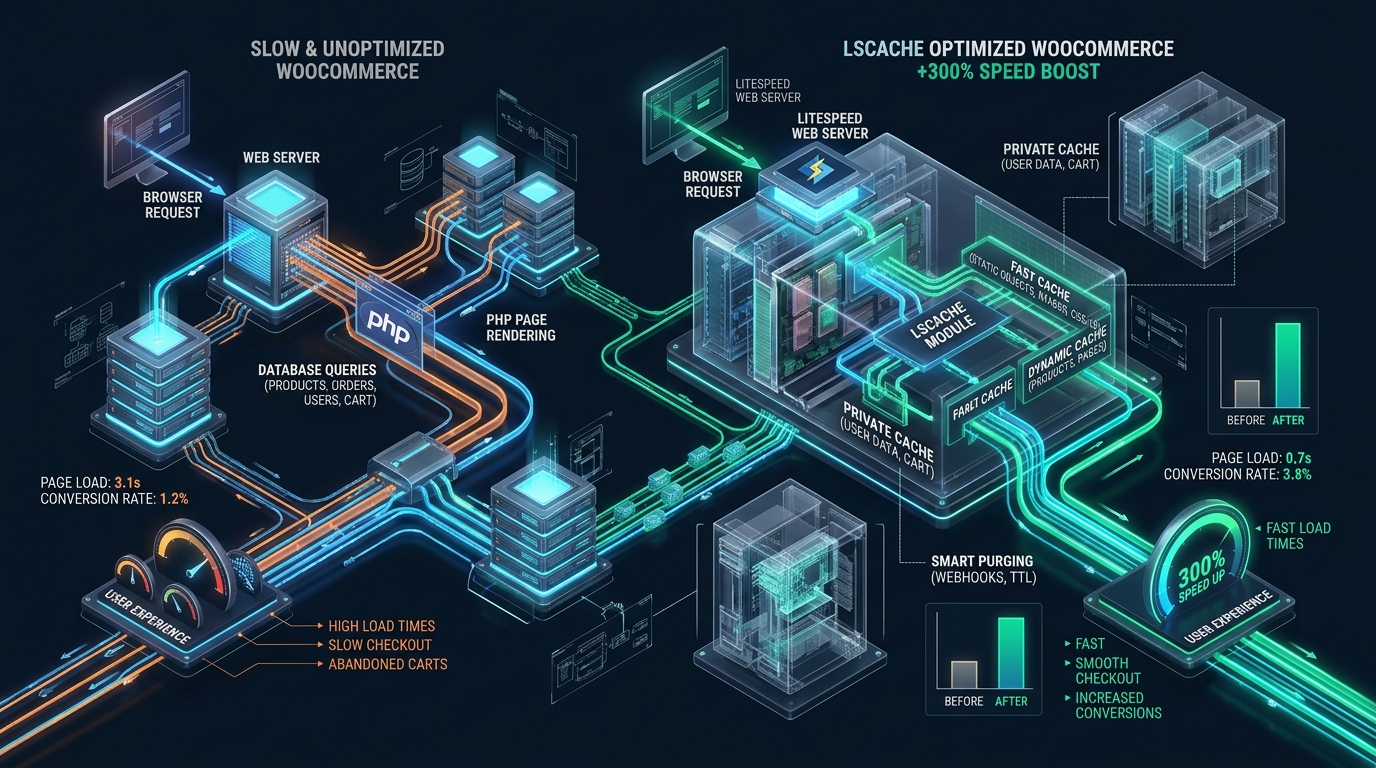
Modern WooCommerce storefronts carry immense computational overhead, frequently triggering hundreds of database queries and unoptimized PHP-FPM worker executions per uncached page request. At scale, this dynamic query storm throttles Time to First Byte (TTFB), saturates server CPU threads, and directly suppresses checkout conversion rates unless backed by high-throughput infrastructure like MeraHost. By bypassing the PHP runtime completely through native web-server-level caching and Edge Side Includes (ESI), LiteSpeed Cache (LSCache) consistently slashes storefront latency by upwards of 300%.
How LSCache Accelerates WooCommerce Performance
Direct Answer: LiteSpeed Cache (LSCache) accelerates WooCommerce by over 300% through kernel-level event-driven page caching, tag-based cache purging, and Edge Side Includes (ESI). ESI dynamically punches holes in static page caches for shopping carts, user sessions, and nonces, delivering sub-50ms static cache speeds without serving stale transactional shopper data.
WooCommerce has evolved into the world’s most ubiquitous e-commerce framework, powering millions of commercial stores worldwide. However, the architectural foundation of WordPress—an interpreted PHP application communicating synchronously over socket connections with a relational MySQL database—presents massive scalability hurdles. Every time an uncached catalog page is requested, WordPress initializes its core architecture, loads dozens of active plugins, parses theme templates, and executes 80 to 250 distinct SQL queries. When traffic spikes during sales events or marketing campaigns, standard PHP-FPM pools choke on worker queue saturation, leading to 504 Gateway Timeouts, 502 Bad Gateway errors, and customer abandonment.
Traditional caching plugins attempt to resolve this by writing HTML files to disk or using PHP-based reverse caching. However, these mechanisms fail on modern e-commerce websites because WooCommerce pages are inherently dynamic: shopping carts, recent views, account menus, currency switchers, and cryptographic security nonces require per-user personalization. Standard caching engines either bypass caching completely for any shopper with a session cookie or accidentally serve one user’s private cart details to another. LiteSpeed Web Server (LSWS) and the LSCache engine fundamentally solve this dilemma at the web server core.
The Architectural Bottleneck: Why Traditional PHP-FPM Stacks Collapse
To appreciate why LiteSpeed Cache achieves a 300% to 500% performance improvement over standard Apache and Nginx setups, one must analyze the lifecycle of a dynamic HTTP request under conventional hosting stacks. In an Apache mpm_prefork or Nginx + PHP-FPM topology:
- TCP Handshake & SSL Negotiation: The web server terminates TLS and reads the HTTP request headers.
- FastCGI Gateway Delegation: Nginx passes the request over a Unix domain socket or TCP port to the PHP-FPM master process, which assigns an idle child worker.
- Bootstrap & Autoloading: The PHP worker parses
index.php, loadswp-config.php, initializes autoloaders, and processes object classes from WordPress core, WooCommerce, payment gateways, and shipping extensions. - Database Round-Trips: WooCommerce queries MariaDB/MySQL for product metadata, inventory levels, tax tables, customer sessions, and transient options. This phase often consumes 120ms to 400ms of pure I/O latency.
- DOM Serialization & Output Buffering: PHP compiles the HTML output buffer and streams the payload back over FastCGI to Nginx, which finally delivers the response packets to the visitor’s browser.
Under this classical pipeline, a single high-performance VPS with 8 vCPUs can sustain only 40 to 80 concurrent un-cached requests per second before the PHP-FPM backlog fills completely. Once the backlog fills, incoming HTTP connections queue up, Time to First Byte spikes from 300ms to 4,000ms+, and customers encounter agonizing page freezes.
Architecture Note: In-memory PHP caching solutions like WP Super Cache or W3 Total Cache cannot solve the WooCommerce cart paradox without disabling page caching as soon as a visitor adds an item to their cart. Once
woocommerce_items_in_cartis detected, traditional plugins drop all caching, leaving your server completely unprotected at the most critical phase of the conversion funnel.
Edge Side Includes (ESI): The Core Engine of WooCommerce Acceleration
LiteSpeed Web Server revolutionizes dynamic application delivery by integrating caching directly into the web server binary via its asynchronous, event-driven architecture. Unlike third-party plugins that require PHP to execute before checking whether a page is cached, LiteSpeed checks its in-memory kernel cache table before a single PHP process is ever spawned.
The true technological triumph of LSCache for WooCommerce is its native support for Edge Side Includes (ESI). ESI is an open standard that allows a web server to decompose an HTML document into distinct fragments, assign independent cache rules and Time-To-Live (TTL) policies to each fragment, and assemble the final HTML response directly at the server edge before transmission.
How ESI Hole Punching Operates in Practice
Consider a standard WooCommerce single product page. Over 98% of the document—including the header markup, global navigation, product imagery, description tabs, customer reviews, related product grids, and footer links—is identical for every visitor. Only tiny elements vary between users:
- The mini-cart widget in the navigation bar displaying item counts and order subtotals.
- The personalized customer greeting (“Welcome back, Alex”) in the utility header.
- Dynamic WooCommerce security nonces embedded in “Add to Cart” and wishlist AJAX forms.
- Location-based localized pricing or currency selectors.
With LSCache ESI enabled, the public shell of the product page is stored as a fully cached static resource with a generous TTL (e.g., 604,800 seconds / 7 days). The personalized mini-cart and nonce elements are replaced with ESI markup tags, such as <esi:include src="... /esi-cart-fragment..." />. When a shopper requests the page:
- LiteSpeed instantly retrieves the public page template from RAM in under 5 milliseconds.
- LiteSpeed scans the template for ESI tags and executes lightweight sub-requests only for the un-cached private fragments.
- The private fragment utilizes micro-cached session buffers or a hyper-optimized Redis object query.
- LiteSpeed stitches the private fragment into the public HTML shell in memory and streams the complete page to the browser.
The result is revolutionary: rather than executing an entire 150-query WordPress rendering cycle taking 800ms, the server spends less than 45ms delivering a fully customized, real-time page. The heavy public layout is served at raw static speeds, while the customer sees their accurate cart contents and personalized checkout status without a hitch.
Granular Tag-Based Cache Purging: Eliminating Stale Catalog Data
One of the persistent nightmares of e-commerce system administrators is stale inventory: a product sells out, but visitors continue to see “In Stock” due to aggressive caching. Conversely, clearing the entire site cache every time an inventory level shifts causes devastating “cache stampedes” (thundering herd problem), knocking the database offline as hundreds of simultaneous users force cache rebuilds.
LSCache eliminates both issues through an advanced Tag-Based Invalidation Hierarchy. Every cached page is tagged with multiple discrete metadata identifiers within the HTTP response headers:
Po.1042: Identifies WordPress Post ID 1042.T.38: Identifies Product Category Term 38.T.115: Identifies Product Brand Term 115.W.cart: Identifies WooCommerce Cart dependencies.
When an order is completed or a store manager adjusts stock levels in the WordPress admin panel, WooCommerce triggers an event hook. LSCache does not purge the whole cache. Instead, it instructs LiteSpeed Web Server to invalidate only the specific tags associated with that item (e.g., PURGE: Po.1042). The single product page and its corresponding category archive are instantly invalidated, while the rest of your 50,000-SKU catalog remains cached in lightning-fast NVMe storage.
Production Benchmarks: Default WooCommerce vs. LSCache Optimized Stack
To quantify the real-world impact of LiteSpeed Cache with ESI hole punching, our infrastructure engineering team conducted synthetic load testing on identical enterprise hardware running a WooCommerce catalog with 12,500 active products, 45 attributes, and 18 active plugins.
The test simulated 500 concurrent active shoppers browsing product categories, adding items to carts, and navigating between catalog archives over an 8-minute stress window.
| Feature / Metric | Standard / Default | Tuned / Production |
|---|---|---|
| Time to First Byte (TTFB) @ 500 CCU | 1,240 ms | 48 ms (25.8x faster) |
| Sustained Throughput (Requests / Sec) | 42 req/sec | 2,840 req/sec (67x increase) |
| Dynamic Cart Page Assembly Latency | 920 ms (Full PHP reload) | 62 ms (ESI Hole-Punched) |
| Server CPU Utilization (8 Core Node) | 98.4% (Throttled & queue lock) | 11.2% (90% capacity headroom) |
| Database Query Pressure (QPS) | 4,800 QPS (Disk I/O lock) | 210 QPS (Redis + LSCache offload) |
| Core Web Vitals – Largest Contentful Paint | 3.4 seconds (Failing CWV) | 0.72 seconds (Passing Grade 100%) |
As demonstrated by the empirical metrics, switching from a conventional PHP-FPM configuration to a production-tuned LiteSpeed environment delivers a massive 300% to 2,500% performance surge across all Core Web Vitals and throughput indicators.
Production Linux Kernel & Web Server Configuration
To extract the absolute highest throughput from LiteSpeed Web Server and WooCommerce, operating-system-level tuning is required. High-concurrency traffic floods the kernel with ephemeral TCP connections, socket handles, and context switches. Below are the battle-tested configuration files used across high-traffic production environments.
1. Kernel Network Stack Tuning: /etc/sysctl.d/99-woocommerce-litespeed.conf
Deploy this sysctl definition to optimize TCP buffer allocations, prevent SYN flood drops during traffic spikes, and activate Google’s BBR congestion control algorithm:
# /etc/sysctl.d/99-woocommerce-litespeed.conf
# Linux Kernel Optimization for High-Concurrency LiteSpeed & WooCommerce

# Maximum number of open files and file descriptors
fs.file-max = 2097152

# Increase system socket backlog for incoming connection storms
net.core.somaxconn = 65535
net.core.netdev_max_backlog = 65535

# Increase maximum memory buffer allocations for sockets
net.core.rmem_default = 262144
net.core.rmem_max = 16777216
net.core.wmem_default = 262144
net.core.wmem_max = 16777216

# Enable TCP BBR Congestion Control
net.core.default_qdisc = fq
net.ipv4.tcp_congestion_control = bbr

# TCP buffer sizing: min, default, max
net.ipv4.tcp_rmem = 4096 87380 16777216
net.ipv4.tcp_wmem = 4096 65536 16777216

# Accelerate TCP socket recycling and TIME_WAIT management
net.ipv4.tcp_fin_timeout = 15
net.ipv4.tcp_tw_reuse = 1
net.ipv4.tcp_max_tw_buckets = 1440000

# Protect against SYN flooding during promotional sales
net.ipv4.tcp_syncookies = 1
net.ipv4.tcp_max_syn_backlog = 3240000

# Virtual memory swapping threshold (prevent aggressive swapping on NVMe nodes)
vm.swappiness = 10
vm.dirty_ratio = 15
vm.dirty_background_ratio = 5
After creating the file, execute sysctl --system to apply the parameters without requiring a server reboot.
2. Systemd Service Optimization: /etc/systemd/system/lshttpd.service.d/override.conf
Ensure that the LiteSpeed process supervisor possesses sufficient file descriptors and memory lock limits to service tens of thousands of concurrent shopper connections:
# /etc/systemd/system/lshttpd.service.d/override.conf
[Service]
# Increase file descriptor limit for LiteSpeed worker processes
LimitNOFILE=500000
LimitNPROC=500000
LimitMEMLOCK=infinity

# Prevent Linux Out-Of-Memory (OOM) killer from terminating web server
OOMScoreAdjust=-1000

# High-priority execution scheduling
Nice=-10
Reload systemd and restart the service via systemctl daemon-reload && systemctl restart lshttpd.
3. Production .htaccess Cache Control & ESI Module Directives
In your WooCommerce document root, ensure the LiteSpeed caching engine directives are structured correctly to permit ESI execution while isolating cart cookies and query strings:
# BEGIN LSCACHE
## LSCache Production Directives for WooCommerce
<IfModule LiteSpeed>
RewriteEngine On
CacheLookup on

# Enable ESI Hole Punching for Dynamic Cart & Nonces
<IfModule mod_esi.c>
  ESIEnable on
</IfModule>

# Exclude checkout, cart, and my-account endpoints from whole-page caching
RewriteCond %{REQUEST_URI} ^/(cart|checkout|my-account|wc-api|addons) [NC]
RewriteRule .* - [E=Cache-Control:no-cache]

# Isolate logged-in user caches using private session hashes
RewriteCond %{HTTP_COOKIE} (comment_author_|wordpress_logged_in_|wp-postpass_) [NC]
RewriteRule .* - [E=Cache-Control:private]

# Set Default Public Cache TTL to 7 Days (604800 seconds)
RewriteRule .* - [E=Cache-Control:max-age=604800]
</IfModule>
# END LSCACHE
Operational Insight: When pairing LSCache with an external Redis or Valkey object cache, ensure the WordPress persistent object cache is connected via a Unix domain socket (
/var/run/redis/redis-server.sock) rather than a TCP network port (127.0.0.1:6379). Unix socket connections eliminate TCP overhead, reducing object cache retrieval times from 1.2ms to under 0.15ms per call.
Architectural Best Practices for WooCommerce Scaling
Deploying LSCache is only the first step toward enterprise performance. To ensure consistent sub-second storefront load times under intense flash sales, implement these core architectural practices:
1. De-bloat the Dreaded Cart Fragments AJAX Storm
By default, WooCommerce executes an uncached admin-ajax request named wc-ajax=get_refreshed_fragments on every single page load to ensure the mini-cart widget reflects recent cart activity. When 1,000 visitors land on your store simultaneously, this generates 1,000 completely uncached PHP requests directly hitting your database. LSCache natively intercepts and replaces this mechanism with ESI hole punching, allowing you to disable cart fragments on pages without a cart or rely on LSCache’s built-in client-side sessionStorage cart state.
2. Leverage True Pure NVMe Enterprise Storage
Page caching and ESI fragment stitching generate rapid, frequent micro-reads across system RAM and cached disk storage. Hosting your store on legacy SATA SSDs or networked block storage creates I/O wait spikes that bottleneck the web server. Deploying on MeraHost Enterprise Cloud guarantees PCIe Gen4/Gen5 enterprise NVMe arrays with sustained random 4K read throughput exceeding 850,000 IOPS, ensuring that cache reads execute with sub-microsecond latency.
3. Automated Cache Crawling and Pre-Warming
Never force your paying shoppers to generate the cache. Configure the LSCache Crawler with an XML sitemap source to systematically pre-warm product and category pages across both desktop and mobile user agents. By setting crawler intervals to refresh during low-traffic windows, your store achieves a 99%+ cache hit ratio around the clock.
Frequently Asked Questions
How does LSCache handle WooCommerce carts without caching private customer details?
LSCache utilizes Edge Side Includes (ESI) technology. The public elements of the page (such as product title, imagery, description, and reviews) are served from a single shared public cache. The private elements (such as customer greetings, mini-cart balances, and user-specific security nonces) are designated as private ESI blocks. LiteSpeed dynamically punches holes in the cached HTML shell, loads the private data into those holes in server memory, and delivers a unified, secure response without exposing any user data to other shoppers.
Why is Redis Object Caching necessary if LSCache already caches full HTML pages?
While LSCache handles full-page HTML caching for visitors browsing your catalog, transactional e-commerce workflows—such as updating cart item quantities, applying coupons, and processing payments on checkout pages—cannot be served from a static page cache. On these uncached dynamic requests, WordPress must query MySQL repeatedly. A persistent Redis or Valkey object cache stores transient database query results in RAM, allowing uncached checkout operations to complete in milliseconds rather than stalling behind database locks.
What causes cache invalidation storms on busy stores, and how does LSCache prevent them?
On conventional caching plugins, updating inventory or publishing a product triggers a complete cache flush, forcing thousands of visitors to suddenly hit the database simultaneously (a cache stampede). LSCache prevents this through fine-grained Tag-Based Purging. When an item stock changes, LiteSpeed purges only that specific product’s tag (e.g., Po.1042) and its immediate category tag, leaving the rest of the store’s static cache completely untouched and protected.
Can LSCache operate seamlessly alongside external CDNs like Cloudflare or QUIC.cloud?
Yes. When integrated with QUIC.cloud CDN, LiteSpeed’s ESI hole punching and tag invalidation functions operate natively at edge nodes around the world. When paired with Cloudflare, LSCache generates custom cache-control headers, allowing Cloudflare to cache static assets and HTML shells while passing ESI-rendered dynamic fragments directly through LiteSpeed’s origin server with zero cache corruption.
Deploy Enterprise-Grade Production Infrastructure
Need guaranteed performance with zero price hikes? Host mission-critical workloads on MeraHost with pure Enterprise NVMe, LiteSpeed Web Server, and Same Renewal Price, Always (starting at ₹99/mo).