
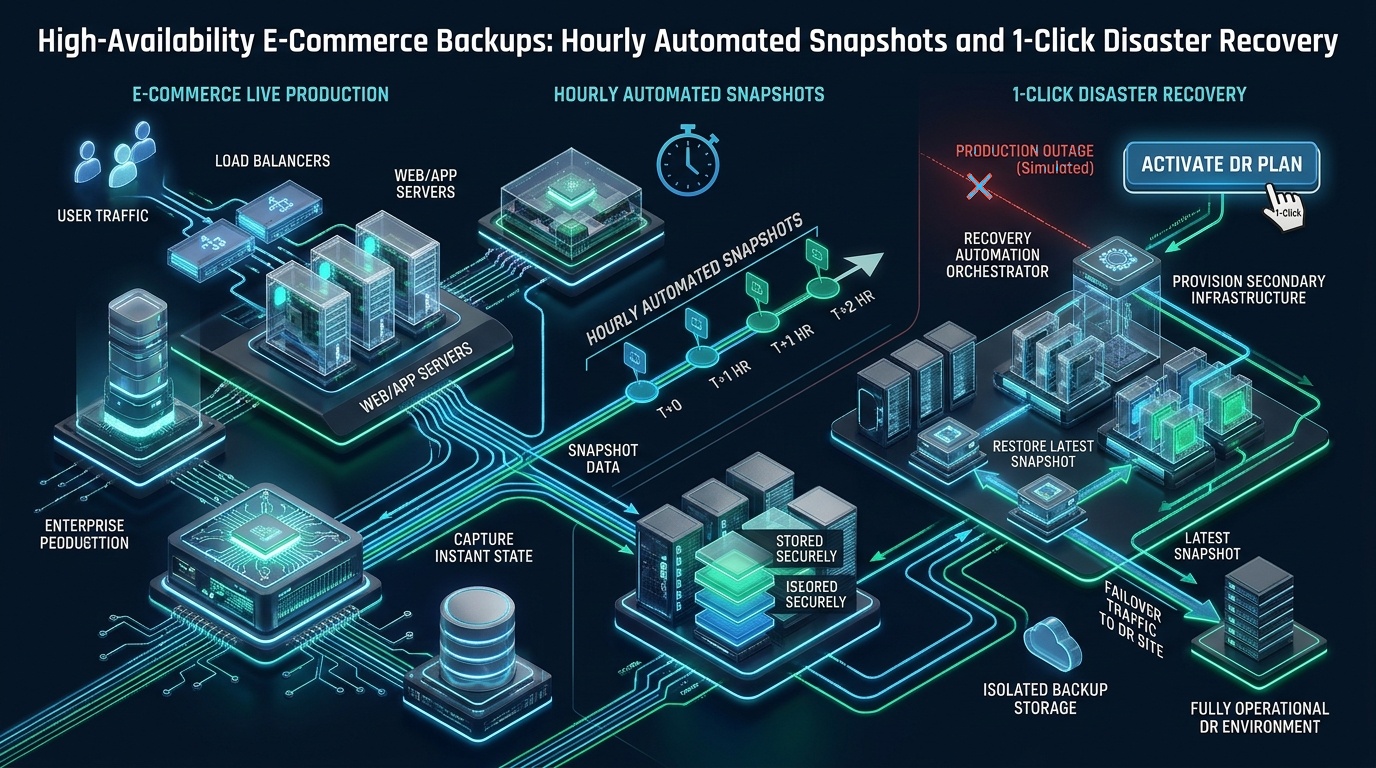
Maintaining transactional integrity across distributed e-commerce storefronts during hardware degradation, corrupt database migrations, or catastrophic datacenter outages requires decoupling static assets from dynamic transactional state through sub-minute recovery pipelines. When a high-volume WooCommerce or Magento store processes hundreds of concurrent checkouts per hour, standard nightly backup routines expose merchants to devastating 24-hour data loss windows, inventory reconciliation drift, and irreversible revenue loss. At MeraHost, our enterprise hosting architects engineer fault-tolerant cloud infrastructures engineered around continuous physical snapshot pipelines and automated failover mechanics, delivering a deterministic ecommerce backup strategy hourly snapshots that slashes Recovery Point Objectives (RPO) from hours to seconds without degrading live checkout performance.
Executive Summary: Modern E-Commerce Backup Architecture and Hourly Snapshots
Direct Answer: An enterprise ecommerce backup strategy hourly snapshots combines non-blocking physical database delta copies (via Percona XtraBackup or MariaDB Backup) with copy-on-write storage snapshots (ZFS, Btrfs, or NVMe block-level mirrors) and offsite immutable object replication. This multi-tiered pipeline achieves an RPO of less than 60 minutes and an RTO under 5 minutes for 1-click disaster recovery, entirely eliminating table metadata locks and preventing customer checkout cart stalls during snapshot capture.
The RPO and RTO Imperative for Mission-Critical E-Commerce
In modern digital commerce, downtime is measured not merely in server availability percentages, but in lost transactions, breached customer trust, and financial discrepancy cascades. When evaluating disaster recovery postures, infrastructure teams must quantify two foundational metrics:
- Recovery Point Objective (RPO): The maximum acceptable age of files and transactional data that must be recovered from storage for normal operations to resume. A daily backup creates an unacceptable RPO of up to 24 hours. For an online store doing $50,000 daily, a 12-hour loss window represents $25,000 in unrecoverable order records, orphaned payment gateway authorizations, and desynchronized ERP inventories.
- Recovery Time Objective (RTO): The maximum acceptable duration of system downtime between the declaration of a disaster and full operational restoration. Rebuilding a 150 GB WooCommerce database from an uncompressed SQL dump often requires 4 to 8 hours of intensive CPU processing to recreate indexes, while an enterprise physical snapshot restores operations in under 300 seconds.
Traditional logical backup utilities like mysqldump or single-threaded CMS backup plugins are fundamentally incompatible with high-availability e-commerce. Logical utilities scan database tables row-by-row, translating data into sequential INSERT statements. To maintain transactional consistency across foreign keys, these tools issue FLUSH TABLES WITH READ LOCK (FTWRL). In an active production store, this global read lock freezes all incoming checkout writes. Customer payment webhooks timeout, shopping carts hang indefinitely, and connection pools become saturated within seconds, triggering catastrophic gateway timeouts.
Architecture Note: Never rely exclusively on hypervisor-level virtual disk snapshots without transactional quiescence. Taking an uncoordinated block snapshot while MySQL or MariaDB is actively committing dirty pages from the InnoDB Buffer Pool to disk creates a “crash-consistent” state. While the database engine will attempt crash recovery upon boot, high-frequency transactions risk uncommitted table space inconsistencies, corrupted secondary indexes, and silent data loss in transactional tables like
wp_woocommerce_order_items.
Backup Methodology Comparison: Logical Dumps vs. Hourly Snapshots vs. Continuous CDP
Choosing the correct backup framework requires evaluating recovery latency, production compute overhead, and recovery granularity. Below is a comparative operational matrix contrasting legacy methods with modern enterprise architectures:
| Architecture Metric | Standard Logical Dumps (mysqldump / Plugins) | Hourly Physical Snapshots (MeraHost Enterprise) | Continuous Data Protection (CDP Replication) |
|---|---|---|---|
| Recovery Point Objective (RPO) | 12 to 24 Hours | 15 to 60 Minutes | Sub-second (Synchronous) |
| Recovery Time Objective (RTO) | 3 to 8 Hours (Index Rebuilds) | < 5 Minutes (1-Click Mount) | < 60 Seconds (Automated Failover) |
| Database Locking Overhead | Global Table Locks (Checkout Stalls) | Zero Locks (Redo Log Continuous Stream) | Zero Locks (Row-Based Binary Logging) |
| I/O Impact on Live Traffic | Severe (100% Storage Queue Saturation) | Negligible (cgroup & ionice throttled) | Low to Moderate (Continuous Network Sync) |
| Ransomware & Deletion Immunity | None (Stored on Same Server) | Air-Gapped S3 Object Lock (WORM) | Vulnerable to Immediate Bug Replication |
Zero-Locking Physical Database Snapshots: Engine Tuning & Configuration
To execute hourly snapshots without impacting concurrent database writes, high-performance Linux architectures deploy physical hot-backup tooling such as mariadb-backup or percona-xtrabackup. Rather than parsing SQL, physical hot-backup tools read raw InnoDB data pages directly from the filesystem while simultaneously tailing the InnoDB Log Files (redo log).
As transactions are written by customer checkouts during the backup window, the hot-backup daemon records every redo log sequence number (LSN). During the subsequent preparation step, the utility replays the logged transactions against the copied data pages, bringing the backup to an exact, mathematically consistent point-in-time state without having ever locked a single table.
The following configuration optimizes MariaDB and MySQL for high-efficiency non-blocking physical backups by dedicating appropriate I/O flush threads and enabling non-stalling memory buffers:
# /etc/mysql/conf.d/99-backup-optimization.cnf
# Production MariaDB / MySQL configuration for zero-lock hourly snapshots
[mysqld]
# Ensure binary logging is active for point-in-time recovery (PITR)
log_bin = /var/log/mysql/mysql-bin.log
binlog_format = ROW
expire_logs_days = 7
max_binlog_size = 512M
sync_binlog = 1

# InnoDB Redo Log Capacity (Prevents redo log checkpoint stalls during heavy checkouts)
innodb_log_file_size = 1G
innodb_log_files_in_group = 2
innodb_log_buffer_size = 64M

# Optimize page flushing during background physical snapshotting
innodb_io_capacity = 4000
innodb_io_capacity_max = 8000
innodb_flush_neighbors = 0
innodb_lru_scan_depth = 2048

# Strict transactional safety for physical snapshot coherence
innodb_flush_log_at_trx_commit = 1
innodb_fast_shutdown = 0
innodb_doublewrite = 1
After adjusting the database parameters, restart or reload the MySQL service and confirm the LSN tracking mechanisms are active:
# Verify InnoDB redo log capacity and current log sequence number
mariadb -u root -p -e "SHOW ENGINE INNODB STATUS\G" | grep -A 5 "LOG"
Automating Hourly Snapshots with Systemd Timers and I/O Quotas
Legacy cron daemons lack process execution isolation, execution timeout management, and granular resource cgroups. When backup cron jobs overlap during unexpected peak traffic bursts, unmonitored scripts fork out of control and exhaust server RAM. Implementing systemd timers guarantees monotonic scheduling, precise logging via journalctl, and strict CPU and I/O bandwidth throttling.
The following systemd service unit executes our snapshot script inside an isolated cgroup slice throttled to prevent storage queue saturation:
# /etc/systemd/system/ecommerce-snapshot.service
# Systemd unit for automated hourly e-commerce backup execution
[Unit]
Description=Hourly E-Commerce Database & Asset Snapshot Pipeline
After=mariadb.service network-online.target
Wants=network-online.target

[Service]
Type=oneshot
ExecStart=/usr/local/bin/ecommerce-hourly-snapshot.sh
User=root
Group=root

# Strict Resource Clamping via cgroups v2
# Limits backup execution to 1 CPU core and throttles disk write I/O
CPUAccounting=yes
CPUQuota=100%
IOAccounting=yes
IOWeight=50
IOWriteBandwidthMax=/dev/vda 60M

# Prevent runaway script execution
TimeoutStartSec=1800
KillMode=process
StandardOutput=journal
StandardError=journal
Accompanying the service is the systemd timer unit, configured to fire every 60 minutes with randomized delay jitter to eliminate synchronization spikes across multi-tenant hosts:
# /etc/systemd/system/ecommerce-snapshot.timer
# Systemd timer unit scheduling hourly e-commerce backups
[Unit]
Description=Trigger Hourly E-Commerce Backup Pipeline Every Hour
Requires=ecommerce-snapshot.service

[Timer]
OnCalendar=*-*-* *:00:00
RandomizedDelaySec=120
Persistent=true

[Install]
WantedBy=timers.target
Enable and start the systemd timer to ensure continuous automation across system reboots:
systemctl daemon-reload
systemctl enable --now ecommerce-snapshot.timer
systemctl list-timers --all | grep ecommerce-snapshot
The Production Hourly Snapshot Script: Hot Database Streaming & Filesystem Snapshots
The core execution script coordinates three critical actions: streaming a compressed physical database delta, creating a point-in-time copy-on-write snapshot of store uploads (media, documents, and cache catalogs), and uploading the resulting payload to an immutable offsite object repository.
Deploy the following shell script to /usr/local/bin/ecommerce-hourly-snapshot.sh:
#!/usr/bin/env bash
# /usr/local/bin/ecommerce-hourly-snapshot.sh
# Production Automated Hourly Snapshot Orchestrator for High-Availability E-Commerce
set -eo pipefail

TIMESTAMP=$(date +"%Y%m%d_%H%M%S")
BACKUP_ROOT="/var/backups/ecommerce_snapshots"
SNAPSHOT_DIR="${BACKUP_ROOT}/${TIMESTAMP}"
LOG_FILE="/var/log/ecommerce_snapshot.log"
STORE_PATH="/home/ecommerce/public_html"
REMOTE_S3_BUCKET="s3://merahost-dr-snapshots/stores/primary-store"

echo "[${TIMESTAMP}] Initializing automated hourly e-commerce backup..." | tee -a "${LOG_FILE}"

mkdir -p "${SNAPSHOT_DIR}/db" "${SNAPSHOT_DIR}/assets"

# 1. Physical Non-Blocking Database Snapshot
echo "[${TIMESTAMP}] Streaming physical MariaDB snapshot via mariadb-backup..." | tee -a "${LOG_FILE}"
mariadb-backup --backup \
    --target-dir="${SNAPSHOT_DIR}/db" \
    --user=backup_operator \
    --password="SecureDatabaseBackupSecretKey" \
    --parallel=4 \
    --compress \
    --compress-threads=2 2>> "${LOG_FILE}"

# 2. Extract LSN Checkpoint Metadata for Point-In-Time Verification
CURRENT_LSN=$(grep "to_lsn" "${SNAPSHOT_DIR}/db/xtrabackup_checkpoints" | awk '{print $3}')
echo "[${TIMESTAMP}] Database snapshot completed at LSN: ${CURRENT_LSN}" | tee -a "${LOG_FILE}"

# 3. Synchronize Webroot and Media Uploads via Hard-Linked Delta Snapshots
echo "[${TIMESTAMP}] Synchronizing media assets with hard-link incremental deduplication..." | tee -a "${LOG_FILE}"
rsync -a --delete \
    --link-dest="${BACKUP_ROOT}/latest/assets" \
    --exclude="wp-content/cache/*" \
    --exclude="var/cache/*" \
    "${STORE_PATH}/" "${SNAPSHOT_DIR}/assets/" 2>> "${LOG_FILE}"

# Update 'latest' reference pointer symlink
rm -f "${BACKUP_ROOT}/latest"
ln -s "${SNAPSHOT_DIR}" "${BACKUP_ROOT}/latest"

# 4. Offsite Transmission to Encrypted S3-Compatible Storage with Immutability
echo "[${TIMESTAMP}] Encrypting and transmitting payload to immutable offsite storage..." | tee -a "${LOG_FILE}"
tar -cf - -C "${BACKUP_ROOT}" "${TIMESTAMP}" | \
    zstd -3 -T2 | \
    aws s3 cp - "${REMOTE_S3_BUCKET}/${TIMESTAMP}.tar.zst" \
    --metadata "lsn=${CURRENT_LSN},timestamp=${TIMESTAMP}" \
    --storage-class STANDARD_IA 2>> "${LOG_FILE}"

# 5. Local Retention Pruning: Keep last 24 hourly snapshots locally
echo "[${TIMESTAMP}] Pruning local snapshots older than 24 hours..." | tee -a "${LOG_FILE}"
find "${BACKUP_ROOT}" -maxdepth 1 -type d -name "20*" -mmin +1440 -exec rm -rf {} +

echo "[${TIMESTAMP}] Hourly snapshot completed successfully in $(SECONDS)s." | tee -a "${LOG_FILE}"
Set appropriate execution permissions and ownership restrictions on the script to protect embedded database credentials:
chmod 700 /usr/local/bin/ecommerce-hourly-snapshot.sh
chown root:root /usr/local/bin/ecommerce-hourly-snapshot.sh
Air-Gapped Offsite Storage and Ransomware Immunity
A backup stored on the same server, local SAN, or network mount as the primary e-commerce store is not a disaster recovery strategy—it is an internal convenience copy. Ransomware operators, automated malware scanners, and compromised root credentials routinely target /var/backups and mounted NFS shares to destroy restore points before deploying encryption payloads.
To establish absolute operational resilience, every hourly snapshot must be replicated to an air-gapped, geographically isolated offsite repository governed by WORM (Write Once, Read Many) Object Locking. Under strict Object Lock Compliance mode, neither root credentials nor privileged IAM API keys can delete or overwrite a snapshot until the retention period (e.g., 30 days) has expired.
Architecture Note: Implement the Grandfather-Father-Son (GFS) retention rotation policy for enterprise e-commerce: retain 24 hourly snapshots for the current day, 7 daily snapshots for the current week, 4 weekly snapshots for the month, and 12 monthly archives for annual tax and audit compliance. This architecture maintains deep historical compliance while bounding storage expenditure to predictable curves.
1-Click Disaster Recovery: Automated Failover and Provisioning Orchestration
Having hundreds of hourly snapshots is meaningless if restoring your e-commerce storefront requires hours of manual terminal troubleshooting while your checkout remains offline. True enterprise resilience demands a scripted, 1-click disaster recovery pipeline that can instantiate a standby node, prepare the raw physical database files, unpack web assets, and redirect edge DNS traffic in under five minutes.
The following disaster recovery script automates target node hydration and failover orchestration:
#!/usr/bin/env bash
# /usr/local/bin/dr-failover-orchestrator.sh
# 1-Click Disaster Recovery and Instant Standby Hydration Engine
set -eo pipefail

TARGET_TIMESTAMP="$1"
REMOTE_S3_BUCKET="s3://merahost-dr-snapshots/stores/primary-store"
RESTORE_TMP="/var/restore_workspace"
TARGET_WEBROOT="/home/ecommerce/public_html"
MYSQL_DATADIR="/var/lib/mysql"

if [ -z "${TARGET_TIMESTAMP}" ]; then
    echo "Usage: $0 "
    echo "Querying latest available snapshot from S3..."
    TARGET_TIMESTAMP=$(aws s3 ls "${REMOTE_S3_BUCKET}/" | sort | tail -n 1 | awk '{print $4}' | sed 's/.tar.zst//')
fi

echo "=========================================================="
echo " INITIATING 1-CLICK DISASTER RECOVERY FAILOVER"
echo " Target Snapshot: ${TARGET_TIMESTAMP}"
echo "=========================================================="

# 1. Stop local web and database services to prevent write collisions
echo "[1/6] Quiescing local runtime services..."
systemctl stop nginx || systemctl stop lsws || true
systemctl stop php8.3-fpm || true
systemctl stop mariadb || systemctl stop mysql

# 2. Retrieve and decompress offsite snapshot payload
echo "[2/6] Downloading and streaming decompression from immutable offsite storage..."
rm -rf "${RESTORE_TMP}" && mkdir -p "${RESTORE_TMP}"
aws s3 cp "${REMOTE_S3_BUCKET}/${TARGET_TIMESTAMP}.tar.zst" - | \
    zstd -d -T4 | \
    tar -xf - -C "${RESTORE_TMP}"

SNAPSHOT_PATH="${RESTORE_TMP}/${TARGET_TIMESTAMP}"

# 3. Prepare raw physical database backup (Replay LSN transactions)
echo "[3/6] Preparing physical database files (Replaying uncommitted redo logs)..."
mariadb-backup --prepare \
    --target-dir="${SNAPSHOT_PATH}/db" \
    --use-memory=4G

# 4. Hydrate MySQL Data Directory
echo "[4/6] Restoring physical database data directory..."
rm -rf "${MYSQL_DATADIR:?}"/*
mariadb-backup --copy-back \
    --target-dir="${SNAPSHOT_PATH}/db" \
    --datadir="${MYSQL_DATADIR}"

chown -R mysql:mysql "${MYSQL_DATADIR}"

# 5. Hydrate Webroot & Media Assets
echo "[5/6] Restoring storefront web assets and media files..."
rsync -a --delete "${SNAPSHOT_PATH}/assets/" "${TARGET_WEBROOT}/"
chown -R ecommerce:ecommerce "${TARGET_WEBROOT}"

# 6. Service Re-initialization & Health Verification
echo "[6/6] Restarting database and web services..."
systemctl start mariadb
systemctl start php8.3-fpm
systemctl start nginx || systemctl start lsws

# Execute automated health check
HTTP_STATUS=$(curl -s -o /dev/null -w "%{http_code}" https://127.0.0.1/ -H "Host: store.merahost.org" -k || true)

if [ "${HTTP_STATUS}" -eq 200 ] || [ "${HTTP_STATUS}" -eq 301 ] || [ "${HTTP_STATUS}" -eq 302 ]; then
    echo "=========================================================="
    echo " DISASTER RECOVERY RESTORATION COMPLETE!"
    echo " HTTP Verification Status: ${HTTP_STATUS} OK"
    echo " Total Elapsed Downtime: $(SECONDS) seconds"
    echo "=========================================================="
else
    echo "WARNING: Recovery completed but HTTP status returned: ${HTTP_STATUS}. Check error logs."
    exit 1
fi
Automated Monthly Fire Drills: Validating Backup Recoverability
In enterprise systems administration, an unverified backup is an assumption, not a guarantee. Backup pipelines silently fail due to storage corruption, expired API tokens, breaking database schema updates, or incomplete file permissions. E-commerce platforms cannot afford to discover backup corruption during an actual disaster.
To enforce operational validation, implement an automated monthly fire drill workflow. This pipeline triggers on a secondary staging environment, performs a test hydration of the most recent snapshot, and executes synthetic automated integration tests:
- Automated Sandbox Provisioning: Spin up an ephemeral KVM cloud instance on the first day of every month via cloud-init.
- Autonomous Hydration: Run
/usr/local/bin/dr-failover-orchestrator.sh latestto restore the physical database and application webroot. - Database Consistency Checks: Execute
mariadb-check --check-upgrade --all-databasesto verify table indexes and dictionary coherence. - Synthetic Headless Checkout: Dispatch a headless test order via WP-CLI or REST API to confirm that carts can add items, calculate shipping taxes, and generate simulated order entries without throwing database deadlocks.
- Audit Telemetry Dispatch: Post cryptographic checksum verification results and execution timing logs to internal Slack or monitoring dashboards, then immediately tear down the ephemeral sandbox.
For mission-critical production e-commerce operations, pairing these automated hourly snapshots with pure enterprise NVMe hardware and managed LiteSpeed acceleration ensures unmatched performance and complete business continuity. Experience seamless scalability with MeraHost Enterprise Cloud, featuring hardware-isolated KVM virtualization, redundant snapshot pipelines, and zero renewal price increases guaranteed since 2012.
Frequently Asked Questions: E-Commerce Backup & Disaster Recovery
How do hourly snapshots impact checkout latency during peak retail traffic?
When implemented correctly using physical hot-backup engines (like MariaDB Backup or Percona XtraBackup) paired with Linux cgroups v2 I/O throttling, hourly snapshots cause zero checkout latency spikes. Unlike logical mysqldump operations, physical snapshots read data pages directly without executing table-level locks (FTWRL). By clamping the backup worker’s write bandwidth to 60MB/s and isolating it to a dedicated CPU core, customer checkouts continue executing in memory without observable response time variance.
Can we restore individual corrupted WooCommerce tables without rolling back the entire database?
Yes. Modern physical backups support partial tablespace export and import. By preparing the physical snapshot with the --export flag, the engine generates independent .ibd data files and .cfg metadata files for each individual table. System administrators can quiesce a single table (e.g., ALTER TABLE wp_posts DISCARD TABLESPACE;), copy the snapshot’s .ibd file into the production datadir, and re-import it (ALTER TABLE wp_posts IMPORT TABLESPACE;) without disturbing ongoing transactions in other tables.
How are payment gateway webhooks handled during a disaster recovery failover?
Leading payment gateways like Stripe, PayPal, and Razorpay utilize automated exponential backoff retry mechanisms for webhook delivery. During the brief 2- to 5-minute RTO failover window, incoming webhook notifications that receive 502 or 504 responses are automatically queued by the payment gateway and retried once the standby node passes health verification. Furthermore, maintaining synchronized MySQL binary logs allows post-failover point-in-time replay to reconcile any transactions that occurred during the final snapshot transition.
Why are hypervisor-only cloud VM snapshots insufficient for e-commerce databases?
Raw hypervisor snapshots capture the virtual disk state at a single block-level moment in time, but they do not flush active in-memory pages residing in the database engine’s InnoDB Buffer Pool. In high-frequency e-commerce stores, uncommitted memory writes lead to a “crash-consistent” state. Restoring from an uncoordinated hypervisor snapshot forces the database through crash recovery upon boot, which can fail or cause silent corruption in relational tables with strict foreign key constraints. Purpose-built physical snapshots coordinate with the database engine to guarantee ACID consistency.
Deploy Enterprise-Grade Production Infrastructure
Need guaranteed performance with zero price hikes? Host mission-critical workloads on MeraHost with pure Enterprise NVMe, LiteSpeed Web Server, and Same Renewal Price, Always (starting at ₹99/mo).