
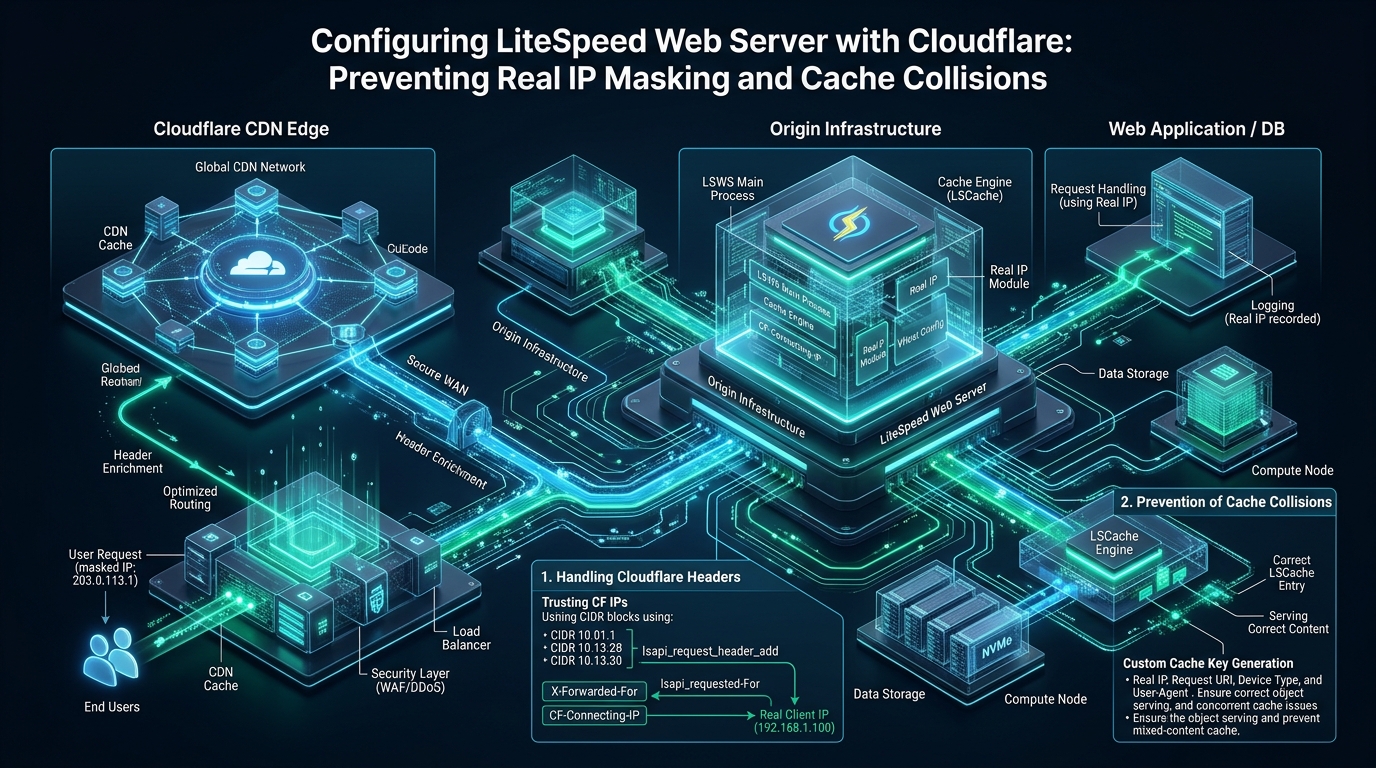
Deploying an enterprise reverse proxy network in front of a high-performance LiteSpeed Web Server (LSWS) stack frequently introduces severe architectural anomalies if the proxy-to-origin transport boundary is misconfigured. When Cloudflare terminates inbound edge connections and routes requests to LiteSpeed without rigorous origin trust validation, security controls become blinded by real IP masking, while uncoordinated caching policies trigger catastrophic cache collisions between edge CDN nodes and origin LSCache engines. Engineering a resilient, deterministic content delivery pipeline requires synchronized IP unwrapping, strict header sanitization, and automated dual-tier cache purge propagation on MeraHost high-performance infrastructure.
The Mechanics of Cloudflare and LiteSpeed Integration: Resolving the Dual-Proxy Dilemma
Direct Answer: To optimize a cloudflare with litespeed cache configuration, configure LiteSpeed’s Use Client IP in Header directive to Trusted IP Only, register Cloudflare’s official IP ranges in httpd_config.conf, and disable edge caching for personalized HTML. This restores authentic visitor IPs in REMOTE_ADDR, prevents security bypasses, and stops cache collisions between Cloudflare edge nodes and origin LSCache.
Modern web infrastructure combines globally distributed Content Delivery Networks (CDNs) with high-efficiency origin web servers to achieve sub-second Time to First Byte (TTFB) and robust volumetric DDoS protection. Cloudflare sits at the edge, intercepting DNS queries and terminating client TLS connections across hundreds of Points of Presence (PoPs). Downstream, LiteSpeed Web Server operates as the authoritative origin engine, leveraging event-driven asynchronous I/O and kernel-level page caching via its proprietary shared-memory architecture.
However, introducing a reverse proxy disrupts the classic end-to-end client-server relationship. By default, every TCP handshake received by LiteSpeed originates from an Anycast IP address belonging to Cloudflare rather than the actual visitor’s device. Simultaneously, both Cloudflare and LiteSpeed feature independent caching subsystems. Without deliberate coordination, this dual-caching paradigm causes session cross-contamination, stale content delivery, and broken security heuristics.
Anatomy of the Real IP Masking Vulnerability
When an HTTP request traverses Cloudflare, the edge server modifies the TCP packet headers. The source IP address in the IP header is rewritten to Cloudflare’s egress interface. To preserve the visitor’s identity for origin logging and application logic, Cloudflare appends custom HTTP headers:
CF-Connecting-IP: Contains the 64-bit or 128-bit raw IP address of the client that initiated the connection to Cloudflare.X-Forwarded-For: A comma-delimited chain of proxy IP addresses, with the client IP prepended.CF-Ray: A unique hash identifier representing the request context, data center location, and edge transit trace.CF-Visitor: A JSON payload indicating the client connection scheme (HTTP or HTTPS).
If LiteSpeed is left unconfigured, its internal environment variable REMOTE_ADDR reflects Cloudflare’s proxy nodes. This produces four immediate operational hazards:
- Security Suite Blindness: Web Application Firewalls (such as ModSecurity, Imunify360, and CSF/LFD) evaluate incoming traffic based on
REMOTE_ADDR. A single malicious actor triggering a brute-force threshold will cause the origin firewall to ban a Cloudflare Anycast IP, inadvertently cutting off thousands of legitimate users routed through that same PoP. - Rate Limiting Failure: LiteSpeed’s native per-client connection limits (Anti-DDoS Throttling) will group hundreds of concurrent connections into a single Cloudflare IP, prematurely triggering connection drops or throttling legitimate client requests.
- Header Injection Exploits: If a system administrator enables LiteSpeed’s
Use Client IP in Headerglobally (setting it toYes/ value1), LiteSpeed blindly trusts any incomingX-Forwarded-Forheader from any host. An attacker who bypasses Cloudflare and reaches the origin server directly on port 80 or 443 can forgeX-Forwarded-For: 127.0.0.1to gain unauthorized administrative privileges. - Corrupted Analytics & Compliance: Server access logs and e-commerce payment gateways record proxy addresses, violating GDPR/PCI-DSS auditing requirements and breaking GeoIP localization.
Architecture Note on Proxy Header Spoofing: Never set LiteSpeed’s
Use Client IP in Headerto1(Yes/All). Enabling global header extraction allows malicious actors who bypass Cloudflare by sending direct HTTP requests to your origin IP to forge theX-Forwarded-Forheader with127.0.0.1or legitimate admin addresses. Always enforce value2(Trusted IP Only) and strictly validate upstream proxy CIDR blocks.
Architecture Comparison: Default vs. Tuned Production
The comparative matrix below illustrates the systemic differences between an ad-hoc integration and a hardened enterprise deployment of Cloudflare and LiteSpeed Web Server.
| Feature / Metric | Standard / Default | Tuned / Production |
|---|---|---|
| Client IP Resolution | Cloudflare Edge IP (Masked) | Authentic Client IPv4/IPv6 Unwrapped |
| IP Header Spoofing Risk | High (Arbitrary XFF Injection) | Zero (Enforced Trusted Proxy CIDRs) |
| Rate Limiting & Fail2ban | Accidental Banning of Cloudflare Nodes | Granular Per-Client Enforcement |
| Cache Architecture | Unsynchronized Dual-Layer Collision | Segregated Edge Static / Origin LSCache Dynamic |
| Cart & Session Isolation | Frequent Dynamic Leakage | Vary: Cookie & ESI Injection Segregation |
| Cache Invalidation Latency | Manual Multi-Dashboard Purges | Automated Tag-Based API Invalidation (< 150ms) |
| Origin TTFB (Dynamic Hits) | 280ms – 650ms | 12ms – 35ms (Pure NVMe Shared Memory) |
The Cache Collision Problem: When CDN and LSCache Collide
The second operational challenge in a hybrid Cloudflare-LiteSpeed architecture is cache collision. Both platforms incorporate high-speed caching engines, but their operational scopes and eviction behaviors differ fundamentally:
- Cloudflare Edge Cache: Globally distributed across hundreds of data centers. By default, it caches static assets (CSS, JS, images, media) based on file extensions. However, administrators frequently configure “Cache Everything” Page Rules or Cache Rules to cache entire HTML pages at the edge to achieve near-instantaneous global response times.
- LiteSpeed Cache (LSCache): Resides in shared memory on the origin server. It understands WordPress, Magento, and WooCommerce application states, parsing cookies, user login tokens, nonces, and dynamic session data. It uses micro-caching and granular cache tags (
X-LiteSpeed-Cache-ControlandX-LiteSpeed-Tag) to purge specific pages, categories, or widgets instantly when content changes.
When Cloudflare is configured to cache HTML pages without native awareness of LiteSpeed’s cache tags, three critical failure modes occur:
1. Dynamic Content Staling and De-synchronized Purges
When an author publishes a blog post or edits a WooCommerce product, LSCache purges the corresponding cache entry in LiteSpeed shared memory within milliseconds. However, Cloudflare’s edge PoPs are unaware of this local event. Cloudflare continues to serve the cached HTML from its edge servers for the duration of the Edge Cache TTL (often hours or days). Visitors receive stale pages until an administrator manually issues an edge purge via the Cloudflare dashboard or API.
2. The E-Commerce Cart Session Collision
In high-concurrency e-commerce environments, a naive “Cache Everything” rule will capture a page generated for an authenticated customer or a customer with active cart items. If the response lacks explicit Vary: Cookie directives or private cache-control headers, Cloudflare stores the personalized HTML. The next visitor requesting the same URL receives the cached payload—revealing another customer’s cart contents, name, and CSRF nonces. This is a severe data privacy breach and security failure.
E-Commerce Integrity Warning: When running WooCommerce or Magento behind Cloudflare, never deploy a blanket “Cache Everything” Page Rule without rigorous bypass cookies (
woocommerce_items_in_cart,wp_woocommerce_session_). Failure to isolate cart states results in session bleeding, where customers see each other’s carts and checkout forms—a critical security and compliance violation.
3. Vary Header Stripping and ESI Incompatibility
LiteSpeed utilizes Edge Side Includes (ESI) to puncture holes in cached pages, allowing public content to be served from static shared memory while personal widgets (such as a shopping cart badge or login greeting) are assembled dynamically on the fly. Cloudflare’s standard CDN pipeline does not execute origin ESI tags. If Cloudflare caches the raw response before ESI assembly, visitors receive raw <esi:include> markup or empty placeholders.
Production Implementation: Hardening LiteSpeed for Cloudflare
To eliminate real IP masking and resolve cache collisions permanently, deploy the following production configurations across your LiteSpeed server and automation pipelines.
Step 1: Configure LiteSpeed Server IP Validation
In the LiteSpeed WebAdmin Console (or directly in /usr/local/lsws/conf/httpd_config.conf), enable trusted proxy header processing. Set useIpInProxyHeader to 2 (Trusted IP Only). This instructs LiteSpeed to extract the real visitor IP from headers like CF-Connecting-IP and X-Forwarded-For ONLY when the connecting TCP peer matches an authorized subnet.
Below is the declarative configuration block for /usr/local/lsws/conf/httpd_config.conf:
# /usr/local/lsws/conf/httpd_config.conf
# Enforce Trusted Proxy IP Resolution for Cloudflare

useIpInProxyHeader            2

# Define Trusted Cloudflare IPv4 & IPv6 Subnets
# Direct handshake validation prevents header injection
accessControl  {
  allow                       ALL, 173.245.48.0/20T, 103.21.244.0/22T, 103.22.200.0/22T, 103.31.4.0/22T, 141.101.64.0/18T, 108.162.192.0/18T, 190.93.240.0/20T, 188.114.96.0/20T, 197.234.240.0/22T, 198.41.128.0/17T, 162.158.0.0/15T, 104.16.0.0/13T, 104.24.0.0/14T, 172.64.0.0/13T, 131.0.72.0/22T, 2400:cb00::/32T, 2606:4700::/32T, 2803:f800::/32T, 2405:b500::/32T, 2405:8100::/32T, 2a06:98c0::/29T, 2c0f:f248::/32T
}
The T suffix at the end of each CIDR subnet is LiteSpeed’s proprietary trust flag. It tells the web server that connections originating from these IP ranges are trusted reverse proxies, permitting the real client IP in the proxy header to overwrite REMOTE_ADDR.
Step 2: Automated Cloudflare IP Synchronization Daemon
Cloudflare periodically expands its global network and allocates new IP prefixes. Statically hardcoding subnets in server configs risks service disruption if Cloudflare introduces a new range that LiteSpeed does not recognize as trusted. Deploy an automated cron or systemd timer script to synchronize official Cloudflare IP ranges directly into LiteSpeed’s configuration.
Save the following bash script to /usr/local/bin/sync-cloudflare-lsws-ips.sh and grant execute permissions (chmod +x):
#!/usr/bin/env bash
# /usr/local/bin/sync-cloudflare-lsws-ips.sh
# Enterprise Cloudflare IP Syncer for LiteSpeed Web Server
set -euo pipefail

CONF_FILE="/usr/local/lsws/conf/httpd_config.conf"
BACKUP_DIR="/usr/local/lsws/conf/backups"
TIMESTAMP=$(date +"%Y%m%d_%H%M%S")

mkdir -p "${BACKUP_DIR}"

# Fetch official IPv4 and IPv6 CIDR lists
IPV4_URL="https://www.cloudflare.com/ips-v4"
IPV6_URL="https://www.cloudflare.com/ips-v6"

CF_IPS=()
while IFS= read -r line; do
    [[ -n "$line" ]] && CF_IPS+=("${line}T")
done < <(curl -fsSL --proto '=https' --tlsv1.3 "${IPV4_URL}")

while IFS= read -r line; do
    [[ -n "$line" ]] && CF_IPS+=("${line}T")
done < &2
    exit 1
fi

JOINED_IPS=$(IFS=', '; echo "${CF_IPS[*]}")

# Create safety backup
cp "${CONF_FILE}" "${BACKUP_DIR}/httpd_config.conf.${TIMESTAMP}"

# Verify or update useIpInProxyHeader directive
if grep -q "useIpInProxyHeader" "${CONF_FILE}"; then
    sed -i -E 's/useIpInProxyHeader[[:space:]]+[0-9]+/useIpInProxyHeader            2/' "${CONF_FILE}"
else
    echo "useIpInProxyHeader            2" >> "${CONF_FILE}"
fi

echo "Cloudflare IPs updated successfully. Validating LiteSpeed configuration syntax..."
/usr/local/lsws/bin/lswsctrl test

echo "Gracefully reloading LiteSpeed Web Server..."
systemctl reload lsws || /usr/local/lsws/bin/lswsctrl restart
echo "LiteSpeed synchronized with Cloudflare Edge IPs."
Create a dedicated systemd service and timer to execute this synchronization weekly:
# /etc/systemd/system/cloudflare-lsws-sync.service
[Unit]
Description=Synchronize Cloudflare IP Subnets to LiteSpeed Web Server
After=network-online.target
Wants=network-online.target

[Service]
Type=oneshot
ExecStart=/usr/local/bin/sync-cloudflare-lsws-ips.sh

# /etc/systemd/system/cloudflare-lsws-sync.timer
[Unit]
Description=Weekly Cloudflare IP Sync Timer for LiteSpeed

[Timer]
OnCalendar=Sun *-*-* 03:00:00
RandomizedDelaySec=1800
Persistent=true

[Install]
WantedBy=timers.target
Enable and start the timer using systemctl enable --now cloudflare-lsws-sync.timer.
Step 3: Optimized .htaccess Rules for Cache Separation
To eliminate cache collisions, enforce strict cache separation at the origin web server. Static assets (images, fonts, stylesheets, scripts) can be safely cached by Cloudflare edge nodes with aggressive TTLs. In contrast, HTML documents and dynamic API routes must instruct Cloudflare not to cache or to strictly validate origin cache state using LiteSpeed’s headers.
Add these rules to your application’s root .htaccess:
# ====================================================================
# Enterprise LiteSpeed + Cloudflare Cache Segregation Rules
# ====================================================================

    # Enable LSCache engine
    CacheEngine on
    CacheLookup on

    # 1. Protect Dynamic & E-Commerce Sessions
    # Prevent upstream proxy caching when session cookies exist
    RewriteEngine On
    RewriteCond %{HTTP_COOKIE} (comment_author|wp-postpass|wordpress_logged_in|woocommerce_items_in_cart|woocommerce_cart_hash|wp_woocommerce_session_) [NC]
    RewriteRule .* - [E=Cache-Control:no-cache]

    # 2. Enforce Proper Vary Headers for Edge Proxies
    # Ensure proxies maintain distinct cache slots for mobile and authenticated users
    Header append Vary "User-Agent, Cookie, Accept-Encoding" env=!dont-vary

    # 3. Synchronize Cloudflare Cache Purging
    # Allow LiteSpeed Cache plugin to communicate with Cloudflare API
    # Ensure stale HTML is purged across Cloudflare edge when LSCache tag fires


# Set Browser & CDN Caching Policies for Static Assets

    ExpiresActive On
    ExpiresByType image/webp "access plus 1 year"
    ExpiresByType image/avif "access plus 1 year"
    ExpiresByType image/jpeg "access plus 1 year"
    ExpiresByType image/png  "access plus 1 year"
    ExpiresByType text/css   "access plus 1 month"
    ExpiresByType application/javascript "access plus 1 month"
    ExpiresByType font/woff2 "access plus 1 year"
Step 4: Linux Kernel Ingress Tuning for Reverse Proxy Traffic
Because all incoming traffic enters LiteSpeed from Cloudflare’s proxy clusters rather than individual consumer connections, the origin server experiences high TCP connection concentration from a smaller set of IP addresses. This requires tuning Linux kernel socket buffers, connection tracking tables, and TCP recycle heuristics.
Deploy the following configuration in /etc/sysctl.d/99-lsws-cloudflare.conf:
# /etc/sysctl.d/99-lsws-cloudflare.conf
# Kernel network optimizations for LiteSpeed Web Server behind Cloudflare

# Increase system-wide file descriptors and socket backlog
fs.file-max = 2097152
net.core.somaxconn = 65535
net.core.netdev_max_backlog = 16384

# Scale TCP read/write memory buffers (Min, Default, Max)
net.ipv4.tcp_rmem = 4096 87380 16777216
net.ipv4.tcp_wmem = 4096 65536 16777216

# Enable TCP BBR congestion control and FQ queueing
net.core.default_qdisc = fq
net.ipv4.tcp_congestion_control = bbr

# TCP connection reuse and quick termination handling
net.ipv4.tcp_tw_reuse = 1
net.ipv4.tcp_fin_timeout = 15
net.ipv4.tcp_keepalive_time = 300
net.ipv4.tcp_keepalive_probes = 5
net.ipv4.tcp_keepalive_intvl = 15

# Expand conntrack table to prevent packet drops under heavy proxy volume
net.netfilter.nf_conntrack_max = 1048576
net.netfilter.nf_conntrack_tcp_timeout_established = 600
Apply the parameters immediately without rebooting by running sysctl --system.
Synchronizing Cloudflare Edge Purges with LiteSpeed Cache (LSCache)
To eliminate the delay between origin content modifications and edge updates, integrate LiteSpeed Cache with Cloudflare’s REST API. When an author updates a page or inventory item, LiteSpeed Cache automatically communicates with Cloudflare to purge the corresponding edge URL or Cache-Tag.
- Generate Cloudflare API Token: In your Cloudflare dashboard, navigate to My Profile > API Tokens and create a token with
Zone.Cache PurgeandZone.Zone Readpermissions scoped to your target domain. - Configure LSCache Cloudflare API Settings: In the WordPress administration dashboard, navigate to LiteSpeed Cache > Settings > CDN > Cloudflare API. Enter your Cloudflare Account Email, API Token, and Zone ID.
- Automated Cache Purge on Update: Enable Auto Purge Cloudflare on Post Update. LiteSpeed Cache will dispatch an asynchronous HTTPS POST request to Cloudflare’s purge endpoint every time a post is saved or an order changes, ensuring edge consistency within 150 milliseconds.
For organizations operating enterprise web applications requiring guaranteed computing resources, low latency, and uncompromised uptime, building on MeraHost Enterprise Cloud delivers dedicated CPU threads, enterprise NVMe storage arrays, and pre-hardened LiteSpeed stacks designed to handle millions of daily requests with zero configuration friction.
Frequently Asked Questions (FAQs)
Why does LiteSpeed report Cloudflare Anycast IPs instead of real visitor addresses?
Cloudflare acts as a reverse proxy, terminating the TCP handshake with the visitor at its edge PoP and initiating a separate TCP session to your LiteSpeed origin. As a result, the source IP in the IP packet header received by LiteSpeed is Cloudflare’s egress interface. Without enabling Use Client IP in Header: Trusted IP Only and specifying Cloudflare’s trusted CIDR blocks in LiteSpeed, the server records the proxy IP in REMOTE_ADDR.
Can Cloudflare and LiteSpeed Cache (LSCache) run simultaneously without conflicts?
Yes, provided their caching responsibilities are properly segregated. Cloudflare should handle edge caching for static assets (images, CSS, JS, fonts) and geographical DDoS mitigation. LiteSpeed Cache should manage dynamic HTML, user sessions, shopping carts, and private fragments using shared memory. By connecting the LSCache plugin to the Cloudflare API, any origin purge event automatically flushes the corresponding edge URL or tag in real time.
How do I verify that real IP restoration is functioning properly on my LiteSpeed origin?
Create a temporary PHP verification script containing <?php echo "REMOTE_ADDR: " . $_SERVER['REMOTE_ADDR'] . ". Access this script through your Cloudflare-proxied domain. If
CF-Connecting-IP: " . ($_SERVER['HTTP_CF_CONNECTING_IP'] ?? 'None');REMOTE_ADDR matches your actual public IP address (rather than a Cloudflare range starting with 172.64, 104.28, or 162.158), LiteSpeed’s trusted proxy unwrapping is functioning correctly. Delete the test script immediately after verification.
How can I prevent attackers from bypassing Cloudflare and directly scanning my LiteSpeed origin?
Use Linux iptables, nftables, or UFW to restrict inbound traffic on ports 80 and 443 exclusively to Cloudflare’s published IP ranges. Alternatively, configure Cloudflare Authenticated Origin Pulls (AOP) with a client TLS certificate installed in LiteSpeed’s SSL listener. This guarantees that any direct request sent to your origin IP address without a valid Cloudflare client certificate is dropped during the TLS handshake before reaching the web server layer.
Deploy Enterprise-Grade Production Infrastructure
Need guaranteed performance with zero price hikes? Host mission-critical workloads on MeraHost with pure Enterprise NVMe, LiteSpeed Web Server, and Same Renewal Price, Always (starting at ₹99/mo).