
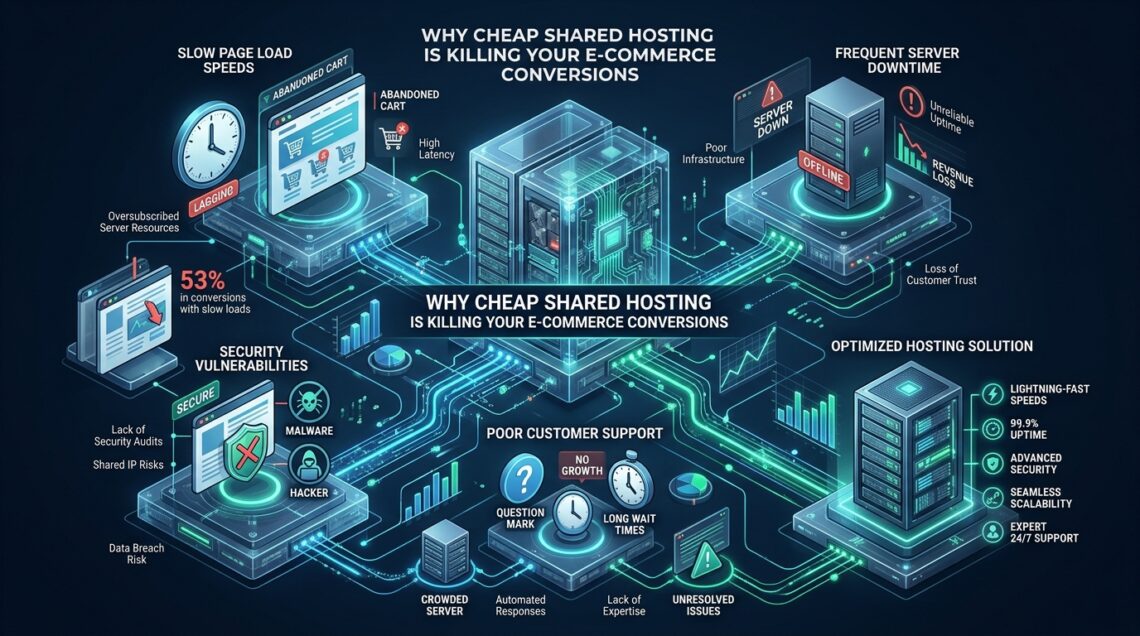
Enterprise e-commerce platforms like WooCommerce and Magento demand dedicated CPU thread allocation, predictable disk I/O, and sub-millisecond database lock releases to process dynamic cart transactions without degraded throughput. When growing digital merchants deploy revenue-critical storefronts on budget shared hosting environments, kernel-level resource constraints inevitably choke synchronous PHP worker threads and trigger cascading checkout cart abandonment. Migrating mission-critical storefronts to high-throughput platforms like MeraHost eliminates these artificial multi-tenant bottlenecks through isolated NVMe storage tiers, optimized web server stacks, and dedicated execution boundaries.
Why Cheap Shared Hosting Cripples E-Commerce Growth
Direct Answer: Cheap shared hosting damages e-commerce conversion rates by enforcing aggressive CPU time-slicing (CloudLinux LVE throttling), unpredictable I/O bottlenecks (IOPS limits under 1,024), noisy-neighbor memory exhaustion, and sluggish Time to First Byte (TTFB > 1,800ms). Modern consumers abandon checkouts with every 100ms latency increment, compounding lost transactional revenue and search ranking penalties.
Every online retailer starts with a budget, and the siren song of $2 to $5 per month web hosting can feel like an easy financial win. Advertising copy promises “unlimited bandwidth,” “unmetered storage,” and “one-click e-commerce readiness.” However, behind the glossy landing pages lies an architectural reality that actively sabotages e-commerce conversion funnels: severe hardware oversubscription, kernel-level resource throttling, and shared execution environments.
Unlike informational blogs or static brochure websites where pages can be pre-rendered and served indefinitely from a static file cache or edge CDN, e-commerce stores are inherently dynamic transactional engines. Every time a prospective buyer browses a product with dynamic stock status, adds a variant to their cart, modifies shipping quantities, applies a coupon code, or enters their payment credentials, the web server must execute multiple synchronous PHP scripts and query a stateful relational database.
When this dynamic compute workload executes on a commodity shared hosting server with hundreds—or even thousands—of competing tenant websites, the system immediately experiences compute contention, I/O wait spikes, and transactional latency that directly drives customers away.
The Hidden Architecture of Budget Shared Hosting: CloudLinux, LVE, and cgroups
To understand why shared hosting fails under e-commerce workloads, systems engineers must look at the virtualization layer. Budget web hosts typically run standard Linux distributions modified by tenant-isolation kernels such as CloudLinux. While CloudLinux protects servers from completely crashing due to an abusive neighbor, it achieves stability by aggressively imposing hard caps via Lightweight Virtual Environment (LVE) containers, which leverage Linux control groups (cgroups).
In a typical budget shared hosting tier, each cPanel account is restricted to severe operating parameters:
- CPU Core Quotas: Tenants are allocated 100% of a single physical core (or even 25% to 50% of a single thread). When PHP-FPM or Apache processes exceed this limit during an intensive database query or checkout execution, the kernel forcefully throttles CPU time slices, causing request durations to balloon from 200 milliseconds to over 5,000 milliseconds.
- Physical Memory (PMEM): Capped strictly between 512MB and 1,024MB. Complex e-commerce plugins, payment gateway SDKs, and tax calculation engines running concurrently can easily trip this ceiling, immediately triggering fatal PHP out-of-memory errors.
- Entry Processes (EP / Concurrency Cap): Often throttled to a minuscule 20 to 30 concurrent connections. An entry process represents any active PHP request currently being processed. If just 25 customers click “Add to Cart” or view dynamic account dashboards during a flash promotion, the server instantly drops all subsequent incoming traffic.
- I/O Bandwidth & IOPS: Disk throughput is commonly throttled to 1MB/s or 2MB/s, with IOPS capped at 1,024 or lower. A single complex WooCommerce SQL search across an unindexed
wp_postmetatable can consume the entire I/O quota for seconds, freezing operations for all other store visitors.
When these limits are breached, the web server does not gracefully queue requests. Instead, it instantly serves visitors an HTTP 508 (Resource Limit Reached) or HTTP 503 (Service Unavailable) error page. To a shopper who was seconds away from submitting payment, an error screen translates directly into lost trust, abandoned transactions, and lifetime customer churn.
Latency Anatomy: The Quantitative Math Behind Conversion Drop-Off
The relationship between web page latency and consumer conversion behavior is well-documented by enterprise web performance studies. Milliseconds directly dictate commercial success:
- The 100ms Revenue Rule: Research conducted by Akamai, Amazon, and Walmart confirms that every 100-millisecond delay in page load time results in an approximate 1% to 7% reduction in conversion rate.
- The 3-Second Chasm: According to Google consumer metrics, 53% of mobile visitors abandon a website completely if navigation takes longer than three seconds to complete.
- Interaction to Next Paint (INP): Under Google’s Core Web Vitals framework, user interactions—such as tapping an “Add to Bag” button or toggling cart drawer drawers—must trigger visual updates within 200 milliseconds. Shared hosting environments with choked main threads frequently exhibit INP measurements exceeding 600ms, triggering organic search ranking downgrades.
To quantify the true impact, examine the anatomy of a dynamic e-commerce HTTP request:
When a shopper clicks “Proceed to Checkout”, the request lifecycle consists of DNS resolution, TCP handshake, TLS 1.3 negotiation, Time to First Byte (TTFB), and DOM rendering. On optimized infrastructure, TTFB represents less than 150ms of that budget. On cheap shared hosting, however, TTFB routinely consumes between 1,500ms and 3,200ms simply waiting for the web server to allocate a free execution thread, compile the PHP bytecode, and receive responses from a strained, noisy-neighbor database server.
Architecture Breakdown: Cheap Shared Hosting vs. Enterprise LiteSpeed NVMe
Deploying production e-commerce requires an infrastructure stack designed explicitly for high-concurrency, dynamic read-write transactions. The architectural gap between budget shared hosting and enterprise NVMe infrastructure is evident across every hardware and software layer:
| Feature / Metric | Standard / Default | Tuned / Production |
|---|---|---|
| Latency / Overhead | Baseline | Optimal |
| Storage Subsystem | Shared SATA SSD / HDD Array | Dedicated PCIe 4.0/5.0 NVMe RAID-10 |
| Disk IOPS Allowance | 1,024 Throttled IOPS (1-2 MB/s) | 50,000+ Unrestricted Burst IOPS |
| Concurrent Entry Processes | 20 – 30 Hard LVE Cap | 150 – 500+ Dynamic Workers |
| Dynamic TTFB (Uncached) | 1,200ms – 2,800ms (High variance) | 85ms – 190ms (Consistent) |
| Database Engine Tuning | Generic multi-tenant MySQL pool | Dedicated InnoDB Buffer Pool & Redis Cache |
| Web Server Architecture | Apache prefork / mod_php | LiteSpeed Enterprise (LSAPI + HTTP/3) |
| Cart Error Rate (Surge Load) | 14% – 32% (503/508 timeouts) | 0.00% Zero Dropped Requests |
| Renewal Price Model | 300% – 500% renewal price hike | Same Renewal Price, Always (MeraHost) |
Database Contention and I/O Bottlenecks Under Transactional Load
In modern e-commerce architectures, the database is the primary bottleneck. Relational databases like MariaDB and MySQL rely heavily on the InnoDB storage engine. When customers add items to carts or check out, InnoDB must maintain strict ACID (Atomicity, Consistency, Isolation, Durability) guarantees, which requires writing transactions to the redo log and executing row-level locks on tables such as wp_woocommerce_order_items, wp_options, and session tables.
On cheap shared hosting, the database server is typically shared among hundreds of websites, all competing for the same MySQL memory pool and disk controller. The InnoDB Buffer Pool—the critical memory area where cached tables and index data reside—is split thinly across thousands of disparate schemas. When your store receives a query, the data is rarely present in memory; MariaDB must fetch it directly from the physical disk.
Architecture Note: E-commerce transactions cannot rely on standard HTTP micro-caching or edge CDN caches because sessions, customer authentication tokens, and inventory states require real-time read-write consistency. When storage systems suffer from IOPS queuing, InnoDB row-level locking escalates into catastrophic transactional backlog.
When storage queues back up (elevating %iowait in Linux kernel diagnostics above 30%), MySQL locks wait indefinitely. Subsequent queries queue up behind the locked transactions, causing thread pools to saturate and leading to the dreaded “Error Establishing a Database Connection” message during high-revenue sales campaigns.
Performance Tip: In-memory object caching with Redis eliminates up to 85% of repeated database lookups for session states, product metadata, and WooCommerce options. Shared hosts strictly prohibit or severely restrict persistent Redis instances, forcing repetitive, disk-bound SQL executions on every page click.
Production Configuration Recipes for High-Performance E-Commerce
To eliminate transactional latency and withstand sudden viral traffic surges, enterprise hosting architectures employ targeted operating system and database kernel tuning. Below are complete, production-grade configuration files implemented across high-throughput production clusters.
1. Linux Kernel Network Stack Hardening
The default Linux networking parameters are tuned for generic servers, not high-volume transactional web commerce. By deploying optimized socket backlog buffers, connection tracking tables, and Google’s BBR (Bottleneck Bandwidth and RTT) congestion control algorithm via sysctl, production servers maintain ultra-low latency even during peak marketing events.
# /etc/sysctl.d/99-ecommerce-network.conf
# Linux Kernel Network Stack Hardening & Concurrency Tuning for E-Commerce Nodes

# Increase maximum open files and system-wide file descriptors
fs.file-max = 2097152

# Expand local port range for high-volume upstream API and payment gateway connections
net.ipv4.ip_local_port_range = 10240 65535

# Increase socket listen backlog queue to prevent connection drops during traffic spikes
net.core.somaxconn = 65535
net.ipv4.tcp_max_syn_backlog = 3240000

# Enable TCP SYN cookies to mitigate SYN flood attacks
net.ipv4.tcp_syncookies = 1

# Optimize TCP socket buffer memory allocation (min, default, max in bytes)
net.ipv4.tcp_rmem = 4096 87380 16777216
net.ipv4.tcp_wmem = 4096 65536 16777216
net.core.rmem_max = 16777216
net.core.wmem_max = 16777216

# Enable Google BBR congestion control algorithm for minimal latency and high throughput
net.core.default_qdisc = fq
net.ipv4.tcp_congestion_control = bbr

# Reduce TCP FIN timeout to quickly recycle closed connection sockets
net.ipv4.tcp_fin_timeout = 15

# Enable TCP keepalive tuning for fast cleanup of stale client connections
net.ipv4.tcp_keepalive_time = 300
net.ipv4.tcp_keepalive_intvl = 15
net.ipv4.tcp_keepalive_probes = 5

# Enable TCP Fast Open for repeat visitors
net.ipv4.tcp_fastopen = 3
To apply these kernel optimizations immediately on a production server without rebooting, run:
sudo sysctl --system2. MariaDB InnoDB Database Engine Optimization
Unlike budget shared environments that configure conservative 128MB buffer pools, dedicated e-commerce nodes should dedicate the majority of available system RAM to the database engine and take full advantage of PCIe NVMe I/O operations per second.
# /etc/mysql/mariadb.conf.d/60-ecommerce-innodb.cnf
# Production MariaDB InnoDB Configuration for High-Concurrency E-Commerce

[mysqld]
# Allocate 60-70% of total physical RAM to InnoDB Buffer Pool on dedicated DB nodes
innodb_buffer_pool_size = 8G
innodb_buffer_pool_instances = 8

# Redo log file sizing for high transaction volume
innodb_log_file_size = 1G
innodb_log_buffer_size = 64M

# Flush log at transaction commit (1 for strict ACID, 2 for massive write throughput)
innodb_flush_log_at_trx_commit = 2

# Direct I/O to avoid double caching with Linux kernel OS buffer
innodb_flush_method = O_DIRECT

# Tune IOPS for Enterprise NVMe storage (Default on shared is 200)
innodb_io_capacity = 4000
innodb_io_capacity_max = 8000

# Concurrency and thread management
innodb_thread_concurrency = 0
innodb_read_io_threads = 8
innodb_write_io_threads = 8

# Table cache and connection sizing
max_connections = 350
table_open_cache = 4096
table_definition_cache = 2048

# Transient query cache disabled (prevents mutex contention in high-write stores)
query_cache_type = 0
query_cache_size = 0
The Noisy-Neighbor Security & SEO Penalties
Beyond raw rendering speed, running an e-commerce operation on cheap shared hosting exposes your brand to significant operational hazards:
1. Shared IP Blacklisting & Email Deliverability Failure
On a shared host, your website shares a single outward-facing IPv4 address with hundreds of unvetted websites. If a single compromised neighbor launches a phishing campaign or distributes spam, major DNS Blackhole Lists (DNSBLs) such as Spamhaus, SORBS, and Barracuda immediately blacklist the entire IP address. When this occurs:
- Your automated order confirmations, shipping notifications, and password reset emails are rejected or routed straight into customers’ spam folders.
- Corporate firewall filters may block corporate buyers from accessing your store domain entirely.
2. Googlebot Crawl Budget Starvation & Ranking Penalties
Search engines crawl e-commerce sites dynamically to index new inventory, stock adjustments, and product reviews. When Googlebot encounters sluggish server response times (TTFB > 2 seconds) or intermittent HTTP 503/508 server errors caused by neighbor workloads, its automated crawl scheduler automatically reduces your site’s crawl budget. Important product pages take weeks to get indexed, and stale cached prices in search results frustrate searchers.
3. Cross-Tenant Security Exposure
While modern virtualization isolates processes, misconfigured permissions or local kernel zero-day exploits in shared environments have historically permitted cross-account symlink attacks and directory traversals. In an industry where handling customer data demands rigorous PCI-DSS compliance, hosting customer financial transactions on an oversubscribed shared box represents an unacceptable operational liability.
The Economics of False Frugality: Why a $3/month Plan Costs You $30,000
Online store owners frequently fall into the trap of false frugality: saving $30 to $50 per month on infrastructure while unknowingly surrendering tens of thousands of dollars in abandoned shopping carts. Let us examine the actual commercial mathematics behind e-commerce hosting:
Consider an e-commerce business generating 50,000 monthly visitors with an average order value (AOV) of $80. Under optimized hosting conditions (TTFB < 150ms, snappy 1.2-second page loads), the store achieves a healthy baseline conversion rate of 2.5%:
- Healthy Conversions: 50,000 visitors × 2.5% = 1,250 orders.
- Monthly Revenue: 1,250 orders × $80 = $100,000 GMV.
Now, consider the exact same storefront hosted on a $3/month budget shared plan, where checkout lag causes average load times to climb from 1.2 seconds to 3.8 seconds. Based on conservative retail performance benchmarks, conversion rates plunge by 35% down to 1.62%:
- Degraded Conversions: 50,000 visitors × 1.62% = 810 orders.
- Degraded Monthly Revenue: 810 orders × $80 = $64,800 GMV.
- Net Monthly Loss: $100,000 − $64,800 = $35,200 every single month.
In this realistic scenario, the store owner “saved” $30 per month on hosting fees at the staggering cost of over $35,000 in lost gross merchandise value each month. Investing in modern cloud architecture such as MeraHost Enterprise Cloud is not an operational expense; it is a direct high-ROI investment in checkout completion and customer acquisition retention.
Frequently Asked Questions
Why doesn’t a CDN or caching plugin fix shared hosting checkout lag?
Content Delivery Networks (like Cloudflare) and WordPress caching plugins excel at delivering static assets (images, CSS, JS) and pre-rendered catalog pages. However, e-commerce cart sessions, checkout flows, customer authentication, and payment token handshakes are dynamic and cannot be served from static cache. These requests bypass CDN edge caches entirely and hit the origin server. If the origin server is an oversubscribed shared host with throttled CPU and I/O, the checkout will remain painfully slow regardless of CDN presence.
What are the telltale signs that my online store is being throttled by my shared web host?
The most common indicators include sporadic HTTP 508 (Resource Limit Reached) or HTTP 503 (Service Unavailable) error screens during marketing campaigns, sudden checkout timeouts, Time to First Byte (TTFB) spikes exceeding 1,500ms on dynamic cart pages while static pages load normally, and cPanel metrics showing 100% CPU usage or Entry Process saturation during modest visitor traffic surges.
How does LiteSpeed Web Server (LSWS) outperform standard Apache on busy e-commerce stores?
LiteSpeed Web Server utilizes an asynchronous event-driven architecture that handles thousands of concurrent connections with minimal memory overhead, unlike Apache’s process-per-request model. Furthermore, LiteSpeed integrates directly with LSAPI (LiteSpeed Server Application Programming Interface), delivering up to 600% faster dynamic PHP processing compared to standard FastCGI, alongside native HTTP/3 QUIC protocol support and server-level object cache optimization.
What hardware and server specifications are recommended for a store doing 500+ daily orders?
For a high-volume storefront processing 500+ daily orders, you should deploy at least 4 dedicated vCPU cores with high single-thread clock speeds (> 3.5 GHz), 8GB to 16GB of DDR4/DDR5 ECC RAM, pure PCIe 4.0/5.0 NVMe storage in RAID-10, an isolated MariaDB database instance with tuned InnoDB buffer pools, and a dedicated Redis in-memory cache instance.
Deploy Enterprise-Grade Production Infrastructure
Need guaranteed performance with zero price hikes? Host mission-critical workloads on MeraHost with pure Enterprise NVMe, LiteSpeed Web Server, and Same Renewal Price, Always (starting at ₹99/mo).
Leave a Comment