
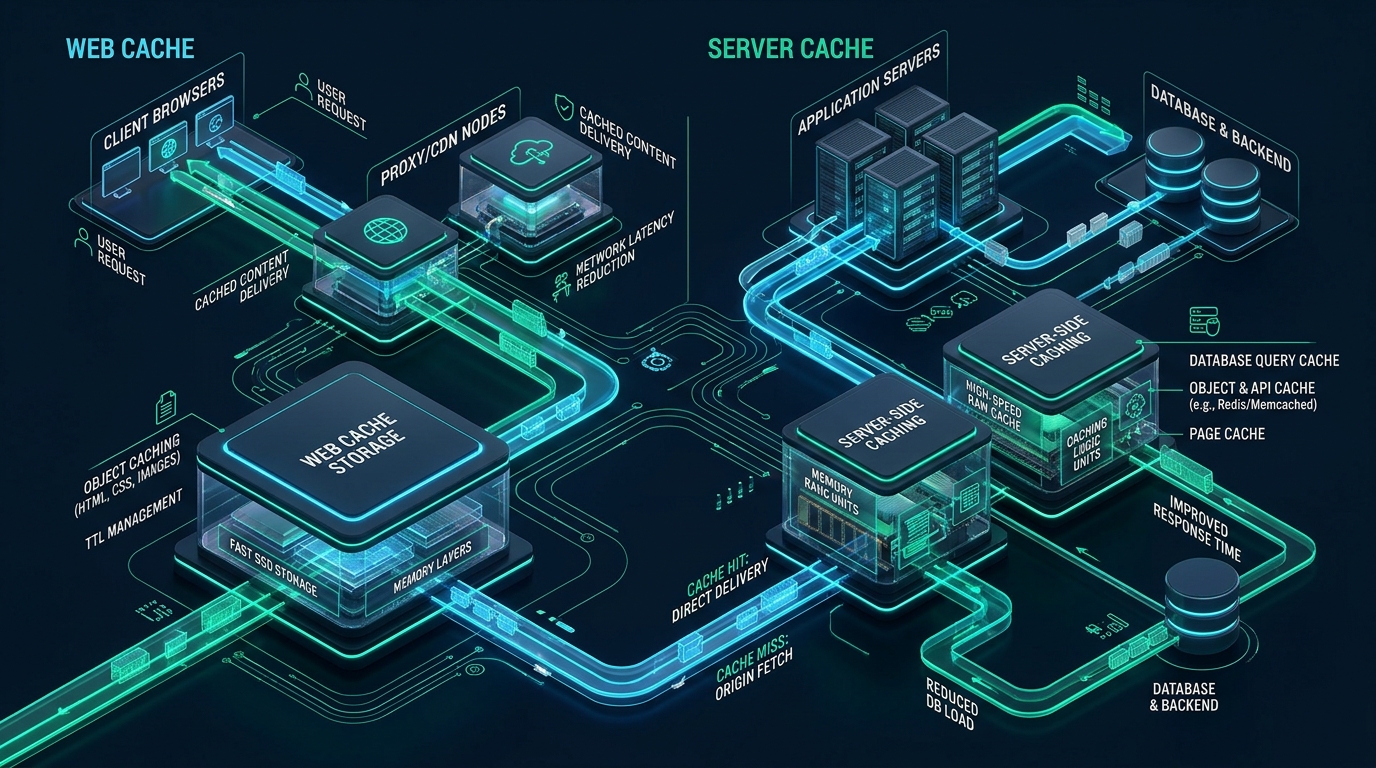
In modern high-concurrency web hosting, few technical issues waste more engineering hours or trigger more user friction than stale cache collisions, where newly deployed features, styling updates, or database modifications fail to render due to mismatched invalidation layers. Enterprise applications powered by MeraHost leverage LiteSpeed Web Server (LSWS) and pure NVMe storage arrays to deliver millisecond page delivery, yet maintaining that peak velocity requires precision cache lifecycle management across both server-side memory pools and client-side browsers. Mastering how to clear LSCache and browser cache effectively ensures that dynamic code deployments propagate instantaneously to end users without triggering devastating cache stampedes or exhausting backend database connections.
How to Clear LSCache and Browser Cache Effectively: The Definitive Framework
X-LiteSpeed-Purge headers to flush modified URL tags. Concurrently, force client browser cache refreshes via HTTP Cache-Control: no-cache, must-revalidate headers and production asset fingerprinting (cache-busting hash digests).
Web application caching operates as a distributed multi-tier pipeline. Between the backend code execution (such as PHP-FPM, Node.js, or Python WSGI) and the end-user’s display, data is stored, transformed, and cached across multiple discrete layers: object caches (Redis or Memcached), server-level page caches (LiteSpeed LSCache, Varnish, or Nginx FastCGI cache), edge Content Delivery Networks (Cloudflare or Fastly), and finally the client’s local user-agent memory and disk cache. A failure to update visible website content is rarely a failure of code; it is almost universally a failure to coordinate invalidation across these independent tiers.
When developers and system administrators attempt to resolve caching anomalies, they frequently resort to brute-force actions: clicking “Purge All” in their CMS administration panel and instructing end users to perform a “hard refresh” (Ctrl+Shift+R). While this brute-force approach may temporarily display new content, it introduces two severe production anti-patterns: it causes immediate backend resource exhaustion through cache stampedes (dog-piling) on high-traffic sites, and it fails to solve the caching issue for the thousands of passive visitors who never press a manual refresh shortcut.
Architecture Comparison: LSCache vs. Traditional PHP Plugins vs. Browser Cache
Understanding the difference between server-side page caching and client-side browser caching is essential for diagnosing delivery anomalies. LiteSpeed Cache is fundamentally different from PHP-based caching plugins because it is built directly into the web server binary.
| Architecture Vector | Standard PHP Plugin (e.g. WP Super Cache) | LiteSpeed Enterprise LSCache | Client Browser Cache |
|---|---|---|---|
| Execution Tier | PHP Application Runtime | Web Server Core Engine (C/C++) | User-Agent Device (RAM / Disk) |
| Cache Hit Latency (TTFB) | 120ms – 350ms (PHP bootstrap) | 1ms – 15ms (Zero PHP Overhead) | 0ms (Local memory fetch) |
| Invalidation Control | File unlinks via disk I/O | Granular Tag-Based Purge Index | HTTP Headers & Asset Fingerprinting |
| Dynamic ESI Capability | Requires full PHP reload | Native Edge-Side Includes (C level) | Not Applicable |
| Thundering Herd Protection | Vulnerable to database lockups | Built-in Stale-While-Revalidate Engine | Autonomous per client |
As demonstrated in the architectural matrix above, LiteSpeed Enterprise bypasses the PHP interpreter entirely. When an HTTP GET request hits LiteSpeed Web Server, the engine inspects its shared memory index. If a valid cache file exists, LiteSpeed streams the response directly from kernel page cache or NVMe storage into the network socket via sendfile() or epoll, delivering response times under 5 milliseconds. Client browser cache, conversely, stores immutable static assets (CSS, JavaScript, images, WOFF2 fonts) on the visitor’s local filesystem to eliminate network round-trips altogether.
Architecture Note: Clearing the server-side LSCache ensures that new HTML documents are assembled and sent upon the next request. However, if your static assets (e.g.
main.css) were delivered with long-livedCache-Control: max-age=31536000headers and lack unique version query strings or content hashes, the visitor’s browser will NEVER request the updated file from LiteSpeed, no matter how many times you flush LSCache.
The Mechanics of LSCache Invalidation: Tag-Based Precision vs. Global Purges
LiteSpeed Cache utilizes a high-performance hash index based on Cache Tags. Whenever a web page or dynamic endpoint is generated, the backend application attaches an internal X-LiteSpeed-Tag HTTP response header listing all content entities that contributed to that page. For example, a single blog article might emit the following tags:
# Typical internal LiteSpeed Cache Tags attached to a rendered page:
X-LiteSpeed-Tag: 36a_HTTP.200, 36a_post_1117, 36a_URL.6a2e9, 36a_category_14, 36a_author_3, 36a_F
When an author edits post #1117, the application does not need to purge the entire website cache. Instead, it sends a targeted purge header: X-LiteSpeed-Purge: 36a_post_1117. The LiteSpeed server engine marks only cache files bearing that specific tag as expired. The homepage, category archive, and related posts that list tag 36a_post_1117 are instantly invalidated, while thousands of unrelated articles, product pages, and checkout flows remain hot in cache memory.
The Production Dangers of “Purge All”
Executing a global “Purge All” command deletes the shared memory hash map and invalidates hundreds of gigabytes of cached objects across your server. On an e-commerce platform or high-traffic publication receiving 1,000 requests per minute, a global purge causes every concurrent visitor to hit the raw backend concurrently. PHP processes queue up, database connection pools are exhausted, and CPU utilization spikes to 100%, causing the dreaded HTTP 504 Gateway Timeout. Selective, tag-based or URL-specific purges are non-negotiable for enterprise stability.
Surgical LSCache Purge Workflows: CLI, API, and WebAdmin
Enterprise systems engineers manage LSCache through automated deployment pipelines and command-line interfaces rather than manual GUI clicks. Below are the verified production methods for clearing LSCache deterministically.
Method 1: High-Speed CLI Invalidation via WP-CLI
When managing WordPress or WooCommerce under LiteSpeed, the official LSCache plugin provides native WP-CLI commands. Run these commands as the web system user (e.g., admin or www-data):
# 1. Purge a single specific URL (surgical invalidation)
wp lscache-purge purge_url "https://merahost.org/blog/how-to-clear-lscache-and-browser-cache-effectively/"

# 2. Purge by specific content tag (e.g. all pages showing category 14)
wp lscache-purge purge_tag "category_14"

# 3. Purge by post ID
wp lscache-purge purge_tag "post_1117"

# 4. Invalidate only Front Page, Category Archives, and Feed
wp lscache-purge purge_tag "F,A,FD"

# 5. Flush Object Cache (Redis/Memcached) without dumping page cache
wp lscache-admin flush_object

# 6. Global purge (strictly reserved for catastrophic release failures)
wp lscache-admin purge_all
Method 2: Direct HTTP Purge Header Invalidation via cURL
If your application runs without a CLI wrapper or is deployed via continuous integration (CI/CD) pipelines, you can dispatch an authenticated HTTP PURGE request directly to the LiteSpeed server interface:
# Dispatch a direct PURGE request to LiteSpeed Web Server
curl -I -X PURGE "https://merahost.org/blog/how-to-clear-lscache-and-browser-cache-effectively/"

# Invalidate specific tags via cURL using secret purge key
curl -I -H "X-LiteSpeed-Purge: post_1117"      -H "X-LiteSpeed-Purge-Key: 94a8f93c01bf4e21a884"      "https://merahost.org/"
Method 3: Linux Filesystem Purge (Physical Storage Maintenance)
LiteSpeed stores its cached page payloads on high-speed NVMe block storage or a RAM-backed tmpfs mount. In scenarios where shared memory indexes become corrupt, you can flush the physical storage directory safely using standard Linux system tools:
# Default LiteSpeed Web Server cache directories:
# /tmp/lshttpd/swap/ or /home//lscache/

# Safely remove all cached swap files without stopping the server process
rm -rf /tmp/lshttpd/swap/*

# For cPanel / CyberPanel per-user cache roots:
find /home/*/lscache/ -type f -delete

# Touch the LiteSpeed restart marker to re-initialize shared memory indexes smoothly
touch /tmp/lshttpd/.openlitespeed_restart
Production Configuration: Production-Ready .htaccess and HTTP Headers
To prevent browser cache lock-in while maintaining blistering LiteSpeed page caching speeds, deploy the following battle-tested configuration in your site’s root .htaccess file. This configuration instructs LiteSpeed on how to handle page caching while explicitly enforcing correct client-side expiration headers.
# ====================================================================
# PRODUCTION LITESPEED CACHE & BROWSER CACHE HARDENING (.htaccess)
# ====================================================================


    # Enable LSCache engine globally for this vhost
    CacheEngine on
    CacheLookup on

    # Set public cache TTL to 86,400 seconds (24 hours)
    CacheMaxAge 86400

    # Configure stale-while-revalidate to prevent thundering herd
    CacheStaleAge 3600

    # Exempt sensitive administrative and transactional routes from cache
    CacheIgnoreQueryString off
    RewriteEngine On
    RewriteCond %{REQUEST_URI} ^/(wp-admin|wp-login|cart|checkout|my-account)/ [NC]
    RewriteRule .* - [E=Cache-Control:no-cache]


    ExpiresActive On
    ExpiresDefault "access plus 1 month"

    # HTML / Dynamic Documents: MUST always revalidate to prevent stale UI
    ExpiresByType text/html "access plus 0 seconds"

    # Static Assets: Long TTL with immutable caching (requires asset fingerprinting)
    ExpiresByType text/css "access plus 1 year"
    ExpiresByType application/javascript "access plus 1 year"
    ExpiresByType image/webp "access plus 1 year"
    ExpiresByType image/avif "access plus 1 year"
    ExpiresByType image/svg+xml "access plus 1 year"
    ExpiresByType font/woff2 "access plus 1 year"


    # Enforce revalidation for HTML documents so updates render immediately

        Header set Cache-Control "no-cache, must-revalidate, max-age=0"
        Header unset ETag
        FileETag None


    # Enforce immutable caching for versioned static assets

        Header set Cache-Control "public, max-age=31536000, immutable"


    # Expose LSCache debug headers in response for telemetry verification
    Header always set X-Content-Type-Options "nosniff"
The Browser Cache Dilemma: Invalidation vs. Asset Fingerprinting
The most common pitfall encountered by web administrators is failing to distinguish between document caching (the HTML payload) and asset caching (the linked CSS, JS, and image dependencies). Client browsers evaluate caching through the HTTP Cache-Control specification (RFC 9111):
Cache-Control: max-age=31536000: The browser will store the asset locally for one full year. During this period, the browser will never send an HTTP request to the server to see if the file changed. It satisfies the request directly from local memory.Cache-Control: no-cache: The browser stores the file locally, but it must send a conditional HTTP request (usingIf-None-MatchorIf-Modified-Since) to verify with the web server before using it. If the server responds with304 Not Modified, the cached asset is displayed; if changes occurred, a200 OKresponse with the fresh file is sent.Cache-Control: no-store: The browser is strictly forbidden from writing the asset to memory or disk. Every single pageview requires a full network download.
The Production Solution: Cache Busting with Content Hashing
Telling your end users to clear their browser cache or press Ctrl+Shift+R is an unacceptable operational procedure in production. If you release a layout bug, 99.8% of your visitors will simply abandon your site because they do not know what a browser cache is. The only enterprise-grade mechanism to invalidate client-side browser cache is Asset Fingerprinting (Cache Busting).
When compiling static assets with modern build systems (such as Vite, Webpack, esbuild, or Rollup), configure output files to embed a cryptographic hash of their contents into the filename:
# Stale architecture (vulnerable to browser cache lock-in):
https://merahost.org/static/css/styles.css
https://merahost.org/static/js/app.js

# Production fingerprint architecture (instant cache busting):
https://merahost.org/static/css/styles.8f3a9e2d.css
https://merahost.org/static/js/app.7c1b4d08.js
Because the filename is unique to that specific build, the browser treats the asset as a brand-new resource. When LSCache serves the updated HTML document referencing the new filename, the browser downloads the fresh asset immediately without requiring any client-side intervention. For content management systems like WordPress, ensuring that your theme enqueues scripts using dynamic version tokens (e.g. filemtime(get_stylesheet_directory() . '/style.css')) accomplishes the same automated cache-busting effect.
Verifying Cache State: HTTP Response Header Diagnostics
Never assume your cache is purged based solely on visual inspection in a local browser. Always inspect the raw HTTP response headers using curl or browser developer tools. Below are the definitive header signatures to inspect:
# Test cache delivery state from your terminal:
curl -I https://merahost.org/blog/how-to-clear-lscache-and-browser-cache-effectively/

# Look for these critical diagnostic headers:
HTTP/2 200
content-type: text/html; charset=UTF-8
x-litespeed-cache: hit
x-litespeed-cache-control: public,max-age=86400
etag: "1117-1730000000"
expires: Wed, 28 Oct 2026 18:00:00 GMT
cache-control: no-cache, must-revalidate, max-age=0
Telemetry Key: When
X-LiteSpeed-Cache: hitis present, LiteSpeed served the page directly from server memory without triggering backend code execution. Immediately after a purge command, the subsequent request must returnX-LiteSpeed-Cache: miss, followed by subsequent requests returninghit. If you observebypass, check your cookies or rewrite rules for an unintended session bypass.
Automated Linux Kernel Tuning for High-Volume LSCache Storage
When hosting mission-critical applications on MeraHost Enterprise Cloud, high-concurrency cache flushes generate intense burst I/O across file system inodes and virtual memory page caches. To ensure that clearing LSCache does not create system-level lockups, apply the following production kernel parameters in /etc/sysctl.d/99-litespeed-cache.conf:
# /etc/sysctl.d/99-litespeed-cache.conf
# Linux Kernel Tuning for High-Concurrency LiteSpeed & Cache Invalidation

# 1. Expand Inode and File Descriptor Capacity
fs.file-max = 2097152
fs.inotify.max_user_watches = 524288

# 2. Virtual Memory Flush Controls (Prevent Disk Stalls during Cache Dumps)
vm.dirty_background_ratio = 5
vm.dirty_ratio = 10
vm.swappiness = 10
vm.vfs_cache_pressure = 50

# 3. Network Socket Queue Optimization for Burst Traffic Post-Purge
net.core.somaxconn = 65535
net.core.netdev_max_backlog = 16384
net.ipv4.tcp_max_syn_backlog = 8192
net.ipv4.tcp_fin_timeout = 15
net.ipv4.tcp_tw_reuse = 1

# Apply settings immediately with:
# sysctl --system
Frequently Asked Questions (FAQs)
Why do changes still appear stale after purging LSCache in WordPress?
This discrepancy occurs because LSCache only invalidates the server-side HTML document. If your CSS, JavaScript, or image assets were delivered with long-term browser cache headers (e.g. max-age=31536000) and lack versioned filenames or query string tokens (e.g. ?v=2.4.1), client browsers will continue displaying local copies from disk memory without pinging LiteSpeed for updates. In addition, verify that intermediate CDN caches (such as Cloudflare) have also received an invalidation signal.
What is the safest way to clear cache on a high-traffic e-commerce store?
Never use “Purge All” on a live e-commerce site during peak hours. Use tag-based purges (e.g. wp lscache-purge purge_tag "product_123") to invalidate only modified products and their parent categories. Combine this with LiteSpeed’s automated Crawler feature, which pre-warms the cache immediately following a purge, ensuring real users consistently encounter cache hits rather than cold database queries.
How do I force all visitors to see updated styles without asking them to refresh?
Implement asset fingerprinting (content hashing) in your build pipeline or CMS. By appending a build hash or file modification timestamp to your stylesheet URL (e.g. main.min.css?ver=1730001234), client browsers recognize the URI as a new asset and download it automatically on their next page load without requiring manual browser clearing.
Does clearing LSCache delete my database contents or uploaded files?
No. LSCache operates strictly as a read-through mirror that stores pre-rendered HTML payloads and HTTP headers in server storage. Purging LSCache simply discards these pre-rendered snapshot files. The underlying MySQL database tables, media uploads, and application source code remain completely untouched.
Deploy Enterprise-Grade Production Infrastructure
Need guaranteed performance with zero price hikes? Host mission-critical workloads on MeraHost with pure Enterprise NVMe, LiteSpeed Web Server, and Same Renewal Price, Always (starting at ₹99/mo).