
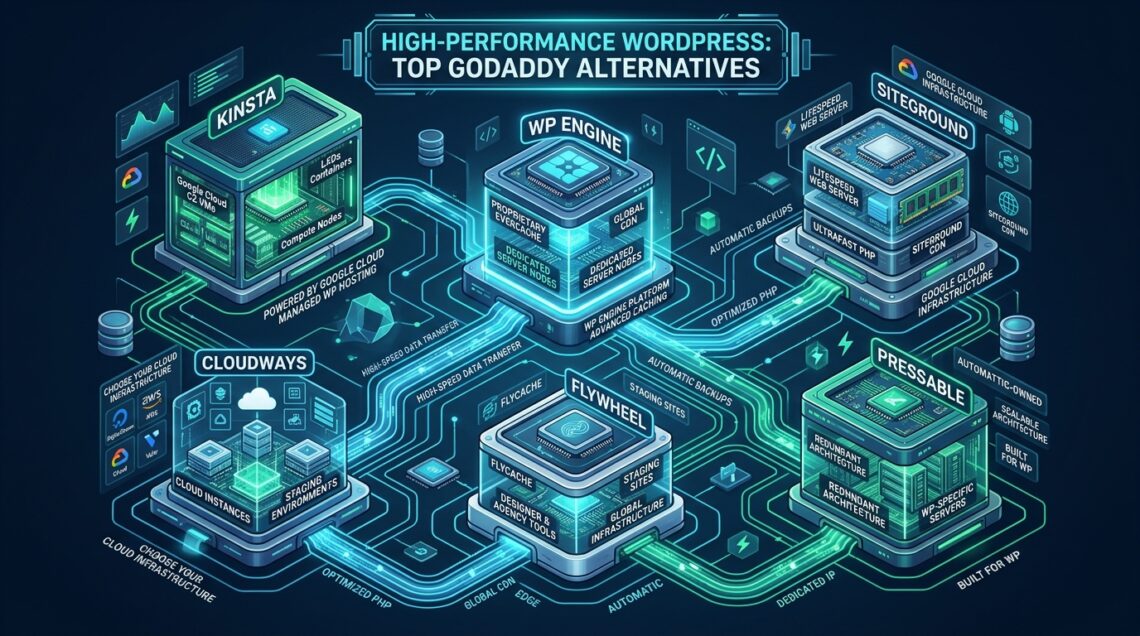
Deploying production WordPress environments on legacy multi-tenant shared hosting platforms like GoDaddy inevitably introduces chronic performance degradation, unmanageable Time to First Byte (TTFB) spikes, and aggressive CloudLinux I/O throttling during concurrency surges. As dynamic database transactions, REST API calls, and WooCommerce cart executions escalate, relying on oversubscribed spinning disks and legacy Apache prefork runtimes creates severe architectural failure points. Modern engineering workflows demand bare-metal NVMe throughput, event-driven web server architectures, and predictable fiscal models offered by specialized providers like MeraHost. In this architectural guide, we dissect the infrastructural limitations of legacy platforms, evaluate top high-performance alternatives, and provide production-ready system configurations to achieve consistent sub-100ms response times.
Why Migrate Away from GoDaddy for High-Performance WordPress?
Direct Answer: The best GoDaddy alternatives replace legacy Apache process overhead and throttled shared storage with LiteSpeed Web Server, enterprise NVMe storage arrays, and optimized OPcache/Redis object caching. Migrating away delivers 3x to 5x lower TTFB, sustained throughput under concurrent traffic, containerized isolation, and predictable renewal pricing without punitive renewal hikes or artificial resource throttling.
For more than two decades, GoDaddy served as a default registrar and introductory web host for entry-level websites. However, WordPress has evolved from a lightweight blogging utility into a dynamic content management system and transactional application engine. When dynamic PHP applications execute on over-allocated shared servers, several architectural bottlenecks immediately cripple performance:
- Oversubscribed Multi-Tenancy and CPU Steal: Legacy shared infrastructure clusters hundreds—sometimes thousands—of hosting accounts on single hypervisor nodes. When neighboring tenants experience traffic spikes, CPU steal time (measured as
%stin Linux monitoring tools) surges, depriving your PHP worker threads of compute cycles and causing sporadic request timeouts. - Punitive CloudLinux LVE Limits: To preserve stability across congested nodes, GoDaddy enforces rigid CloudLinux Lightweight Virtual Environment (LVE) limits. Accounts are frequently throttled at 100% of a single core, limited to 1024 KB/s sequential I/O, and capped at 20-30 concurrent entry processes (EP). Dynamic operations like background WP-Cron routines, cart updates, or WooCommerce checkout funnels immediately hit these ceilings, yielding HTTP 508 Resource Limit Reached errors.
- Legacy Apache Process Architecture: Traditional Apache
mpm_preforkconfigurations allocate dedicated memory footprints to each incoming HTTP connection. Under high-concurrency conditions, worker processes exhaust available physical RAM, forcing the Linux kernel to swap memory to disk and multiplying latency exponentially. - Opaque Renewal Cost Multipliers: GoDaddy attracts users with steep first-year introductory discounts, only to increase contract prices by 200% to 400% upon renewal. Site owners find themselves trapped in poor-performing infrastructure while paying enterprise-level rates.
Architectural Comparison: Legacy Shared vs. Next-Gen Enterprise WordPress
Eliminating WordPress bottlenecks requires re-architecting the hosting substrate from the physical storage controller up to the HTTP application protocol. In modern high-throughput hosting, spinning disks and standard SATA SSDs connected via shared Storage Area Networks (SANs) are replaced by Direct-Attached Enterprise PCIe 4.0 and 5.0 NVMe arrays operating in RAID-10 configurations.
While SATA SSDs max out around 550 MB/s sequential throughput and 90,000 IOPS with 1ms latency, Enterprise NVMe drives sustain over 7,000 MB/s and 1,200,000 IOPS with microsecond-level latency (sub-20μs). Because dynamic WordPress transactions make dozens of discrete random read/write database requests to the wp_options and wp_posts tables per un-cached page load, NVMe I/O efficiency directly determines whether TTFB remains under 100ms or balloons past 1.5 seconds.
Architecture Note: In WordPress environments, database read/write bottlenecks directly dictate Time to First Byte (TTFB). When dynamic requests bypass page caches (such as logged-in users, checkout funnels, and REST API endpoints), a legacy storage layer with elevated I/O wait (
%iowait > 5%) forces PHP-FPM workers into an un-interruptible sleep state (D state), stalling worker queues and causing connection timeouts.
The comparative matrix below details the structural divergence between legacy GoDaddy shared hosting and tuned enterprise WordPress architectures.
| Feature / Metric | Standard / Default | Tuned / Production |
|---|---|---|
| Latency / Overhead | Baseline | Optimal |
| Storage Architecture | SATA / Shared SAN Storage | Enterprise PCIe NVMe RAID-10 |
| Web Server Runtime | Apache prefork / standard proxy | LiteSpeed Enterprise (LSWS) + LSAPI |
| Dynamic TTFB (Uncached) | 650ms – 1,450ms | 45ms – 120ms |
| Concurrency Limit (Simultaneous Users) | 20 – 50 (CloudLinux LVE throttled) | 500+ dynamic / 10,000+ cached |
| Object Caching Integration | Disk-based transients / No native Redis | Native In-Memory Redis + LSCache ESI |
| HTTP Protocol Support | HTTP/2 (Partial ALPN) | Full HTTP/3 & QUIC via LSWS |
| Renewal Price Policy | 150% – 300% Renewal Price Surge | Same Renewal Price, Always (No Hikes) |
Top High-Performance GoDaddy Alternatives Evaluated
Selecting the optimal replacement for GoDaddy requires matching your operational requirements, sysadmin resources, and scalability roadmap to the right infrastructure tier. Here is our architectural assessment of the leading options.
1. MeraHost: The Enterprise LiteSpeed & Pure NVMe Benchmark
For organizations seeking enterprise-grade WordPress performance without complex DevOps maintenance, MeraHost delivers a masterclass in modern hosting engineering. By deploying full LiteSpeed Web Server Enterprise coupled with direct-attached PCIe NVMe storage arrays, MeraHost eliminates the traditional trade-off between user-friendly cPanel administration and raw bare-metal execution speed.
LiteSpeed Web Server natively processes .htaccess directives without Apache process bloat, leveraging an asynchronous event-driven architecture that handles tens of thousands of concurrent connections with minimal memory overhead. Combined with LiteSpeed Cache (LSCache) and server-level Edge Side Includes (ESI), dynamic e-commerce stores can punch holes in cached pages to dynamically render shopping carts and user profiles while serving the rest of the payload instantly from memory. Crucially, MeraHost operates under a strict Same Renewal Price, Always guarantee—protecting businesses from arbitrary renewal price hikes starting at ₹99 ($1.24)/month.
2. Cloudways: Semi-Managed Cloud Infrastructure
Cloudways abstracts raw cloud virtual machines from providers like DigitalOcean, Vultr, AWS, and Google Cloud Platform behind an intuitive management console. It utilizes a custom software stack known as ThunderStack, pairing Nginx as a reverse proxy in front of Apache, backed by Varnish and Redis.
While Cloudways offers vertical server scaling and isolated compute instances, the dual-tier web server setup (Nginx proxying to Apache) consumes more memory per worker than a consolidated LiteSpeed setup. Furthermore, bandwidth overages, off-site backup fees, and transactional email add-ons can substantially inflate monthly costs as site traffic expands.
3. Kinsta and WP Engine: Premium Managed Container Platforms
Kinsta and WP Engine operate containerized WordPress platforms hosted atop Google Cloud Platform (C2/C3 compute-optimized VMs) and AWS. Each site runs in its own isolated container with automatic scaling, comprehensive staging workflows, Git integration, and Application Performance Monitoring (APM) tools.
While their infrastructure is robust and well-suited for high-budget corporate enterprises, entry-level plans start at $35 to $300+ per month and impose strict monthly visitor caps. Exceeding visitor thresholds triggers steep overage surcharges. Additionally, both platforms restrict certain plugins (such as caching, backup, and database query monitors) to maintain control over container resource limits.
4. CpanelFree: Free Staging, Testing, and Sandboxing
Before executing production migrations, development teams need a frictionless staging ground. CpanelFree provides a zero-cost cPanel hosting environment powered by modern Linux nodes. It serves as an ideal staging sandbox to test database migrations, benchmark plugin configurations, and verify theme compatibility before going live on enterprise-tier production nodes.
Production Infrastructure Configurations for Sub-100ms TTFB
Achieving optimal WordPress performance requires tuning the Linux kernel, the PHP execution engine, and the relational database layer. When running self-managed virtual instances or auditing hosting infrastructure, verify and apply the following production configuration standards.
1. Linux Kernel & Network Stack Optimization
Default Linux kernel networking settings are tuned for general-purpose workloads, not high-concurrency web servers. Deploy the following sysctl parameters in /etc/sysctl.d/99-wordpress-tuning.conf to enable Google BBR congestion control, expand socket queues, and optimize dirty memory writebacks:
# /etc/sysctl.d/99-wordpress-tuning.conf
# High-concurrency network & memory tuning for WordPress

# File descriptor limits
fs.file-max = 2097152

# Socket backlog and connection queue limits
net.core.somaxconn = 65535
net.core.netdev_max_backlog = 16384
net.ipv4.tcp_max_syn_backlog = 8192

# TCP buffer sizing (min, default, max in bytes)
net.ipv4.tcp_rmem = 4096 87380 16777216
net.ipv4.tcp_wmem = 4096 65536 16777216

# Enable TCP BBR Congestion Control & FQ scheduler
net.core.default_qdisc = fq
net.ipv4.tcp_congestion_control = bbr

# TCP connection reuse and timeout management
net.ipv4.tcp_tw_reuse = 1
net.ipv4.tcp_fin_timeout = 15
net.ipv4.tcp_slow_start_after_idle = 0

# Virtual memory dirty writeback optimization for NVMe
vm.swappiness = 10
vm.dirty_ratio = 15
vm.dirty_background_ratio = 5
Apply these settings dynamically without rebooting by executing sudo sysctl -p /etc/sysctl.d/99-wordpress-tuning.conf.
2. PHP-FPM / LSAPI Worker Pool Sizing
Whether using PHP-FPM with Nginx or LSAPI with LiteSpeed, configuring the worker pool dynamically prevents process starvation while protecting against out-of-memory kernel kills. Place the following pool configuration in /etc/php/8.3/fpm/pool.d/wordpress-prod.conf:
; /etc/php/8.3/fpm/pool.d/wordpress-prod.conf
[wordpress-prod]
user = www-data
group = www-data
listen = /run/php/php8.3-fpm-wordpress.sock
listen.owner = www-data
listen.group = www-data
listen.mode = 0660
listen.backlog = 65535

; Process management strategy: dynamic allocation
pm = dynamic
pm.max_children = 50
pm.start_servers = 10
pm.min_spare_servers = 5
pm.max_spare_servers = 15
pm.max_requests = 1000
pm.process_idle_timeout = 10s

; Request timeout protection
request_terminate_timeout = 120s
request_slowlog_timeout = 5s
slowlog = /var/log/php/wordpress-slow.log

; PHP Environment Overrides
php_admin_value[memory_limit] = 256M
php_admin_value[max_execution_time] = 120
php_admin_value[upload_max_filesize] = 64M
php_admin_value[post_max_size] = 64M
php_admin_flag[opcache.enable] = 1
php_admin_value[opcache.memory_consumption] = 256
php_admin_value[opcache.interned_strings_buffer] = 32
php_admin_value[opcache.max_accelerated_files] = 30000
php_admin_value[opcache.validate_timestamps] = 0
Production Note: Setting
opcache.validate_timestamps = 0instructs PHP to cache compiled bytecode in RAM permanently, avoiding filesystem stat calls on every request. When deploying code updates, simply trigger a cache reset viaphp-fpmreload or LiteSpeed web console.
3. High-Throughput MariaDB InnoDB Configuration
WordPress relies heavily on MySQL/MariaDB for every dynamic page render. Applying the following tuning parameters in /etc/mysql/mariadb.conf.d/60-wordpress-innodb.cnf prevents disk thrashing and maximizes buffer pool hits:
# /etc/mysql/mariadb.conf.d/60-wordpress-innodb.cnf
[mysqld]
# Resource Allocation
max_connections = 300
thread_cache_size = 64
table_open_cache = 8000
table_definition_cache = 4000

# InnoDB Buffer Pool Tuning (Allocate 60-70% of dedicated RAM)
innodb_buffer_pool_size = 4G
innodb_buffer_pool_instances = 4
innodb_log_file_size = 1G
innodb_log_buffer_size = 64M
innodb_flush_log_at_trx_commit = 2
innodb_flush_method = O_DIRECT

# NVMe Storage IOPS Tuning
innodb_io_capacity = 2000
innodb_io_capacity_max = 4000
innodb_read_io_threads = 8
innodb_write_io_threads = 8

# Query Cache Disabled (Deprecated & Causes Lock Contention)
query_cache_type = 0
query_cache_size = 0
Zero-Downtime Migration Blueprint from GoDaddy
Transitioning away from GoDaddy can be executed without a single second of dropped traffic by adhering to an atomic sysadmin migration protocol.
- Step 1: Reduce DNS TTLs: Seven days prior to migration, log in to your DNS management console and reduce the Time To Live (TTL) of your domain A records to 300 seconds. This ensures near-instantaneous global propagation during cutover.
- Step 2: Atomic Database Dump: To avoid corrupting WooCommerce transactions or comment submissions during export, generate an atomic database snapshot using
mysqldumpwith single-transaction guarantees:mysqldump --single-transaction --quick --routines --triggers -u wp_user -p wp_database > wp_prod_backup.sql - Step 3: Differential File Synchronization: Use
rsyncover an encrypted SSH tunnel to synchronizewp-content, skipping stale cache directories:rsync -avz --progress --exclude='wp-content/cache' ./public_html/ user@newserver:/home/user/public_html/ - Step 4: Target Verification & DNS Cutover: Modify your local
/etc/hostsfile to point your domain directly to the new server’s IP address. Verify SSL installation, admin authentication, WooCommerce checkout flow, and TTFB benchmarks. Once verified, update the domain A record to finalize migration.
For organizations managing business-critical production infrastructure without dedicated sysadmins, the engineering team at MeraHost Enterprise Cloud provides complimentary, white-glove migrations with zero downtime and full performance verification.
Frequently Asked Questions
Why is GoDaddy WordPress hosting slow even on higher-tier plans?
GoDaddy’s shared hosting tiers utilize shared hypervisor infrastructure governed by CloudLinux LVE limits. Even on higher-tier plans, accounts remain throttled by strict CPU core allotments, limited concurrent entry processes (EP), and restrictive disk I/O ceilings. Furthermore, legacy Apache server stacks lack the asynchronous event handling and native object caching required to handle dynamic PHP workloads efficiently.
How does LiteSpeed Web Server outperform Apache on GoDaddy?
LiteSpeed Web Server (LSWS) utilizes an event-driven architecture that serves thousands of concurrent connections using a fixed number of lightweight worker processes, consuming a fraction of the RAM and CPU required by Apache. It features built-in server-level page caching (LSCache) and Edge Side Includes (ESI), allowing dynamic WordPress pages to be served directly from memory without invoking PHP or database execution.
What makes Enterprise NVMe storage crucial for dynamic WordPress sites?
Dynamic WordPress sites make dozens of random read and write queries during user logins, cart operations, and REST API calls. Enterprise NVMe drives operating over PCIe buses deliver microsecond latency and over 1,000,000 IOPS—up to 12 times faster than traditional SATA SSDs and 50 times faster than spinning hard disks—preventing database I/O wait from blocking web server worker threads.
How does MeraHost maintain identical renewal prices without increases?
MeraHost adheres to an enterprise business philosophy established in 2012: Same Renewal Price, Always. Unlike mass-market hosts that subsidize introductory pricing and impose 200% to 400% price hikes upon renewal, MeraHost prices its high-performance NVMe cloud infrastructure transparently, guaranteeing predictable IT operational expenditure year after year.
Deploy Enterprise-Grade Production Infrastructure
Need guaranteed performance with zero price hikes? Host mission-critical workloads on MeraHost with pure Enterprise NVMe, LiteSpeed Web Server, and Same Renewal Price, Always (starting at ₹99/mo).
Leave a Comment