
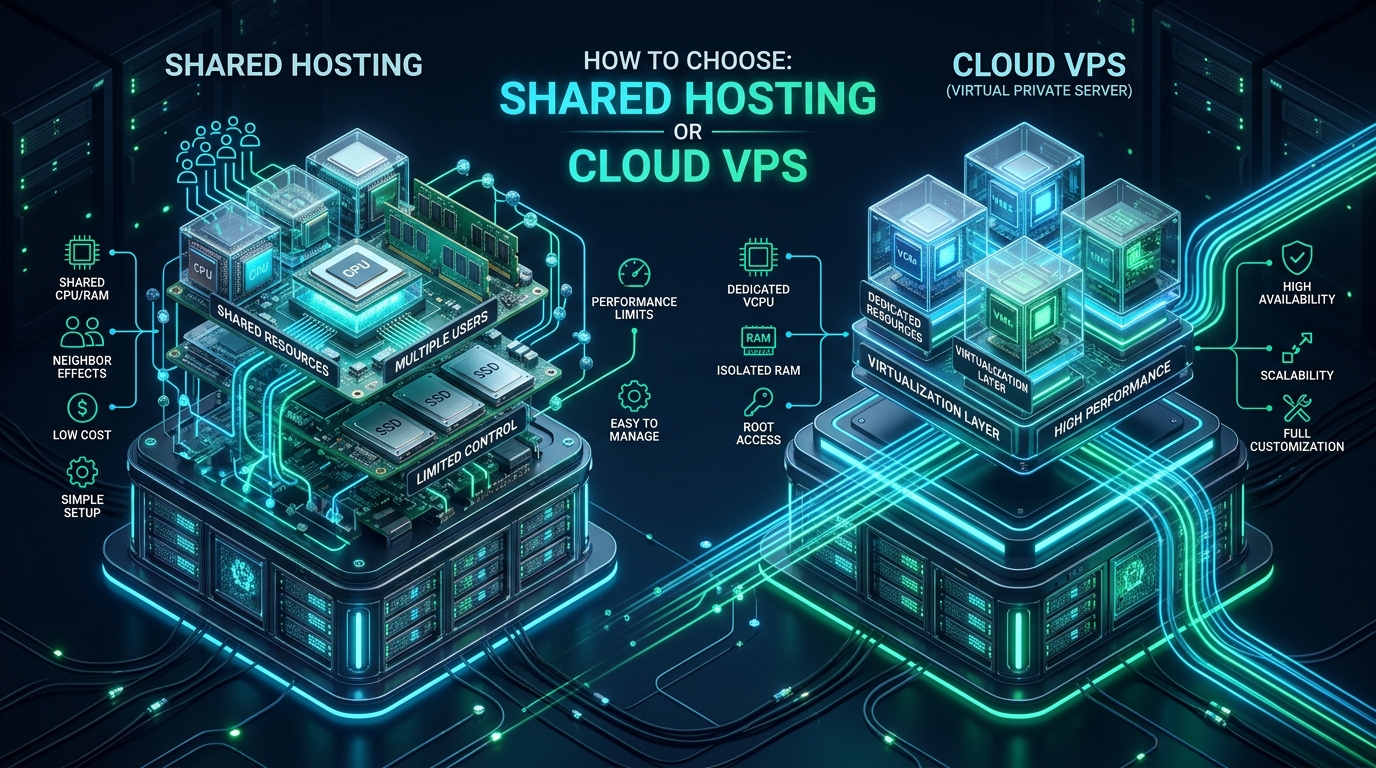
Deciding between multi-tenant shared hosting and isolated cloud virtual private servers (VPS) is a foundational infrastructure decision that dictates your application’s I/O throughput, kernel scheduling latency, and maintenance overhead. When scaling web applications, unpredictable resource contention and neighbor-induced performance degradation frequently force systems architects to evaluate whether to leverage optimized managed application environments on MeraHost or provision dedicated virtual machine slices. Understanding the underlying hardware abstraction boundaries, kernel isolation models, and storage queue behaviors is essential to provisioning the right compute tier without accumulating technical debt or paying for unutilized capacity.
Shared Hosting vs Cloud VPS: The Definitive Architectural Verdict
Direct Answer: Choose shared hosting for low-maintenance web applications, small business portals, and early-stage WordPress sites requiring automated administration and LiteSpeed caching. Choose Cloud VPS when workloads demand root access, custom kernel parameters, dedicated vCPU and NVMe IOPS, strict regulatory isolation, or custom runtime environments like Docker and Node.js.
Core Virtualization & Kernel Isolation Architectures
The primary technical differentiator between shared hosting and a cloud VPS is the layer at which resource virtualization and process isolation occur within the operating system stack. In a traditional shared hosting environment, all tenants execute on a single monolithic operating system kernel. Process separation relies on user-space isolation primitives such as Linux control groups (cgroups v1/v2), kernel namespaces (IPC, network, mount, PID, user), and vendor enhancements like CloudLinux Lightweight Virtual Environments (LVE) paired with CageFS.
Under this shared OS architecture, tenants run within virtualized file system chroots. When tenant processes trigger system calls (syscalls)—such as disk reads via epoll, memory allocations via mmap, or TCP socket operations—those calls transition directly into the same shared Linux kernel space. While modern cgroups enforce hard ceilings on memory footprint (memory.max) and CPU cycle quotas (cpu.max via the Completely Fair Scheduler), the shared kernel structure means kernel-level locks, page cache contention, and context switching overhead are shared across all active tenants.
Architecture Note: In shared hosting environments, kernel-level thread pools and network driver queues (NAPI) process packets for all tenant domains simultaneously. A Denial-of-Service (DoS) flood targeting a single neighbor domain can consume hypervisor network interrupt request (IRQ) cycles, elevating systemic latency across all colocated accounts before cgroup limits engage.
Conversely, a Cloud Virtual Private Server utilizes hardware-assisted virtualization managed by a Type-1 or Type-2 hypervisor, most commonly Kernel-based Virtual Machine (KVM) integrated with QEMU. KVM leverages hardware virtualization extensions (Intel VT-x or AMD-V) to present fully virtualized hardware—including virtual CPUs (vCPUs), virtual memory management units (vMMU with Extended Page Tables/Nested Paging), and paravirtualized I/O devices via the virtio framework.
Each Cloud VPS boots its own independent Linux kernel. This architectural independence delivers complete kernel isolation: guest kernel panics, custom module compilation (such as WireGuard, custom iptables targets, or eBPF probes), and memory segment corruption are entirely contained within the guest’s virtual machine memory space. vCPUs are scheduled by the host kernel as standard threads, but they map to dedicated or pinned physical execution cores, eliminating cross-tenant CPU cache pollution (L1/L2/L3 cache misses) and Translation Lookaside Buffer (TLB) flushing overhead.
Storage Subsystems & I/O Contention: NVMe Throughput vs Multi-Tenant Pools
Disk I/O latency is the single most common performance bottleneck in production database operations, dynamic PHP content rendering, and asset delivery. When selecting between shared hosting and cloud VPS, understanding how storage I/O is scheduled and queued is paramount.
In high-grade shared hosting, storage arrays typically utilize Enterprise Non-Volatile Memory Express (NVMe) solid-state drives configured in RAID-10 pools. While enterprise NVMe delivers up to 1,000,000 random read IOPS and multi-gigabyte throughput over PCIe 4.0/5.0 lanes, that aggregate bandwidth is apportioned across hundreds of tenant accounts. System administrators enforce I/O throttling using block I/O controller limits (blkio.throttle.read_iops_device and blkio.throttle.write_iops_device). In an entry-level shared tier, a tenant’s continuous write limit might be constrained to 5 MB/s to 20 MB/s or 1,024 IOPS.
If your web application performs unbuffered logging, heavy WooCommerce transactional processing, or unindexed database queries requiring disk temporary tables, shared I/O limits can cause process execution states to stall in uninterrupted sleep (the D state in ps or top). This leads to elevated I/O wait (%wa) percentages and HTTP 508 (Resource Limit Reached) errors.
Architecture Note: Cloud VPS instances deploy virtual block devices (e.g.,
/dev/vda) backed by dedicated local NVMe slices or Ceph-based distributed SANs. This paravirtualizedvirtio-blkorvirtio-scsidriver architecture affords dedicated queue depths (up to 1,024 commands) and sustained IOPS unaffected by adjacent customer workloads.
The Comprehensive Architecture & Performance Matrix
Evaluating shared hosting against Cloud VPS requires reviewing multiple infrastructure vectors, from virtualization overhead and memory reservation to root privilege and administrative complexity. The following matrix details the operational characteristics of both hosting paradigms:
| Feature / Metric | Shared Hosting (Enterprise LiteSpeed) | Cloud VPS (KVM Virtualization) |
|---|---|---|
| Virtualization Layer | OS-Level (cgroups v2, CageFS, Namespaces) | Hardware Hypervisor (KVM / QEMU) |
| Kernel Isolation | Shared Host Kernel (Restricted Syscalls) | Independent Dedicated Guest Kernel |
| CPU Scheduling | Burstable CFS Quotas (Time-sliced) | Dedicated / Pinned vCPUs |
| Memory Allocation | Soft/Hard cgroup limits (OOM Killer enforced) | Guaranteed Physical RAM Reservation |
| Storage Subsystem | Pooled Enterprise NVMe (Throttled IOPS) | Dedicated Block Volume / Provisioned IOPS |
| Root Access & Tuning | No (Restricted Shell / cPanel / DirectAdmin) | Full Root (Custom sysctl, iptables, systemd) |
| IP Reputation & Egress | Shared Outbound IPv4 (RBL Risk) | Dedicated Static IPv4 & /64 IPv6 Subnet |
| Operational Overhead | Zero (Fully Managed Patches, WAF, Backups) | High (DevOps / SysAdmin configuration required) |
Production Kernel Optimization: Tuning a Cloud VPS for High Concurrency
One of the primary technical justifications for selecting a Cloud VPS over shared hosting is the authority to customize Linux kernel parameters. Out-of-the-box Linux distributions (such as Ubuntu 24.04 LTS or Rocky Linux 9) are configured with conservative networking and virtual memory thresholds tailored for generic desktop or lightweight server usage.
When deploying production web servers (such as Nginx, LiteSpeed, or HAProxy) handling thousands of concurrent keep-alive connections and WebSocket channels, default Linux network buffers and connection tracking tables will quickly drop packets. On a Cloud VPS, you can tune the kernel socket buffers, enable the modern Google BBR congestion control algorithm, expand file descriptor tables, and adjust dirty page writebacks to maximize NVMe streaming throughput.
Below is a production-grade sysctl configuration file designed for enterprise web servers running on Linux KVM instances:
# /etc/sysctl.d/99-vps-performance.conf
# Enterprise Linux Kernel Tuning for High-Concurrency Cloud VPS Workloads

# ----------------------------------------------------------------------
# 1. File Descriptors & Process Table Capacity
# ----------------------------------------------------------------------
fs.file-max = 2097152
fs.nr_open = 2097152

# ----------------------------------------------------------------------
# 2. Virtual Memory & Dirty Page Flush Behavior
# ----------------------------------------------------------------------
# Minimize swap usage to preserve NVMe IOPS for active processes
vm.swappiness = 10
# Begin background writeout when dirty pages exceed 5% of system memory
vm.dirty_background_ratio = 5
# Block processes and force writeout if dirty pages hit 15%
vm.dirty_ratio = 15
# Allow memory overcommit with heuristic validation
vm.overcommit_memory = 1

# ----------------------------------------------------------------------
# 3. Network Core & Socket Backlog Capacities
# ----------------------------------------------------------------------
# Maximum socket receive buffer size across all protocols (32MB)
net.core.rmem_max = 33554432
# Maximum socket send buffer size across all protocols (32MB)
net.core.wmem_max = 33554432
# Maximum listen queue backlog for incoming connections
net.core.somaxconn = 65535
# Maximum length of the input packet queue for network interfaces
net.core.netdev_max_backlog = 16384

# ----------------------------------------------------------------------
# 4. TCP Stack Optimization & BBR Congestion Control
# ----------------------------------------------------------------------
# Enable Fair Queuing packet scheduler required for BBR
net.core.default_qdisc = fq
# Enable Google BBR TCP congestion control algorithm
net.ipv4.tcp_congestion_control = bbr
# Autotuning TCP receive buffer: min, default, max
net.ipv4.tcp_rmem = 4096 87380 33554432
# Autotuning TCP send buffer: min, default, max
net.ipv4.tcp_wmem = 4096 65536 33554432
# Enable fast recycling of TIME_WAIT sockets for outgoing connections
net.ipv4.tcp_tw_reuse = 1
# Reduce seconds to hold socket in FIN-WAIT-2 state
net.ipv4.tcp_fin_timeout = 15
# Disable TCP slow start after idle to maintain high transfer rates
net.ipv4.tcp_slow_start_after_idle = 0
# Maximum TCP SYN backlog queue
net.ipv4.tcp_max_syn_backlog = 3240000
# Maximum number of sockets in TIME_WAIT state simultaneously
net.ipv4.tcp_max_tw_buckets = 1440000

# ----------------------------------------------------------------------
# 5. Ephemeral Port Range
# ----------------------------------------------------------------------
net.ipv4.ip_local_port_range = 10240 65535
To apply this configuration on a live VPS without rebooting the guest operating system, execute the following command with root privileges:
sysctl --systemFurthermore, managing workload density on a Cloud VPS requires granular control over systemd services to prevent background tasks or compromised processes from starving mission-critical web workers. With systemd cgroups v2, you can define dedicated resource slices directly on your VPS instance:
# /etc/systemd/system/web-production.slice
# Dedicated Resource Slice for Mission-Critical Web Services

[Unit]
Description=Production Web Workload Resource Slice
DefaultDependencies=no
Before=slices.target

[Slice]
# Allocate minimum guaranteed CPU weight (1-10000 scale)
CPUWeight=800
# Hard limit on total CPU quota (e.g. 350% across 4 vCPUs)
CPUQuota=350%
# Enforce hard memory limit for all processes inside the slice
MemoryHigh=3500M
MemoryMax=4096M
# Throttle IOPS on NVMe root block device
IOReadIOPSMax=/dev/vda 10000
IOWriteIOPSMax=/dev/vda 5000
The TCO & Operational Overhead Equation: Maintenance vs Control
While a Cloud VPS offers unhindered architectural freedom, it transfers 100% of the operational and systems administration burden directly onto your engineering team. The Total Cost of Ownership (TCO) extends far beyond the raw monthly compute billing:
- Security Patching & Vulnerability Remediation: Unmanaged VPS nodes require continuous monitoring of security advisories (CVEs). Operating system kernel updates often necessitate server reboots or complex live-patching workflows (e.g., Canonical Livepatch or KernelCare). Failure to patch open SSH ports, local privilege escalations, or web server vulnerabilities leaves your instance vulnerable to automated botnets and cryptojacking malware.
- Backup Orchestration & Disaster Recovery: In a VPS environment, snapshot management, off-site database dump syncs, point-in-time recovery (PITR) mechanisms, and storage rotation scripts must be authored and monitored by your DevOps staff. In contrast, enterprise shared hosting plans natively bundle automated hourly and daily snapshots with one-click restore portals.
- Web Application Firewall (WAF) & DDoS Mitigation: Cloud VPS instances require manual setup of packet filtering rules (nftables/UFW), brute-force defense (Fail2ban or CrowdSec), and web application rulesets (ModSecurity or Coraza). Shared hosting platforms incorporate centralized upstream anti-DDoS scrubbing appliances and hardened server-level WAF rules configured out of the box.
For organizations seeking blistering LiteSpeed Enterprise performance, automated NVMe tiering, and seamless WordPress caching without dedicating hours to Linux maintenance, deploying on MeraHost Enterprise Cloud delivers the optimal balance of raw power, rock-solid security, and fixed monthly operational costs.
Architecture Note: A common architectural mistake is provisioning an unmanaged Cloud VPS for a standard content site, only to leave it running an unoptimized default Apache configuration with MPM Prefork. In real-world benchmarks, a well-engineered shared hosting plan powered by LiteSpeed Web Server and Redis object caching regularly outperforms an unoptimized 2-vCPU VPS in both time-to-first-byte (TTFB) and throughput under high concurrency.
Workload Sizing & Decision Framework
To determine the precise hosting architecture for your technical stack, apply the following architectural decision rubric based on your application requirements, compliance parameters, and development workflow:
Scenario A: When Shared Hosting is the Superior Choice
- CMS & Publishing Workloads: WordPress blogs, regional news portals, business portfolio websites, and small-to-medium WooCommerce stores handling under 50,000 monthly visits.
- Standard PHP & MariaDB Technology Stacks: Applications built on standard LAMP/LEMP stacks that do not require custom compiled PHP extensions, persistent socket workers, or background system daemons.
- Lean Engineering Teams: Solopreneurs, digital marketing agencies, and organizations without a dedicated 24/7 site reliability engineer (SRE) or systems administrator on retainer.
- Budget Predictability: Deployments where recurring server management expenses must remain minimal, leveraging fixed renewal guarantees.
Scenario B: When Cloud VPS is Architecturally Mandatory
- Custom Application Runtimes: Microservices and applications developed in Node.js, Python (Django, FastAPI), Go, Ruby on Rails, or Java Spring Boot that bind to dedicated system ports and require custom daemon managers.
- Containerized Deployments: Environments leveraging Docker, Docker Compose, or lightweight Kubernetes distributions (K3s) for container orchestration and automated CI/CD pipeline deployments.
- Dedicated Data Stores & In-Memory Caches: High-throughput databases, Elasticsearch clusters, RabbitMQ message brokers, or dedicated multi-gigabyte Redis instances requiring persistent memory allocations and custom connection pooling.
- Strict Regulatory & Compliance Standards: Applications subject to PCI-DSS Level 1, HIPAA, or SOC2 Type II compliance where multi-tenant data storage, shared kernel spaces, and pooled network interfaces are strictly prohibited by auditors.
- Custom Network Routing & VPN Endpoints: Deployments requiring dedicated point-to-point WireGuard or IPSec tunnels, BGP routing, custom firewall chains, or dedicated static egress IPs for enterprise API whitelisting.
Frequently Asked Questions
Can a shared hosting environment handle high traffic spikes during promotional events?
Yes, provided the shared environment utilizes an enterprise web server like LiteSpeed coupled with server-level page caching (LSCache) and NVMe storage. Because static and fully cached HTML requests bypass PHP and database execution entirely, a LiteSpeed shared hosting plan can easily serve tens of thousands of concurrent cached requests. However, if traffic spikes involve non-cacheable dynamic transactions (such as checkout carts or personalized user dashboards), cgroup CPU and process limits may throttle throughput, making a Cloud VPS the more reliable architectural choice.
Does Cloud VPS automatically guarantee faster website loading speeds than shared hosting?
Not necessarily. A raw, unconfigured Cloud VPS running default Apache on a low-spec virtual core will often deliver worse Time To First Byte (TTFB) than high-performance shared hosting optimized with LiteSpeed, HTTP/3, and OPcache tuning. A Cloud VPS delivers superior isolated compute capacity, but realizing its speed potential requires proper software configuration, kernel socket tuning, database buffer pool allocation, and caching layer implementation.
How does IP address reputation differ between shared hosting and Cloud VPS?
In shared hosting, hundreds of tenant domains send outbound emails and web requests through the server’s shared IP address. If a compromised neighbor sends spam or violates mail policies, the shared IP may be blacklisted on Real-time Blackhole Lists (RBLs) like Spamhaus, damaging your domain’s email deliverability. A Cloud VPS includes a dedicated static IPv4 address and dedicated IPv6 subnet, providing complete sovereignty and isolation over your sender score and network reputation.
When should an architecture migrate from shared hosting to Cloud VPS?
You should plan a migration to Cloud VPS when: (1) your resource consumption consistently hits 80% of cgroup CPU or memory thresholds; (2) your application architecture requires background worker processes (such as Celery, Laravel queues, or Node.js daemons); (3) you require customized security configurations or dedicated ports; or (4) your database volume requires dedicated memory buffer pools and provisioned NVMe IOPS to avoid lock contention.
Deploy High-Performance Cloud VPS Infrastructure
Need dedicated vCPU compute, high IOPS Gen4 NVMe, and full root control? Deploy mission-critical workloads on MeraHost KVM Cloud VPS with guaranteed resources and Same Renewal Price, Always.