
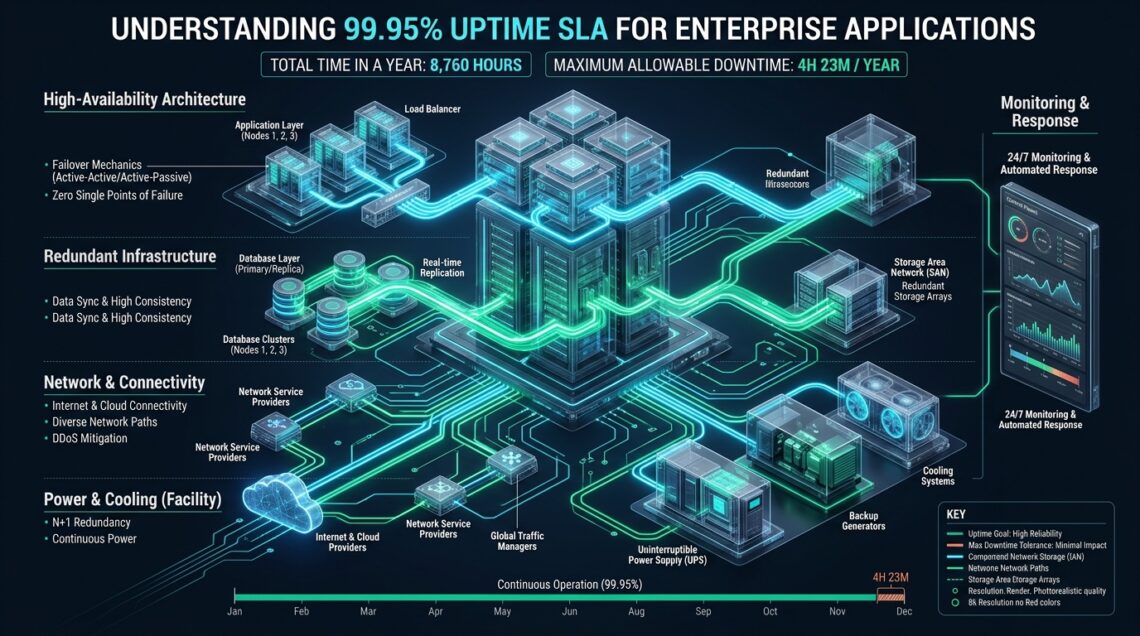
Architecting enterprise web services requires translating high-level contractual Service Level Agreements (SLAs) into deterministic Linux kernel tunables, resilient multi-node topology, and sub-second failover orchestration. While a 99.95% availability target sounds virtually flawless to non-technical stakeholders, it permits a cumulative annual downtime of exactly 4 hours, 22 minutes, and 58 seconds—an error budget that can be entirely vaporized by a single uncoordinated database schema migration, unhandled memory leak, or network split-brain event on commodity infrastructure. For enterprise engineering teams deploying high-throughput workloads to MeraHost, designing an infrastructure stack capable of consistently outperforming the 99.95% threshold demands a rigorous understanding of Mean Time to Recovery (MTTR), automated synthetic health-checking probes, and redundant edge routing.
Uptime SLA Explained: What Does 99.95% Availability Really Mean?
Direct Answer: In enterprise infrastructure, an uptime SLA explained as 99.95% (colloquially termed “three and a half nines”) guarantees that your application remains fully functional and accessible with no more than 21.91 minutes of unplanned downtime per month, or 4.38 hours per calendar year. Delivering on this SLA requires active-active redundancy, automated failover detection under 3 seconds, zero-downtime rolling deployment pipelines, and persistent storage with sub-millisecond p99 latency.
The Mathematics of Availability: Deconstructing the Error Budget
In modern Site Reliability Engineering (SRE), availability is not an abstract concept or a marketing vanity metric; it is defined mathematically through Service Level Indicators (SLIs) and bounded by a strict error budget. The error budget represents the precise duration during which an application or hosting tier is permitted to fail, return HTTP 5xx errors, or degrade beyond acceptable latency thresholds before violating legal commitments and incurring contractual penalties.
Availability percentage is calculated using the standard operational formula:
Availability (%) = (Total Operating Time − Total Unplanned Downtime) / Total Operating Time × 100
To appreciate how narrow the operating tolerance is under a 99.95% uptime commitment, examine the maximum allowable downtime windows across standardized calendar intervals:
- Daily Allowance: 43.2 seconds
- Weekly Allowance: 5.04 minutes
- Monthly Allowance (30-day billing cycle): 21.60 minutes (21.91 minutes for an average 365.25-day year)
- Quarterly Allowance: 1.09 hours (65.74 minutes)
- Annual Cumulative Allowance: 4 hours, 22 minutes, and 58 seconds (4.38 hours)
When contrasted with a standard consumer-tier hosting SLA of 99.9% (“three nines”), which permits 8.76 hours of downtime annually, a 99.95% agreement cuts your permissible operational outage window in half. Furthermore, entering the realm of 99.99% (“four nines”) restricts annual downtime to just 52.56 minutes. The leap from 99.9% to 99.95% represents the exact inflection point where manual human sysadmin intervention becomes mathematically impossible as a recovery mechanism.
Architecture Note: If an automated monitoring check alerts a systems engineer via pager at 02:00 AM, the human response time to wake up, authenticate via VPN bastion, inspect system telemetry, and initiate a manual service restart typically takes between 8 and 15 minutes. Under a 99.95% SLA, that single incident consumes up to 68.5% of your entire monthly downtime allowance. Therefore, achieving 99.95% requires fully automated, self-healing clustering where dead nodes are cordoned and traffic is re-routed in single-digit seconds without manual sysadmin intervention.
Architectural Benchmarks: Standard Infrastructure vs 99.95% Production HA
Delivering consistent 99.95% availability requires eliminating every Single Point of Failure (SPOF) across compute, network switching, power delivery, edge reverse proxies, and database storage backends. The comparative matrix below outlines the critical operational boundaries between standard hosting stacks and enterprise-tuned high-availability clusters.
| Feature / Metric | Standard / Default | Tuned / Production |
|---|---|---|
| Permitted Monthly Outage | 43.8 minutes (99.9%) | 21.9 minutes (99.95% SLA) |
| Mean Time to Detect (MTTD) | 60 – 180 seconds (External Polling) | 1.5 – 3.0 seconds (eBPF / VRRP Heartbeats) |
| Mean Time to Recovery (MTTR) | 15 – 45 minutes (Manual Triage) | < 5 seconds (Automated VIP Failover) |
| Storage I/O Tail Latency (p99) | 25.0 ms – 65.0 ms (SATA SSD / Shared SAN) | 0.35 ms – 0.85 ms (Enterprise NVMe RAID-10) |
| Database Recovery Point Objective (RPO) | 5 – 15 minutes (Async Binlog Delay) | 0 ms (Semi-Sync Raft / Galera Cluster) |
| Deployment Rollout Strategy | Maintenance Window (Hard Restart) | Blue/Green Canary with Connection Draining |
| Reverse Proxy Retries | Direct 502 Bad Gateway to Client | Synthetic In-Flight Retry to Standby Upstream |
Anatomy of an SLA-Resilient Architecture
To guarantee that an application never breaches the 21.9-minute monthly downtime ceiling, software architects and infrastructure engineers must structure their deployment across four decoupled operational tiers: edge ingress routing, stateless application execution, database state synchronization, and kernel network optimization.
1. Anycast and Virtual IP Edge Ingress
Relying on public DNS changes for high availability is an anti-pattern. Even with a Time to Live (TTL) set to 30 or 60 seconds, public recursive resolvers (ISPs, local router caches, corporate forwarders) aggressively cache A and AAAA records, stranding client traffic on an offline server for up to 30 minutes. Instead, 99.95% architectures utilize Border Gateway Protocol (BGP) Anycast at the edge, or redundant Virtual Router Redundancy Protocol (VRRP) pairs using Keepalived across local top-of-rack switches. When a physical node crashes, the Virtual IP (VIP) floats to the backup node within 1.5 seconds without changing public DNS records.
2. Stateless Compute and Graceful Connection Draining
Application servers must remain completely stateless. User sessions must be offloaded to low-latency Redis or KeyDB caching clusters configured in high-availability sentinel pairs. When an application instance requires patching or binary replacement, the reverse proxy initiates graceful connection draining: new TCP connections are directed exclusively to updated instances, while existing in-flight HTTP requests are permitted to complete cleanly within a defined timeout window (e.g., 30 seconds) before the old process is terminated.
3. Zero-Lag Database State Replication
Database downtime is historically responsible for more than 70% of SLA breaches. Standard asynchronous master-slave replication introduces replication lag during traffic spikes. If the primary master dies while replication lag is at 4 seconds, sysadmins face an impossible dilemma: fail over immediately and suffer permanent data loss (violating RPO), or pause the service to reconstruct missing transactions (violating SLA uptime). A true 99.95% architecture implements semi-synchronous replication or synchronous multi-master clusters (e.g., Galera Cluster or PostgreSQL Patroni with synchronous_commit) combined with automated proxy layer routing such as ProxySQL or HAProxy.
4. Pure Enterprise NVMe Storage Acceleration
Storage I/O bottlenecks frequently mimic system crashes. Under intense database writes or bursty web traffic, standard SATA SSDs and multitenant SAN volumes suffer severe tail latency spikes, causing Linux kernel I/O wait (wa) to spike to 80%+. As worker threads block waiting for disk flush acknowledgement, the web server connection queue exhausts, triggering HTTP 504 Gateway Timeouts. Deploying on dedicated Enterprise NVMe storage arrays guarantees predictable sub-millisecond p99 latency, ensuring thread pools never starve under write-intensive spikes.
Production Configuration Files: Engineering for Zero-Downtime
Contractual guarantees are executed at the operating system and daemon level. Below are three production-grade configuration files implemented across high-availability Linux nodes to enforce fast failover, prevent thread exhaustion, and automate service healing.
1. Linux Kernel Network Stack Hardening (/etc/sysctl.d/99-high-availability-sla.conf)
Default Linux kernel networking settings are tuned for general-purpose workstations, leaving server sockets vulnerable to TCP connection exhaustion and slow socket reclamation during traffic surges. The following production sysctl profile tunes socket buffers, activates fast recycling, accelerates keepalive probing, and eliminates connection dropping under peak concurrency:
# /etc/sysctl.d/99-high-availability-sla.conf
# Linux Kernel Network Stack Optimization for 99.95% Uptime SLA

# Expand socket listen backlog to prevent SYN drop under load
net.core.somaxconn = 65535
net.ipv4.tcp_max_syn_backlog = 65535
net.core.netdev_max_backlog = 32768

# Accelerate TCP socket recycling and reclaim dead connections
net.ipv4.tcp_tw_reuse = 1
net.ipv4.tcp_fin_timeout = 15

# Aggressive TCP keepalive probing to detect dead nodes rapidly
# Detect dead client or upstream socket in 30s instead of default 7200s (2 hrs)
net.ipv4.tcp_keepalive_time = 30
net.ipv4.tcp_keepalive_intvl = 5
net.ipv4.tcp_keepalive_probes = 3

# Prevent TCP SYN flood lockouts while maintaining high connection rates
net.ipv4.tcp_syncookies = 1
net.ipv4.tcp_synack_retries = 2

# Enforce BBR congestion control for ultra-low tail latency
net.core.default_qdisc = fq
net.ipv4.tcp_congestion_control = bbr

# Memory allocation: avoid virtual memory swapping on high-throughput nodes
vm.swappiness = 10
vm.dirty_background_ratio = 5
vm.dirty_ratio = 10

# System-wide file descriptor ceiling
fs.file-max = 2097152
Apply these parameters instantly into the running kernel without rebooting:
sysctl -p /etc/sysctl.d/99-high-availability-sla.conf2. High-Availability VRRP Failover (/etc/keepalived/keepalived.conf)
Keepalived provides automated Virtual IP (VIP) failover between redundant application reverse proxies. If the primary node fails its synthetic HTTP health check, the virtual IP floats to the standby node within 2 seconds, shielding end users from service interruption:
# /etc/keepalived/keepalived.conf
# VRRP Automated Failover Cluster Configuration

global_defs {
    router_id PROD_LB_01
    enable_script_security
    script_user root
}

# Health check probe script: validates local proxy and downstream app
vrrp_script chk_proxy_health {
    script "/usr/local/bin/check_app_health.sh"
    interval 2       # Run check every 2 seconds
    weight -20       # Deduct priority if script exits with non-zero
    fall 2           # Declare dead after 2 consecutive failures (4s)
    rise 2           # Declare healthy after 2 consecutive successes
}

vrrp_instance VI_STATIC_EDGE {
    state MASTER
    interface eth0
    virtual_router_id 51
    priority 101     # Set to 100 on BACKUP node
    advert_int 1

    authentication {
        auth_type PASS
        auth_pass 8F2a9B1cE4f7A3d6
    }

    virtual_ipaddress {
        198.51.100.25/24 dev eth0 label eth0:vip
    }

    track_script {
        chk_proxy_health
    }
}
3. Self-Healing Systemd Unit with Hardware Watchdog (/etc/systemd/system/enterprise-app.service)
Application process deadlocks (such as worker threads frozen on a hung socket) will prevent an application from serving requests even though the operating system considers the process ID active. Configuring systemd watchdog integration allows the Linux init system to automatically kill and respawn frozen application instances in seconds:
# /etc/systemd/system/enterprise-app.service
# Enterprise Systemd Service Unit with Zero-Downtime Watchdog Supervision

[Unit]
Description=Enterprise Production Web Application Service
After=network.target network-online.target redis.target
Wants=network-online.target

[Service]
Type=notify
User=www-data
Group=www-data
WorkingDirectory=/var/www/enterprise-app
ExecStart=/usr/local/bin/app-server --workers=8 --bind=127.0.0.1:8080
ExecReload=/bin/kill -HUP $MAINPID

# Self-Healing & Failure Recovery Rules
Restart=always
RestartSec=2s
StartLimitIntervalSec=60s
StartLimitBurst=5

# Systemd Watchdog: Application must ping systemd every 10s
# If deadlocked or hung, systemd terminates the process via SIGABRT
WatchdogSec=15s

# Resource Limits & Isolation
LimitNOFILE=65536
LimitNPROC=32768
OOMScoreAdjust=-500
TasksMax=infinity

[Install]
WantedBy=multi-user.target
SysAdmin Tip: Never rely on basic ICMP ping checks to validate application availability under an SLA agreement. A hypervisor or physical network interface card will respond cleanly to ICMP echo requests even when backend PHP/Node.js worker pools are completely frozen or the database connection pool is exhausted. Always implement synthetic multi-stage HTTP health checks that test actual database read/write queries and cache response times. Configure your edge reverse proxy with
proxy_next_upstream error timeout invalid_header http_502 http_503 http_504;so that transient worker restarts are seamlessly masked by rerouting the HTTP request to a healthy peer node before the client ever receives an error.
Contractual Governance: SLA Breaches, Service Credits, and Exclusion Clauses
An enterprise Service Level Agreement is a binding legal contract between infrastructure providers and business stakeholders. When availability falls below the 99.95% threshold, contracts typically invoke a tiered Service Credit mechanism rather than standard cash refunds. Understanding how service credits are calculated and what standard exclusions exist is critical for IT leadership and procurement officers.
Standard Tiered Service Credit Model
In enterprise cloud contracts, service credits scale non-linearly according to the magnitude of the monthly downtime:
- 99.90% to < 99.95% Availability (21.9 – 43.8 mins downtime): 10% credit applied to the subsequent monthly billing invoice.
- 99.00% to < 99.90% Availability (43.8 mins – 7.2 hours downtime): 25% credit applied to the subsequent monthly billing invoice.
- < 99.00% Availability (> 7.2 hours downtime): 50% to 100% full monthly service credit.
SLA Exclusion Clauses
Infrastructure contracts explicitly exclude certain operational disruptions from the downtime calculation. As a systems architect, you must account for these exclusions in your internal disaster recovery planning:
- Scheduled Maintenance Windows: Planned maintenance notified 48 to 72 hours in advance (typically scheduled during low-traffic off-peak hours) is generally exempt from the downtime clock.
- Customer-Initiated Failures: Software bugs, faulty code deployments, unindexed database queries consuming 100% CPU, or configuration errors introduced by the client team do not constitute an infrastructure SLA breach.
- Distributed Denial of Service (DDoS) Attacks: Volumetric cyberattacks exceeding contractual traffic mitigation thresholds or upstream ISP tier-1 transit provider carrier cuts are universally classified under Force Majeure exclusions.
Choosing the Right Infrastructure Partner for 99.95% Uptime
High-availability engineering software patterns cannot compensate for unstable, over-subscribed underlying hardware. In multitenant hypervisor environments where legacy hosting providers over-allocate CPU cores and utilize shared mechanical or entry-level SATA storage, random I/O latency spikes inevitably cause database deadlocks and unexpected connection drops that destroy your monthly error budget.
When architecting for unwavering uptime and uncompromising performance, deploying your production workloads on MeraHost Enterprise Cloud gives you access to enterprise-grade bare-metal infrastructure engineered specifically for zero-downtime operations. With pure Enterprise NVMe storage arrays in RAID-10, hardware-accelerated LiteSpeed Web Server runtimes, multi-gigabit redundant network uplinks, and an industry-leading Same Renewal Price guarantee with zero hidden renewal hikes, MeraHost provides the resilient foundation required to protect your 99.95% SLA quarter after quarter.
Frequently Asked Questions
How does a 99.95% SLA differ practically from a 99.99% (“Four Nines”) SLA?
While a 99.95% SLA permits up to 21.91 minutes of downtime per month (4.38 hours per year), a 99.99% SLA restricts annual downtime to just 52.56 minutes (roughly 4.38 minutes per month). Achieving “four nines” generally requires fully automated multi-region active-active clustering, complex distributed consensus engines (like CockroachDB or Google Spanner), and redundant multi-cloud edge routing, which can quadruple infrastructure costs. For the vast majority of enterprise SaaS applications and e-commerce platforms, 99.95% represents the optimal balance of enterprise resilience and operational cost efficiency.
Does scheduled maintenance count against our 99.95% uptime error budget?
In standard hosting and cloud contracts, scheduled maintenance does not count against the SLA error budget, provided the hosting provider delivers advance written notice (typically 3 to 7 business days) and executes the maintenance within designated off-peak maintenance windows. However, from the perspective of your end users and revenue pipeline, downtime is downtime. Enterprise engineering teams should therefore design their architecture with rolling updates and active-passive redundancy so that host maintenance on an individual node never takes the production application offline.
How should enterprise teams monitor and mathematically prove an SLA breach?
To formally claim service credits, enterprises must rely on objective, third-party synthetic monitoring tools (such as Datadog, Pingdom, UptimeRobot, or Prometheus Blackbox Exporter) configured to probe HTTP/HTTPS endpoints from multiple geographically diverse nodes at 30- or 60-second intervals. An outage is officially recorded when at least two distinct geographic monitoring probes receive persistent 5xx HTTP response codes or connection timeouts over a continuous duration exceeding 60 seconds.
Can software-level auto-recovery replace the need for redundant hardware?
No. While systemd watchdogs, container orchestrators, and automated script restarts can recover deadlocked worker processes within seconds, they cannot mitigate physical hardware failures such as a blown power supply unit, mainboard chipset failure, physical top-of-rack switch failure, or hypervisor kernel panic. Achieving a true 99.95% SLA mandates physical hardware redundancy—including redundant power feeds (A+B), bonded network interfaces (LACP), and clustered compute nodes.
Deploy Enterprise-Grade Production Infrastructure
Need guaranteed performance with zero price hikes? Host mission-critical workloads on MeraHost with pure Enterprise NVMe, LiteSpeed Web Server, and Same Renewal Price, Always (starting at ₹99/mo).
Leave a Comment