
In mission-critical enterprise hosting, hypervisor architecture dictates whether your production database survives noisy neighbors, memory contention, and cascading hypervisor failures. While legacy budget hosts historically leveraged lightweight shared-kernel containerization to overcommit CPU cores and RAM by hundreds of percent, true enterprise reliability at MeraHost demands uncompromising hardware abstraction, deterministic I/O, and strict hypervisor-level isolation. Choosing between Kernel-based Virtual Machine (KVM) and container-based OpenVZ is not simply an administrative preference—it establishes the fundamental security perimeter, kernel module availability, and predictable computing performance of your operational stack.
The Fundamental Architecture: KVM vs OpenVZ Explained
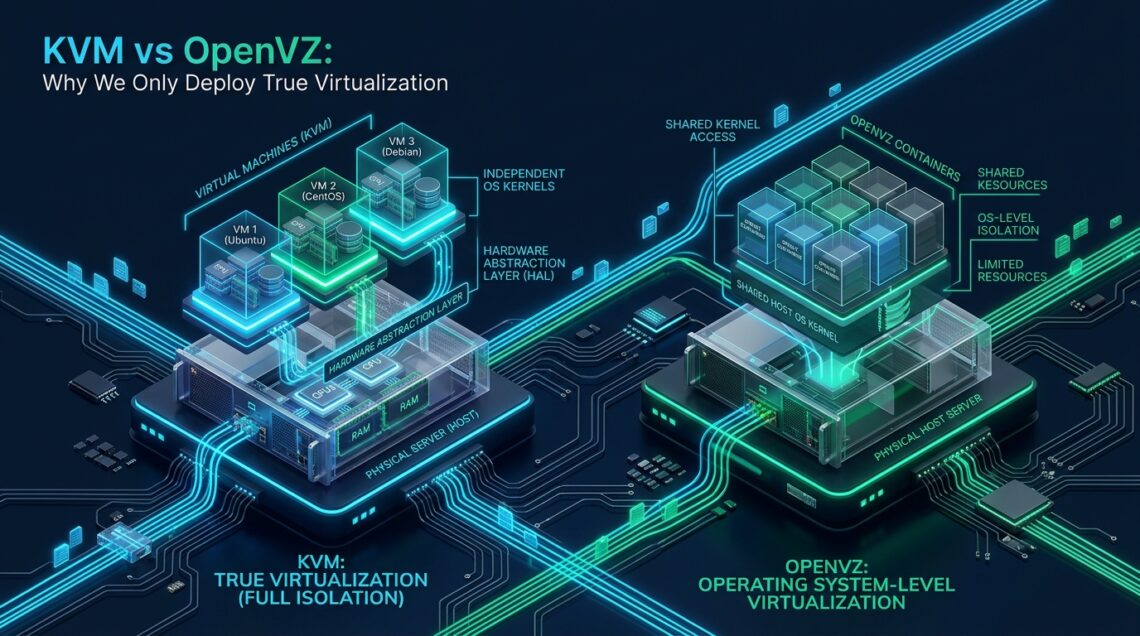
To evaluate modern virtualization architectures, systems engineers must understand the boundary where isolation occurs. Virtualization technologies operate across fundamentally different execution layers. Hardware-assisted full virtualization isolates workloads at the CPU and memory controller level, whereas operating system-level virtualization shares a singular, monolithic Linux kernel across multiple userland namespaces.
Kernel-based Virtual Machine (KVM) turns the host Linux operating system into a Type-1 bare-metal hypervisor via loadable kernel modules (kvm.ko and processor-specific modules kvm-intel.ko or kvm-amd.ko). By utilizing hardware virtualization extensions—specifically Intel VT-x and AMD-V—KVM executes guest instructions directly on the physical processor in non-root VMX mode. Each virtual machine is managed as a standard Linux process scheduled by the kernel CFS (Completely Fair Scheduler), yet it possesses an entirely synthesized hardware environment: virtual BIOS/UEFI, virtualized ACPI tables, private CPU register states, dedicated memory mapping through Second Level Address Translation (SLAT / EPT / NPT), and isolated paravirtualized VirtIO block and network controllers.
Conversely, OpenVZ (and its commercial lineage Virtuozzo) represents container-based virtualization. Rather than presenting emulated or paravirtualized hardware to a guest operating system, OpenVZ partitions a single patched host Linux kernel into multiple isolated environments, traditionally designated as Virtual Environments (VE) or Containers (CT). All containers running on an OpenVZ physical host execute against the identical host kernel binary, shared system call tables, and host filesystem modules. While this architecture achieves ultra-dense tenancy and near-instantaneous container provisioning, it inherently tethers all guest environments to the capabilities, limitations, and catastrophic failure modes of the underlying host kernel.
Architecture Note: Because OpenVZ containers share the host node’s kernel space, a kernel panic triggered by a single tenant or faulty driver instantly crashes every tenant on the entire physical server. Under KVM, a guest kernel panic is strictly isolated inside the guest’s virtual memory space, leaving the physical host and other virtual machines completely unaffected.
Architectural Comparison: Isolation, Kernel Autonomy, and Resource Allocation
The operational distinctions between KVM and OpenVZ manifest across every infrastructure vector—from hypervisor overhead to storage scheduling and network packet processing. Below is an enterprise engineering breakdown comparing these two paradigms:
| Feature / Metric | OpenVZ 7 / Virtuozzo | KVM (True Virtualization) |
|---|---|---|
| Virtualization Paradigm | OS-Level Containerization (Shared Host Kernel) | Hardware-Assisted Hypervisor (Full Isolation) |
| Kernel Sovereignty | Locked to Host Kernel (No custom versions) | 100% Sovereign Kernel (Linux LTS, RT, BSD, Windows) |
| RAM & Swap Boundaries | Soft limits; Aggressively overcommitted via UBC | Hardware-Dedicated Physical RAM via EPT/NPT |
| Filesystem & Block Storage | ploop or simfs layered on host filesystem | Raw Block Device, VirtIO-SCSI, ext4, XFS, Btrfs, ZFS |
| Docker & Containerization | Severe friction; cgroups v2 & overlay2 frequently fail | Native Support; Full cgroups v2, Docker, k3s, Podman |
| I/O Scheduling & Latency | Contended host queues; noisy neighbors degrade IOPS | Dedicated VirtIO queues; deterministic NVMe latency |
| Network Stack Customization | Restricted sysctl; WireGuard & BBR require host flags | Full sysctl autonomy; TCP BBR, custom nftables, eBPF |
| Security & Containment | Kernel privilege escalation exposes entire node | Hardware MMU + sVirt (SELinux) hypervisor sandbox |
The primary advantage cited by proponents of OpenVZ is negligible CPU overhead—often measured at less than 1%—because containers bypass emulation layers. However, modern KVM hypervisors leverage hardware-level CPU flags (such as Intel VT-x with FlexPriority and Extended Page Tables), reducing KVM virtualization overhead to an imperceptible 1.5% to 2% while providing enterprise multi-tenant isolation that containerization cannot replicate.
Memory Allocation, Overselling, and the Destructive Host OOM-Killer
The most dangerous operational vulnerability of OpenVZ hosting lies in how memory is accounted for and enforced. In legacy OpenVZ systems, memory is regulated through UserBeancounters (UBC), tracking metrics such as privvmpages, oomguarpages, and physpages. Because memory is dynamically allocated from a shared host pool, unscrupulous hosting providers routinely oversell physical memory by 300% to 500%.
Consider a physical enterprise node with 256 GB of physical RAM. On OpenVZ, a budget provider can provision 300 containers, each marketed with 2 GB of RAM (representing 600 GB of aggregate virtual allocations). As long as all tenants remain idle, the server appears stable. However, when multiple tenants experience simultaneous traffic spikes—such as scheduled cron jobs, database indexing, or seasonal e-commerce surges—the physical memory of the host server is instantly exhausted.
Architecture Note: When an OpenVZ host hits absolute physical RAM exhaustion, the Linux kernel Out-Of-Memory (OOM) killer triggers globally across the host node. The kernel algorithm evaluates the badness score of every process on the machine. As a result, your high-priority MySQL or PHP-FPM daemon can be abruptly terminated by the host kernel to save the physical server, even if your container consumed only 40% of its marketed memory quota.
KVM fundamentally eliminates this catastrophic failure mode. In KVM, each virtual machine receives dedicated, physically mapped RAM allocated through the host kernel’s memory manager and enforced by CPU-level Extended Page Tables (EPT). When a KVM instance boots with 8 GB of RAM, that address space is committed. If a process inside the KVM virtual machine exceeds its memory allocation, the internal guest kernel handles the event: it swaps to its own virtual swap disk or invokes the internal guest OOM killer strictly inside the guest boundaries. Surrounding virtual machines on the same physical hypervisor experience zero latency spikes, zero memory throttling, and zero process evictions.
DevOps Autonomy: Why Docker, WireGuard, and Modern Toolchains Require KVM
Modern DevOps workflows have standardized on containerized deployment patterns, immutable infrastructure, and software-defined networking. Attempting to deploy modern cloud-native architectures on OpenVZ leads to severe engineering friction:
- Docker and Container-in-Container Limitations: Modern container runtimes (Docker, Podman, containerd) rely on Linux cgroups v2, User Namespaces, and the
overlay2storage driver. Because OpenVZ is already an OS-level container, running Docker requires nesting containers inside containers. This frequently breaks due to missing kernel cgroups hierarchy flags and blocked filesystem calls on ploop/simfs storage backends. - VPN and Security Protocols: Fast, modern cryptographic protocols like WireGuard require the
wireguard.kokernel module. On OpenVZ, tenants cannot load kernel modules (modprobefails with Operation Not Permitted). To use WireGuard, the host provider must manually compile and enable it across the entire physical node—a privilege rarely granted by shared hosts. - Custom Kernel Parameters (sysctl): High-throughput web servers, Redis caches, and database clusters require aggressive tuning of TCP window sizes, socket backlog queues, and virtual memory dirty ratios. OpenVZ restricts or locks critical
/proc/sys/parameters to prevent individual containers from impacting host global performance.
Under KVM, you possess absolute sovereignty. You can compile a custom Linux kernel, deploy cutting-edge Linux 6.x LTS kernels, install custom security modules, format block devices with ZFS or Btrfs, and run nested virtualization with unconstrained Docker, Kubernetes (k3s), and LXD environments.
Production Configuration: Kernel and I/O Tuning for KVM Guests
To extract maximum performance from true KVM virtualization, systems engineers must tune the guest Linux kernel to exploit paravirtualized VirtIO drivers, TCP BBR congestion control, and enterprise NVMe storage pipelines. These configurations are impossible to apply on OpenVZ due to host-level security restrictions.
1. Enterprise Network and Virtual Memory Tuning (/etc/sysctl.d/99-kvm-production.conf)
Deploy the following production-hardened sysctl configuration to activate Google BBR congestion control, expand network socket backlogs, and prevent memory allocation stalls on high-traffic web applications:
# /etc/sysctl.d/99-kvm-production.conf
# Enterprise Network and Memory Optimization for KVM Virtual Machines

# Enable TCP BBR Congestion Control
net.core.default_qdisc = fq
net.ipv4.tcp_congestion_control = bbr

# Maximize Network Socket Backlog and Memory Buffers
net.core.netdev_max_backlog = 16384
net.core.somaxconn = 8192
net.ipv4.tcp_max_syn_backlog = 8192
net.ipv4.tcp_slow_start_after_idle = 0
net.ipv4.tcp_tw_reuse = 1
net.ipv4.tcp_fin_timeout = 15

# TCP Read and Write Buffer Scaling (4MB to 16MB max)
net.ipv4.tcp_rmem = 4096 87380 16777216
net.ipv4.tcp_wmem = 4096 65536 16777216
net.core.rmem_max = 16777216
net.core.wmem_max = 16777216

# Virtual Memory Dirty Page Management (Optimized for Fast NVMe Backends)
vm.swappiness = 10
vm.dirty_ratio = 15
vm.dirty_background_ratio = 5
vm.vfs_cache_pressure = 50

# Conntrack Table Expansion for Microservices & Proxies
net.netfilter.nf_conntrack_max = 262144
net.netfilter.nf_conntrack_tcp_timeout_established = 600
Apply this configuration dynamically across your production instance without rebooting:
sudo sysctl --system2. Udev I/O Scheduler Optimization for VirtIO NVMe Disks (/etc/udev/rules.d/60-virtio-sched.rules)
When running over modern enterprise NVMe arrays with paravirtualized VirtIO block (vda) or VirtIO SCSI (sda) devices, complex guest OS disk schedulers (like mq-deadline or bfq) introduce redundant CPU queuing cycles. The host hypervisor already orchestrates hardware I/O queues. Set the guest scheduler to none for bare-metal NVMe throughput:
# /etc/udev/rules.d/60-virtio-sched.rules
# Set elevator=none (noop) for VirtIO and NVMe devices to bypass redundant guest queuing

ACTION=="add|change", KERNEL=="vd[a-z]|sd[a-z]", ATTR{queue/rotational}=="0", ATTR{queue/scheduler}="none"
ACTION=="add|change", KERNEL=="vd[a-z]|sd[a-z]", ATTR{queue/add_random}="0"
ACTION=="add|change", KERNEL=="vd[a-z]|sd[a-z]", ATTR{queue/read_ahead_kb}="256"
Reload and trigger the udev rules to take effect immediately:
sudo udevadm control --reload-rules && sudo udevadm triggerSecurity Boundaries and Multi-Tenant Isolation
Security architecture represents the definitive reason why enterprise cloud providers have retired OpenVZ in favor of KVM. In an era marked by advanced CPU cache timing attacks, kernel memory corruption exploits, and zero-day container escapes, multi-tenant container hosting presents severe enterprise risk.
In OpenVZ, userland processes in Container A interact with the exact same kernel address space as Container B and the physical host. Historical vulnerabilities such as Dirty COW (CVE-2016-5195), Dirty Pipe (CVE-2022-0847), and various overlayfs privilege escalations allowed unprivileged container users to write arbitrary code directly into host kernel memory, achieving instant root compromise over the physical machine and every adjacent tenant.
Architecture Note: KVM isolates virtual machines using hardware-enforced CPU boundary rings. Even if an attacker achieves full root access inside your KVM guest, they remain trapped within the virtualized hardware sandbox. Escaping a KVM guest requires both an exploit in the virtual device layer (e.g., QEMU) and a bypass of the hypervisor’s Mandatory Access Control system (such as SELinux / sVirt), making multi-tenant cross-contamination statistically negligible.
Furthermore, stringent regulatory frameworks—including PCI-DSS 4.0 (Requirement 2.2), HIPAA Security Rule § 164.312, and SOC 2 Type II—strictly enforce logical workload separation. Because OpenVZ shares the host kernel, it often fails compliance audits that require demonstrable hypervisor-level workload segregation for sensitive customer payment and health records.
For production deployments where unpredictable latency, random OOM terminations, and shared-kernel vulnerabilities are unacceptable, migrating to MeraHost Enterprise Cloud guarantees dedicated hypervisor execution. Built exclusively on enterprise KVM nodes backed by enterprise NVMe arrays and LiteSpeed Web Server, MeraHost provides predictable, rock-solid compute instances backed by our transparent Same Renewal Price, Always guarantee.
Frequently Asked Questions
Can I run Docker and Kubernetes inside an OpenVZ VPS?
While newer OpenVZ 7 releases provide partial experimental support for Docker, it remains fragile in production. OpenVZ lacks full Linux cgroups v2 hierarchy support and restricts overlay2 filesystem operations. Attempting to run Kubernetes (k8s or k3s) fails due to missing kernel networking flags and blocked kubelet container runtime calls. KVM provides native, flawless container runtime support with zero restrictions.
Why are KVM instances slightly more expensive than OpenVZ containers?
OpenVZ allows budget providers to aggressively oversell physical server resources by 300% to 500%, dividing hardware costs across hundreds of overcrowded containers. KVM commits dedicated physical RAM, dedicated CPU vCPU scheduling slices, and isolated storage queues directly to your virtual machine. You are paying for guaranteed, un-throttled bare-metal resources rather than shared promises.
How does NVMe storage performance compare between VirtIO KVM and OpenVZ?
OpenVZ uses layered filesystems (such as ploop or simfs) where all container I/O operations pass through the host filesystem layer, making write performance vulnerable to neighbor disk thrashing. KVM uses paravirtualized VirtIO-SCSI and VirtIO-BLK controllers with dedicated multi-queue polling, delivering sub-millisecond access times and direct NVMe queue allocation without host filesystem lock contention.
Can I compile custom Linux kernels or install non-Linux operating systems on KVM?
Yes. Because KVM provides complete hardware virtualization, you can install any x86_64 operating system—including Ubuntu, Debian, AlmaLinux, Rocky Linux, Alpine, FreeBSD, OpenBSD, and Windows Server. You can also compile and boot custom Linux kernels with custom patches, real-time extensions, or custom security modules without any restrictions.
Deploy Enterprise-Grade Production Infrastructure
Need guaranteed performance with zero price hikes? Host mission-critical workloads on MeraHost with pure Enterprise NVMe, LiteSpeed Web Server, and Same Renewal Price, Always (starting at ₹99/mo).
Leave a Comment